



This article appears in Issue 120 of InDesign Magazine.
In a sea of sameness, designers and marketers are finding it more important than ever to stand out from the crowd. And in the world of business proposals—especially in architecture, engineering, and construction (AEC) industries—that means creating client-winning work.
Gone are the days of using Microsoft Word, which we all know is a rudimentary platform when compared to the design chops of Adobe InDesign. With its flexible formatting and wide range of technical tools, InDesign offers great usability and scalability to any business professional looking to visually represent their work in a unique and effective format.
When building proposals for audiences varying in technical knowledge, designers must not only consider RFP (Request for Proposal) requirements, but also the tone, values, and offerings of those they’re communicating with. Whether you’re a freelancer building templates, an in-house designer, or the art director at a studio, proposals begin and end with the client.
To learn more about proposals and InDesign, I spoke with five designers and marketers, ranging from a large-scale general contractor and a multinational engineering-design firm to an independent consultant and publishing guru. Regardless of the size of their business, each professional uses InDesign to not only communicate a service but also as a tool to streamline workflow, increase efficiency, and create a consistent toolkit.
Before we jump into the technicalities, it’s worth taking a moment to recognize the evolution of proposals and see how far we’ve come with design, innovation, and engagement.
With over 20 years of publishing experience, Dax Castro of WSP USA—a very large engineering firm—witnessed firsthand the transformation of different design and communication platforms. However, the shift from traditional programs to InDesign was quite challenging for most firms.
“Once I was able to show how easy it was to
maintain a consistent format and brand style, minds started to change,” said Castro on the transition from Word to InDesign. “The shift was slow but steady, and of course, with increased efficiency comes increased workload.”
Not only did Adobe introduce a new program to workstations everywhere, but also a conversion of workflow. In 2007, while at a previous firm, Castro had the opportunity to be a part of the re-branding team that helped develop a process to produce a consistent look and brand-feel for their proposals.
“We looked at streamlining the information flow from engineering teams to marketing teams and ensured that a consistent toolkit was used. With over 140 marketing coordinators at that time, it was a monumental task. But, in the end, each office was able to produce a brand-consistent document that unified our voice as an engineering company,” said Castro.
Fast-forward 12 years, and the world of publishing has evolved even further. With more advanced programs and greater opportunity for innovation, clients’ needs and expectations are higher than ever. The key word? Customization.
Proposals have evolved from single-column layouts to something that more closely resembles a magazine or brochure. On top of that, designers are finding new and innovative ways to elevate client experience. Through augmented reality and interactive content, designers are pushing the envelope to keep audiences engaged and win clients.
In the days of Word, the majority of proposals were submitted in tangible form—on paper. Now, most are submitted in a digital format. Not only does this simplify delivery and revisions, it also gives designers new opportunities to utilize interactive content with buttons, hyperlinks, and video.
“The important aspect to all this is training,” said Castro. “Once people learn what can be done and how quickly and consistently it can be accomplished, trends spread and expectations are not just met, but exceeded.”
In the never-ending effort to exceed client expectations, Dax Castro uses InDesign in some of the most creative ways to keep his audience engaged. Castro is well-versed in all the tools that not only help develop successful proposals, but also save time and streamline workflow.
According to Castro, one of the best tools for sharing assets with other collaborators is CC Libraries.
“Additionally, plug-ins for managing the editorial process of proposal drafts like Em Software’s WordsFlow transform what used to be an exercise in hair pulling to one that has become a relatively easy and immensely shorter process,” he said.
In one example, Castro used WordsFlow to help create the 2018 Business Plan for California High-Speed Rail (Figure 1). “This 129-page report normally took months of edits and revisions. By using the plug-in we were able to simultaneously work on design and text edits amongst several teams at once.”
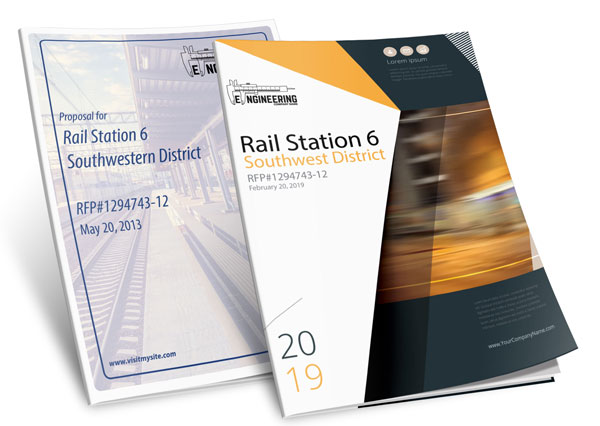
FIGURE 1. Proposals have transitioned to a refreshed, modern and on-brand design.
With the use of WordsFlow, the business plan was produced in weeks rather than months.
Another InDesign feature Castro uses regularly is Next Style (Figure 2). Although it’s not InDesign-exclusive (even Word has it), Castro thinks it’s underutilized. “I see so many designers needlessly clicking to change styles back and forth between header and body styles.”

Figure 2. The Next Style command applies a defined style to following paragraphs, which is great for keeping paragraph styles consistent.
As for InDesign-exclusive features, Castro said GREP and nested styles are also underutilized time-savers. “Being able to chain character styles together saves so much time when you are using complex formats over and over. Any time you can save mouse-clicks, you are a winner,” said Castro.
As for GREP, Castro described it as “search and replace on steroids.”
“It is its own language, but once you harness it you can do amazing things like apply a character style to anything that appears between an open and closed parentheses or even look for varying uses of words in different combinations,” he said.
For example, GREP saves time when trying to make any two-word name that starts with Mr., Mrs. or Ms. bold and red (Figure 3). Rather than search for the correct syntax, GREP easily changes the formatting.

Figure 3. This GREP panel allows you to apply a character style to text inside a paragraph, based on a text pattern.
With so many innovative tools now at our disposal, I asked Castro how he weighs functionality against design when crafting his proposals. “Purpose and function dictate form and design,” he said. “I think the biggest thing that teams miss is answering the twofold question of ‘What do I want the reader to walk away remembering?’ and ‘How can I present the information in a way that they actually will?’”
Proposals at Large: Big Businesses and In-House Capabilities
Most large-scale companies use in-house marketing and design services to produce their proposals. Due to the competitive nature of big business, these companies are forced to think outside the box to develop ways to engage readers.
To get a behind-the-scenes look at how proposals are designed at scale, I spoke with marketing professionals Rachel Seymour and Lindsey Conner to learn about McCarthy Building Companies’ innovative use of InDesign and its in-house capabilities team.
The conversation began with discussing how proposals have changed over time. What used to be simple, text-heavy, and dull packaging has been transformed into a set of personalized designs based on each client—sometimes spanning print, digital, and even aspects of product design.
“Everything that comes out of house now is customized to focus on the client and really convey the value proposition of McCarthy in an impactful way,” said Conner. “This can be achieved through enhanced design and graphics or video and interactive content that demonstrate key ideas of a proposal.”
Additionally, McCarthy’s Virtual Design and Construction group uses the latest technology and software to develop custom plans, schedules, and realistic 3D renderings and animations that are tailored to each project.
While proposals used to be owned by single divisions, nowadays there is more cross-team collaboration as the demand for informative and innovative content becomes a priority.
“Our proposals have a lot of technical content, so alignment with operations on what is needed and key milestones and deadlines is an important first step,” said Conner.
After receiving the core content from the project team in paragraph format, the marketing group identifies ways to turn that text into graphic design. Examples of that include maps with callouts and pictures, schedule bar charts, simple infographics to represent cost information or processes, icons, and case studies with photos (Figure 4).
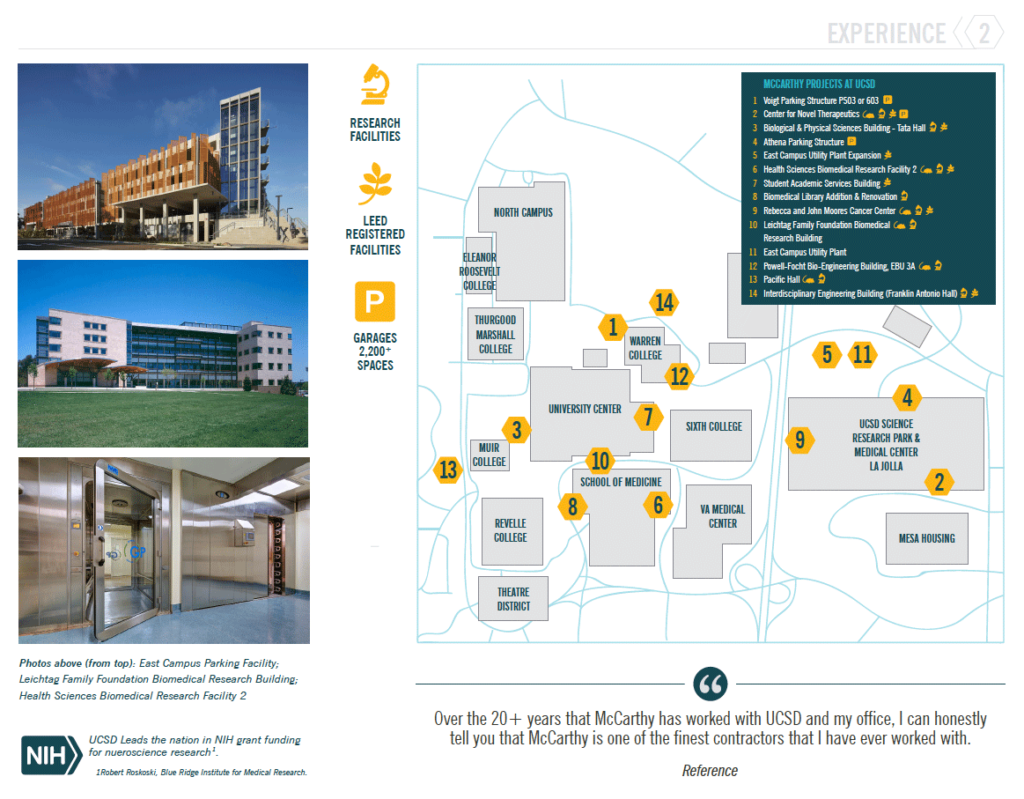
Figure 4. This proposal is a great example of how innovative and technical design can pair well with clean, professional content.
“We are always keeping the audience in mind when generating proposal content as far as what we think is the preferred deliverable,” said Conner. “Our audiences vary in level of technical knowledge, so that can definitely impact whether they want a lot of charts, graphs, images, text, etc.”
After the framework is established, the design process begins.
“I create every proposal from scratch. I want each client to feel like they are reading something that was truly created for them,” said Seymour.
The first thing she does is set up her document design, including a color palette, font and formatting styles, and overall proposal theme. Next, she drops each question from the RFP into the document and allocates the appropriate space for each response. As they develop visual content, she drops in text and builds graphics for each section.
“Several times throughout the life of a proposal, I check for consistency in my document (i.e., color and formatting). That consistency makes it feel like a cohesive document,” she added.
When asked about what makes McCarthy’s proposals engaging and interesting, Seymour said that their most powerful content comes from understanding the goals and values of the client. “We take time to understand their culture and their priorities and capture that in the proposal through messaging and graphics that they can relate to. For example, one of our clients has an identity of just being ‘human.’ We can play off that theme in the proposal, and even relate that to our core value of ‘genuine,’” she said.
Relating to a client on a cultural level helps McCarthy marketing reps position themselves as a true extension of the team, always keeping the client’s best interests in mind.
Since proposals communicate a service to a potential client, first and foremost they need to be effective.
“Sometimes that means they need to get a little gritty to show the true depth of a story,” said Seymour. For construction proposals, that may mean a focus on the foundations, literally.
“Underground utility work is not pretty, let me tell you. But those are the good details that our readers need to see. It’s about finding a good balance between consistent design aesthetic and the gritty details of being a general contractor.”
However, the end goal is bundling up all the details into a single package that feels whole, using effective storytelling that looks professional, is captivating, and captures the genuine nature of McCarthy. And, of course, the finished proposal must be engaging and impressive. For example, Conner recently used an acrylic box that was backlit to package a printed proposal, jump drive, and tablet loaded with digital content (Figure 5).
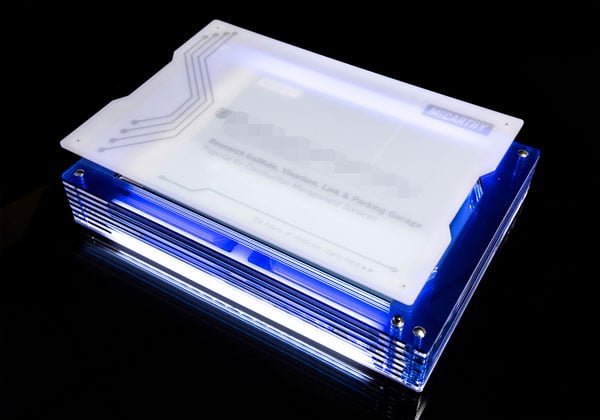
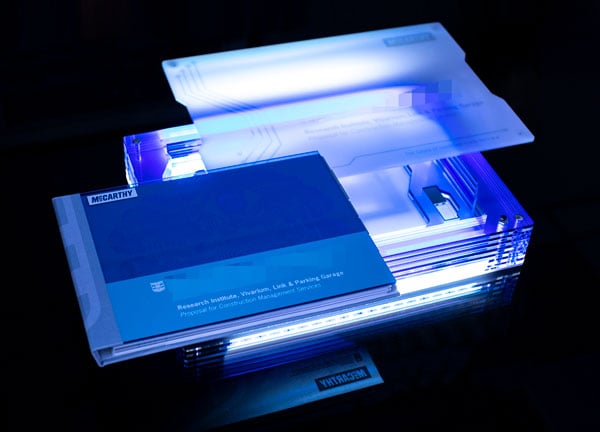
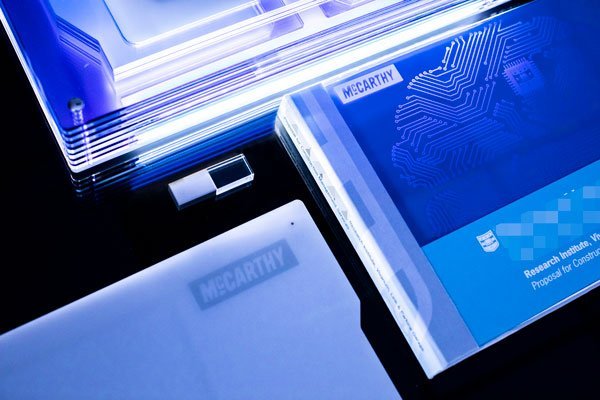
Figure 5. This lightbox by McCarthy uses technology in an innovative and engaging way to showcase a business proposal.
“McCarthy is focused on exceptional client experience and we really want that to start when they receive the proposal, not just with a notice of award,” said Conner. In this example, “the pursuit was focused on delivering a complex, state-of-the-art research facility, and we wanted our deliverable to reflect that. The glowing box with the circuitry design and texture was used to convey a ‘high-tech’ feel.”
Templates: How a Freelance Consultant Builds Proposals for all Skill Levels
While some proposals are developed in-house, others are outsourced to freelance designers. I spoke with Lacey Piekarz, owner and principal consultant of Peak Composition, to walk me through a proposal template she is building for a construction/engineering client.
“My goal in this template is to make this document easy for a beginner InDesign user to make clean proposals in-house quickly,” she said. “This is basically the same thing I do when I’m building templates for my own use or for my more InDesign-experienced colleagues, but this file will have much more in the way of explanation and guidance built into some of the master pages and sample layouts.”
Piekarz explained that most proposals need layout options for write-ups that often include project photos, resumes, and headshots. In this project, Piekarz built master pages for each of these options that can be dropped into the body wherever they belong (Figure 6).
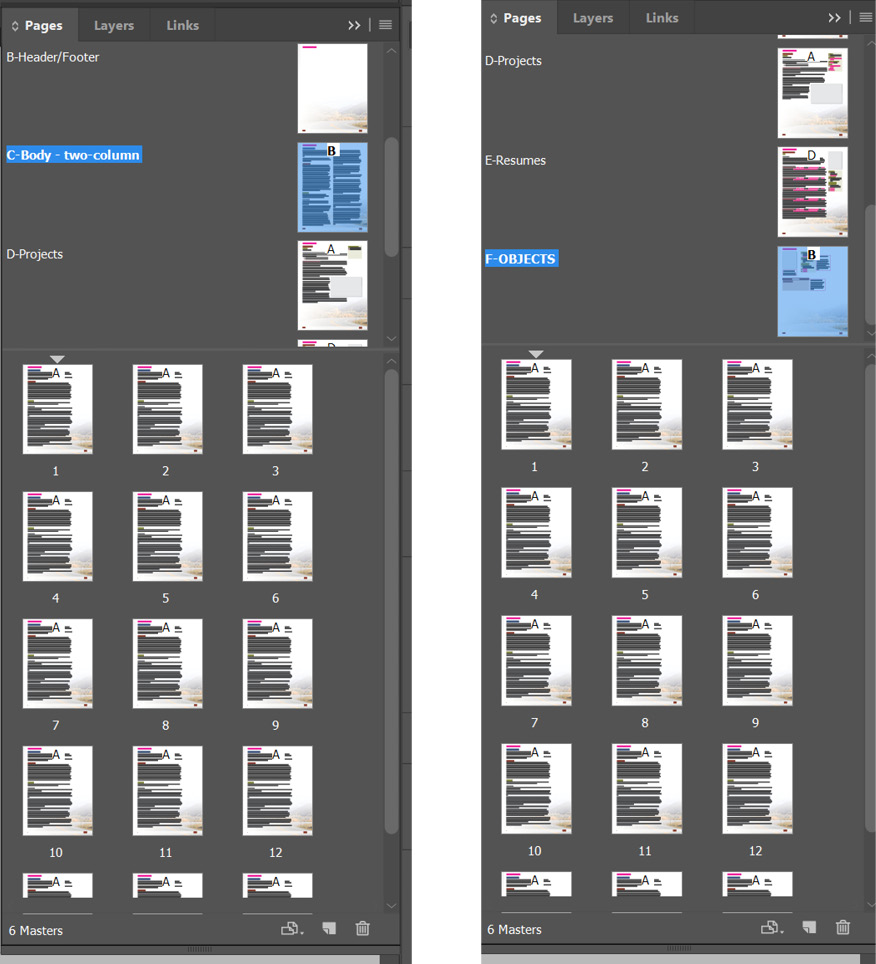
Figure 6. Master pages for various layouts
Keeping in mind varying content, she created two different body page layouts that will be useful depending on whether the client needs more text space (two-column layout) or would benefit from more white space (pushed-over layout).
Piekarz also included an “objects” master page that illustrates and explains the various text box/object styles that can be used in the document. This allows the client to copy objects from this page to be pasted into other pages in the proposal. This use of a master page—as a sort of alternative to a library with all objects that can be used in the template design—is unusual, but can be a practical tool for beginner InDesign users who may not be accustomed to using libraries or CC Libraries.
Piekarz additionally included a master page for “styles” that includes callout styles for quotations and organizational chart objects, as well as a page that illustrates and explains the primary paragraph styles she uses. “Master pages are amazing for ensuring pages look and feel the same across a document, even if there are different looks for the start of the section versus the rest of the body,” she said (Figure 7).

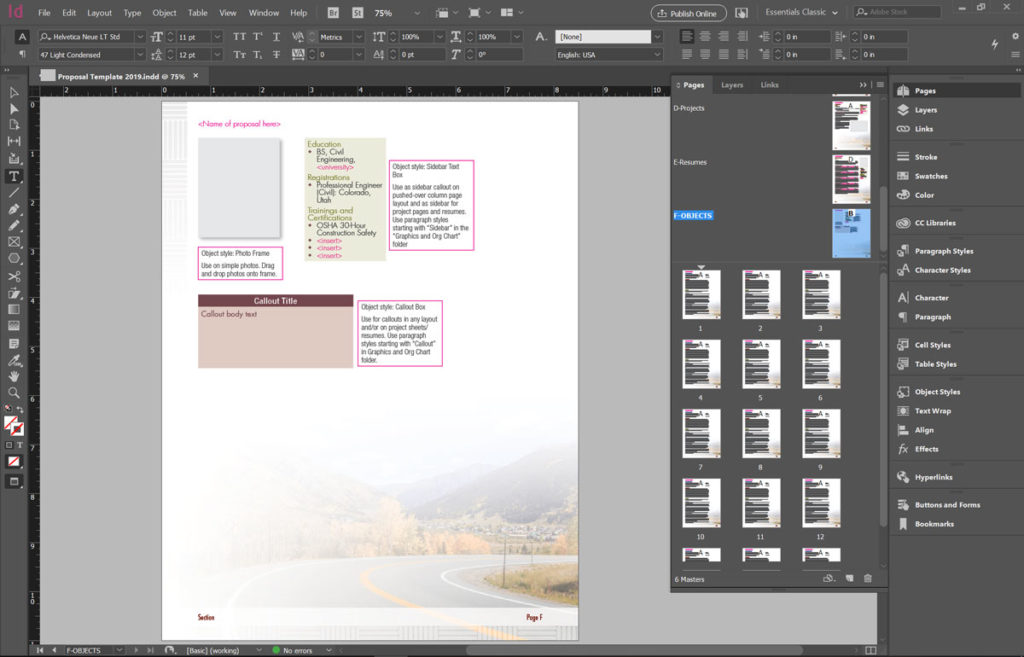
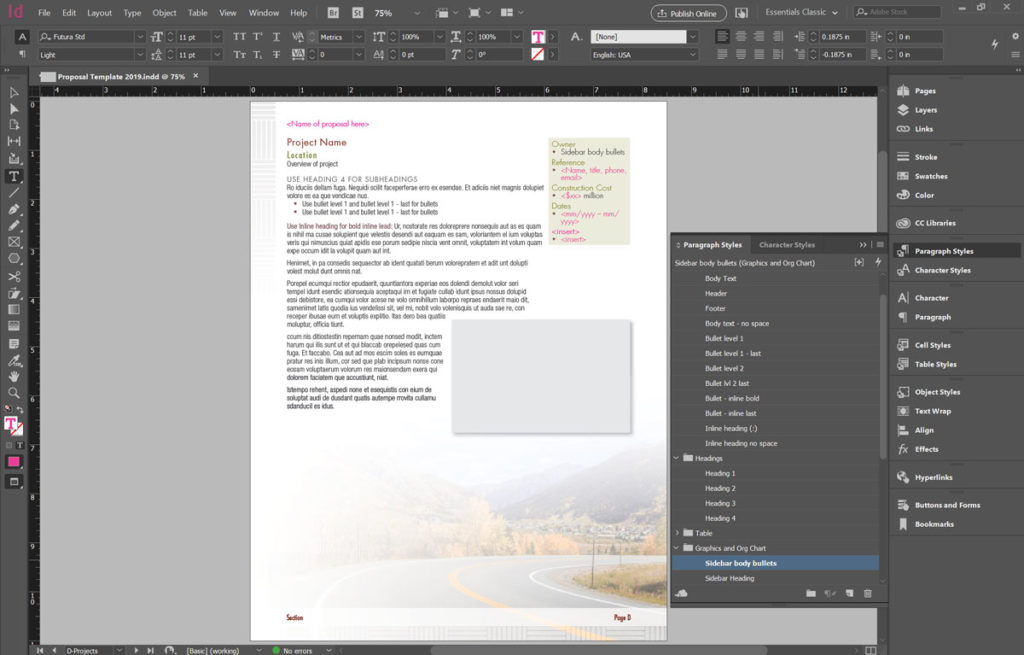
Figure 7. Layout options: two-column for pages that need more text space, “objects” master with visual examples, paragraph styles to ensure consistency, all containing the same watermarked background.
Design-wise, Piekarz’s goal in this template was to offer a clean look with a lot of white space, while also incorporating strategic design elements. “The client’s logo has a basketweave design, which I incorporated into the footer and background. The website uses the basketweave design in combination with slightly transparent white bars under text and over photos, which comprises the bulk of the footer/background,” she explained.
Because the client is based in Colorado and provides roadway/highway work across the state, she also included a stock photo of a highway in the Rocky Mountains to use as the background image (Figure 8). “I’ve done this kind of watermark-ish design for several clients, sometimes using stock images or abstract vector graphics or even design drawings of the project clients are proposing on,” she said. “It’s one of my favorite approaches and I find most of my clients and the owner agencies they’re working with like this look.”
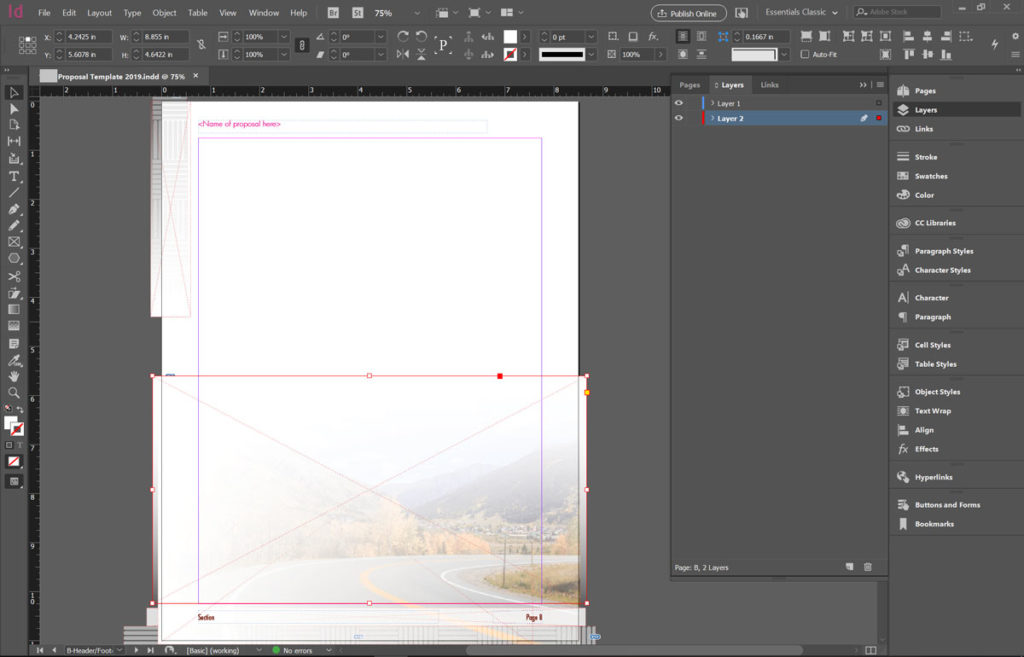
Figure 8. An example of how Piekarz incorporates watermark images to the background of her proposals. She encourages her clients to tailor the template to each of their clients’ brands.
Ultimately, Piekarz said she would like to train her clients to replace the image on the root header/footer master page so they can tailor each proposal to their clients.
When I asked about the pros and cons of using InDesign, Piekarz brought up the challenges of working remotely as a freelance consultant when some of her clients don’t use InDesign or revise in PDF form, which slows down the editing process.
“Both of these challenges give me a chance to talk in depth with my clients about the proposal development and review process rather than simply going through the motions,” she added. “In terms of visual design, though, no other application compares with InDesign for how easily you can update the look of an entire document without affecting text flow or graphic placement.”
Catering to Your Audience
To round out my exploration of InDesign-built proposals, I spoke with Russell Viers, an expert in the publishing world since 1997. From freelance design and onsite training to speaking at conferences and producing yearbooks at schools across the world, Viers has extensive knowledge in publishing content, design, and industry trends.
When I was first introduced to Viers, I heard he had worked on a proposal that was over 20,000 pages. This huge effort is not uncommon in the government services market, where Viers mainly works.
“Since the proposals I work on are 3,000 pages or larger, it’s all about improved workflow and reducing the time between ‘pens down’ and putting it in the box,” he said. “The longer I can give the authors, editors, and estimators, the more complete and accurate our product can be.”
But there are many different audiences for proposals. In the consumer market, Viers explained that there has been a huge drive in the last ten years to spend time and money on higher design in hopes of engaging the consumer with more than just a message.
“The days of just words and graphics in a single-column Word document are gone,” he said. “To compete, the message has to be presented in a more engaging package.”
However, in the government services market, the task is mostly black and white. Viers said that clients will go as far as to say that “magazine and brochure style designs are discouraged.”
Viers explained that his proposals can range in length from 32 pages to thousands of pages, and with that range come varying design elements. “A 32-page proposal can afford higher design and higher quality printing and binding. A 3,000 page proposal that is on a tight deadline can’t afford the design luxuries, even if the customer wanted it,” he said.
Naturally, I was curious about that 20,000-page proposal Viers worked on a few years back.
The specs included four copies of five volumes, making each copy an astounding 20,000 pages. “Each copy took ten banker boxes to deliver,” said Viers (Figure 9). “The cost volumes (volumes 3–5) were 17,000 pages total, and I built them in two days on my MacBook Pro, thanks to a few really cool custom scripts, but mainly just using InDesign off-the-shelf tools.”
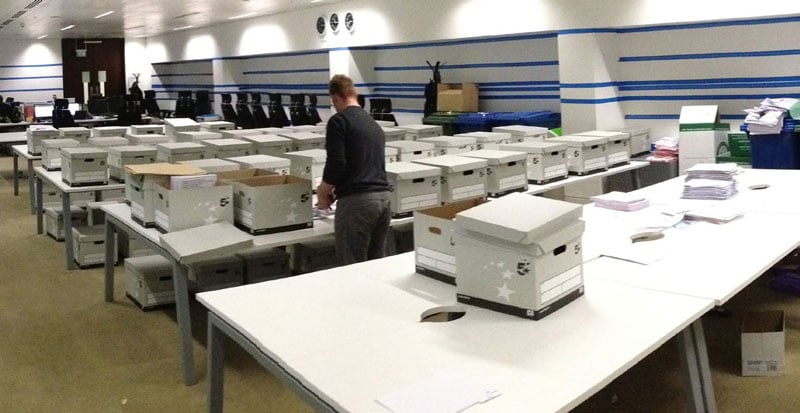
Figure 9. The packaging assembly for the 20,000 page proposals in Manchester, England
When I asked Viers about the pros of working in InDesign, he said enthusiastically, “InCopy!”
“Without InCopy, we couldn’t implement the parallel workflow that speeds the process. There are other benefits, of course, and each version gives us new gems, like the 2019 [version]’s ability to ignore space between paragraphs using the same style.”
With so many tools and design trends existing today, I asked Viers how he weighs functionality against design when building his proposals. He said, “I like to think our proposals strike a perfect balance of both, not one versus the other. To be a good designer, it’s important to know your audience.”
Working within the government services market, his audience includes engineers, accountants, attorneys, and other government employees. To his specific audience, the design must be simple, clear, and compliant with the RFP requirements. Simply, “It’s knowing how the reviewers like to read,” he said.
Best Tools of InDesign
With evolving design trends, new programs, and innovative tools emerging each day, I was curious as to how people stay up to date on the latest InDesign practices.
Lindsey Conner of McCarthy said: “Our team has a variety of ways that we keep up to date with trends. There is a marketing committee that has a monthly call focused on graphic design. Each marketing coordinator has a Lynda.com subscription to take courses and learn new techniques. We also have the opportunity to attend the Adobe MAX conference and CreativePro Week annually. And we have brought in consultants like David Blatner and Duarte to teach classes for our group.”
On top of trends, I wanted to learn what “must-use” tools and techniques these designers would suggest to someone interested in building a proposal.
“Always, always rely on styles. Design with the goal of reusing styles rather than making new design decisions on every page,” said Lacey Piekarz. “I find this approach to be a primary difference between proposal writers/managers and graphic design artists when it comes to InDesign–there often isn’t time to do a lot of page-by-page tweaking of leading, spacing and graphics in the proposal development schedule, so it’s important to be able to make document-wide changes and fixes quickly via styles.”
Additionally, Piekarz recommended learning keyboard shortcuts for common and specialized actions. For example, she created a shortcut (Alt+3) for the Change Case > lowercase command to get rid of any unnecessary capitalization.
There are many details and technicalities that make proposals effective and engaging. Whether you’re a freelancer or an employee at a large brand, InDesign is integral for every business professional. Not only does it allow for visual flexibility and efficient workflow with its tools and plug-ins, but it helps designers create proposals that are, first and foremost, effective.
sidebar div
Finishing Touches
Stuffing bankers boxes with letter- or A4-sized pages is one way to deliver a proposal; a custom-built acrylic case is another. But often you’ll want to bind your proposal in an attractive-yet-manageable binder. Instead of grabbing a generic item from an office-supply store, consider using a high-end bindery, such as a product or service from one of these companies:
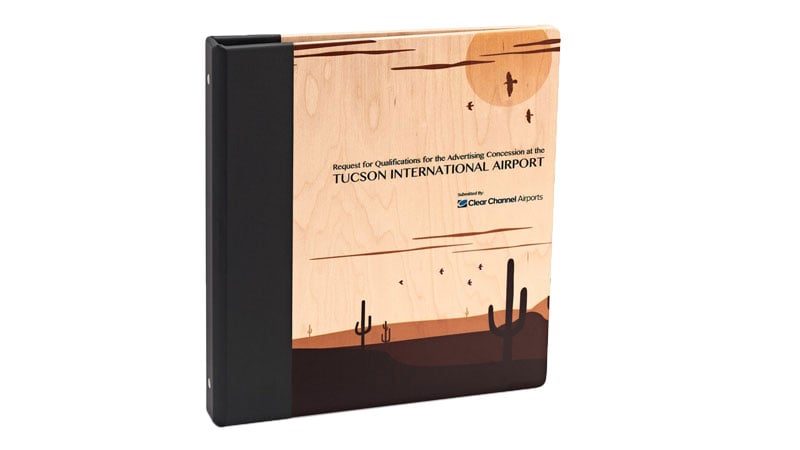
Maple 3-Ring Binder with Color Imprinting by Pina Zangaro
Commenting is easier and faster when you're logged in!

Recommended for you

Populate InDesign Form Fields from a Text File with a Script
If you’ve ever used InDesign’s PDF form tools to make a List Box or...
InDesign How-to Video: How to Create a Gravity Text Effect
In this week’s InDesignSecrets video, David Blatner reveals how to add a gravity...
InDesign How-to Video: Using Power Zoom
In this week’s InDesignSecrets video, Mike Rankin shows us how to use InDesign’s...