





Editor’s Note: As we’ve said here many times, if you’re not using scripts in InDesign, you’re missing out on their incredible powers to improve your workflow and save you a lot of time and money. But when you’re first getting started, it can be a challenge to find scripts that are useful for your workflow and get them up and running. Here’s a great place to start: Project Octopus. This is a collection of free scripts for InDesign that you can install and run with zero hassle. We asked Christoph Steffens, one of the leaders of Project Octopus, to give us a quick introduction.
Introducing Project Octopus
We (the founders of Project Octopus) are in love with automation and scripts. We constantly encourage our customers to automate processes in order to save time and to improve quality. During our over 100 InDesign Usergroup events, we also often presented scripts. That’s why it made sense to publish a script collection of our own.
Project-octopus.net even goes one step further. We don’t just make the scripts available for download. We make sure that you always have all of our scripts up to date on your computer! You start once with a startup script. The next time you start InDesign, everything else will install on its own via the Internet and keep you up to date from that point on! Here’s a direct link to the installer.
Another bonus is the separate menu command for the scripts of project-Octopus.net right in InDesign! With it the scripts don’t have to live a miserable life in a palette that is never opened. Instead, they are offered prominently. Especially for InDesign beginners, that is a great thing!

Our scripts run on Windows 10 and 11 and starting at macOs 10.14 and will be tested in all InDesign versions from 2020.
Of course, the scripts still exist in the Scripts panel. Why? So you can call them up using a keyboard shortcut! You see, we thought of everything. Our scripts are also carefully curated, developed and tested.
We’ve also the ability to add your own scripts to the Octopus menu. Why should only scripts of the project-octopus.net be presented prominently and easily accessible?
Some Examples of Our Scripts
Our most successful script for sure is Octolock. It plugs a hole that Adobe unfortunately left open. You need the script if you edit your InDesign files on a cloud service with other people. In this case, InDesign ignores the .idlk files. To fix this, Octolock simply creates its own.
My personal favorite is Fontinstaller, because I find working with font management programs terrible!
The small script Clean Content Types is very popular for all users who love clean files.
Show Overflow will display overset text along with the character count of the overset on a new layer.

There are also two experimental scripts that work with OpenAI (Link). One uses ChatGPT to generate placeholder text. The other attempts to mimic InDesign Help using ChatGPT (take those answers with a grain of salt since sometimes they are AI “hallucinations”.)
Personally, I think Watermark is quite exciting because it uses a secret built-in function that no one knows about for applying watermarks to your layouts!
There’s also a script that will tell you which of your currently installed fonts support certain OpenType features, and apply them instantly.
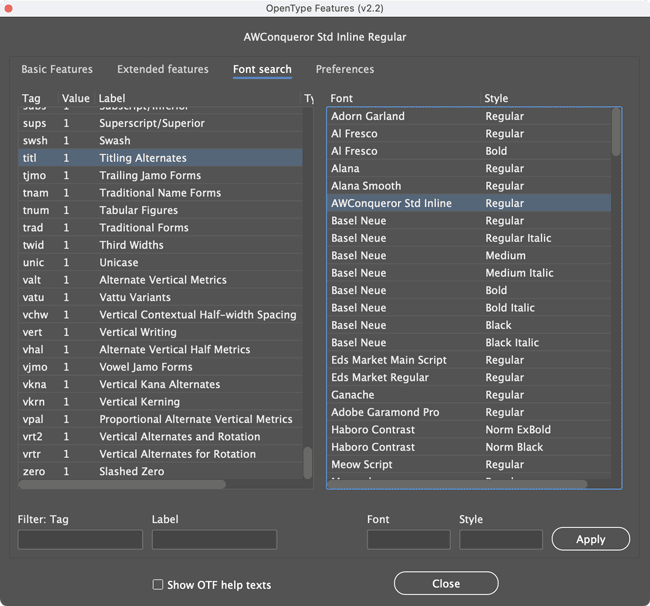
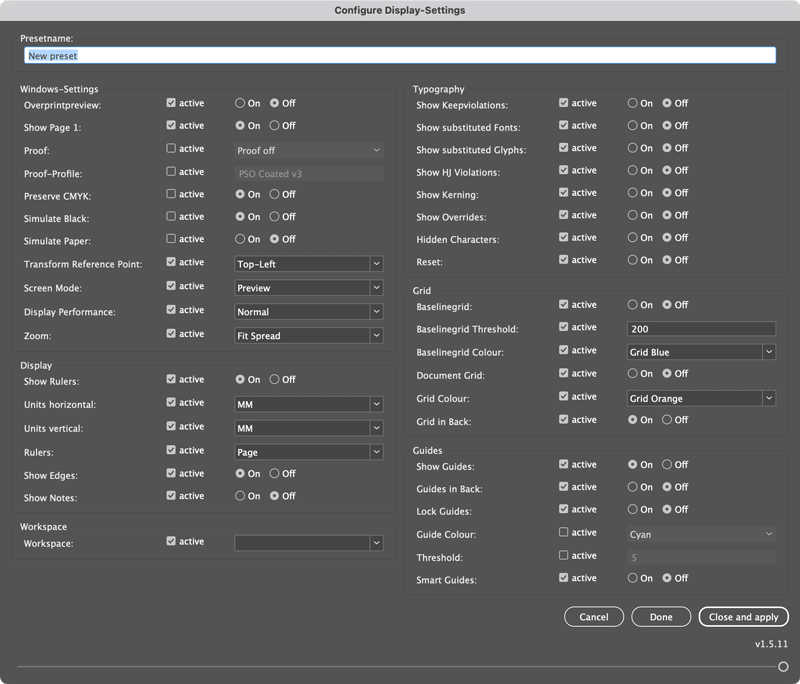
There are also scripts to help with color management, set up baseline grids, manage all display settings with one click, and more!
Version 2 of the Display script allows you to save entire configurations of settings in presets that you can quickly and easily switch between.
And It Continues
Currently (July 2024) project-octopus.net offers 12 scripts. But we have many ideas and are developing additional scripts that we automatically distribute to your computer. A focus will be “Accessibility,” the current hot topic.
By the way: If you would like to use the Octopus functionality for the automated distribution of scripts in your company or your team, please contact us.
Newsletter and Giveaway
We are currently running a giveaway in which you can win an annual subscription to Adobe’s Creative Cloud.
Since we do not collect any personal information, anyone who wants to stay up to date must subscribe to our newsletter.
Who we are:
Satzkiste GmbH (satzkiste.de) is a Media Service Provider in Stuttgart, Germany.
Since 2005 we have been supporting a wide variety of companies in the field of publishing.
Hundreds of thousands of InDesign and Word documents have been processed since then; we created hundreds of templates and passed on our knowledge through thousands of hours of training and consulting.
With this experience and our very well trained and experienced team, we can think outside the box and offer you exactly the solution that suits your project: for editorial, graphics and marketing; from typesetting to automation. And the octopus also benefits from this.
The platform and most of the scripts were developed by Gerald Singelmann from Hamburg/Germany (cuppascript.com). Two of the scripts are from Roland Dreger from Vienna/Austria (rolanddreger.net).
This article was last modified on August 13, 2024
This article was first published on July 23, 2024
Commenting is easier and faster when you're logged in!

Recommended for you

The Next Generation of Imposition Software is Now Shipping
Dynagram, the innovative leader in imposition technology for prepress applicatio...

This Week in InDesign Articles, Number 69
From print to epub, graphs to graphics, this list of links has a little of every...

How to Add a New Text Frame In the Middle of a Thread in InDesign
It's easy to add text frames in the middle of a story, with the help of a script...