




If your layout contains photos, paintings, or posters you can easily add effects to make those images look like they’re framed and matted. There are several ways to do so, but none simpler than giving the image a thick stroke to represent the frame.

image from freevintageposters.com
Then add an inner shadow to the graphic so it looks like the frame is casting a shadow on the image. To do this, make sure you have the image, not the frame selected, and go to the Effects panel. It should say Graphic (not Object). Then click the FX button at the bottom of the panel and choose Inner Shadow.
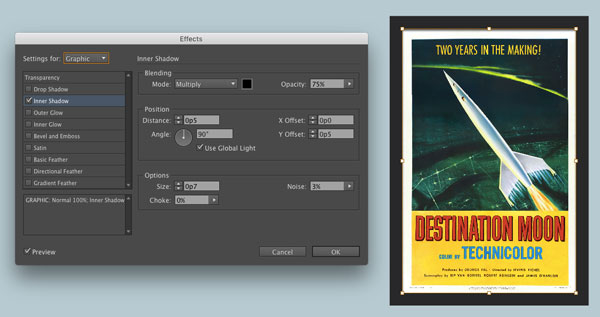
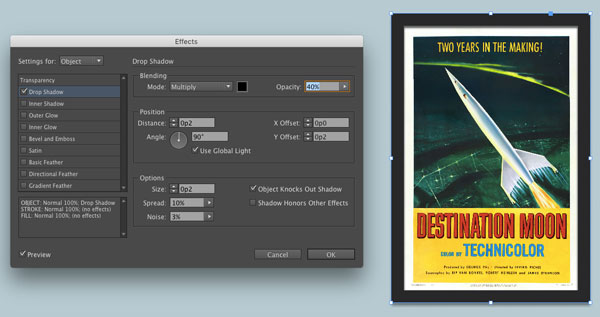
Select the frame and apply a drop shadow with similar settings.
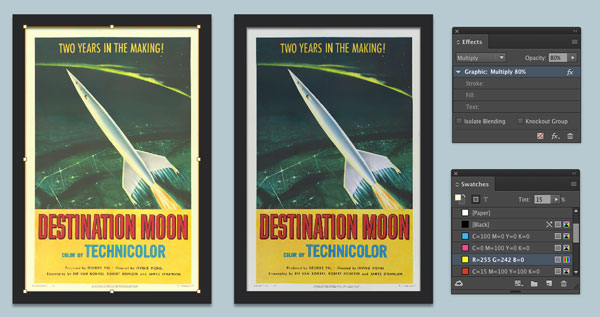
Finally, toning down any areas of pure white and black can make the image seem a little more real and less digital. Lower the opacity to reduce the blacks. To make white less than white, again select the graphic and set it to Multiply in the Effects panel. Then add a fill color to the frame to blend with the image.
You can go for an old yellowed look, or add a light gray fill to give the effect of paper instead of pixels.
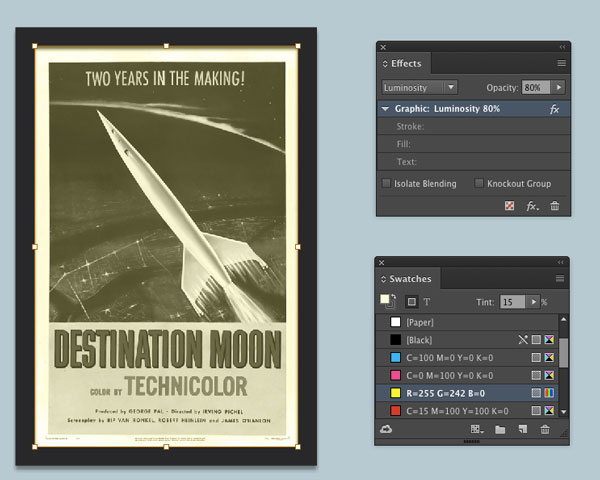
For a monochrome effect, try the Luminosity blend mode applied to the graphic and fill color in the frame.
This article was last modified on January 10, 2022
This article was first published on April 17, 2017
Commenting is easier and faster when you're logged in!

Recommended for you

Helping Photoshop and InDesign Play Nice
Chad Chelius and David Blatner offer advice on how to make these two software si...
Tip of the Week: Creating Cast Shadows
How to create a realistic cast shadow effect on native objects in InDesign.
InDesign Magazine Issue 96: Type FX
We’re happy to announce that InDesign Magazine Issue 96 (April 2017) is now avai...