




Like spices in the hands of experienced cooks, plug-ins and XTensions can take your software to the next level. Here’s a quick look at what’s cooking.
Colorblind Detection in Photoshop
Color deficiency affects approximately 7 percent of the male population. That means that, depending on the colors you use to design a site, a significant number of people may not be able to view it correctly. You can see any Web page through their eyes by entering its URL into the simulator at their Web site.

An example of color deficiency.
From that same site, you can download Vischeck, a free plug-in for Photoshop that displays a small version of your active image as it would appear to people with any of three kinds of colorblindness.
Much Sharper Bevels in Photoshop and Illustrator
Photoshop’s Bevel feature can be too smooth. That’s when Shinycore’s Path Styler Pro is valuable. This plug-in for Photoshop or Illustrator ($99 each or $129 for both) creates sharp, clean bevels, accurate reflections, and has multiple lighting options and advanced controls for these and a dozen other features. Photoshop uses pixels to create bevels, while Path Styler Pro uses multiple paths. The result is much greater control and accuracy. You can apply multiple bevels to a path, and each bevel can have its own material, contour, textures, and procedural maps (such as wood, metal, plastic, or glass). Lights can be directional, omni, or tube. More than 100 presets are included. The company’s Web site demonstrates the difference.
Easy, Automatic Color Conversion in PDFs
Callas Software’s PDFColorConvert (249 euros; $299 from ThePowerXChange) plug-in for Acrobat 6 or 7 is getting rave reviews for its simple yet powerful ability to convert spot colors and color spaces.
The plug-ins common uses are to convert spot colors to CMYK; to convert spot colors to other spot colors; to convert RGB colors to CMYK; and to convert all colors to gray. Among its clever features: you can assign or remove source or destination ICC profiles from any graphic; built-in source profiles include digital photography, office application, prepress, prepress USA (SWOP), and custom; built-in output profiles include an array of commercial, digital, gravure, newspaper, or Web presses; an automatic setting allows PDFColorConvert to analyze and convert the PDF’s colors automatically; it displays a swatch of every spot color, along with its RGB and CMYK equivalents; you can compare spot colors with previously converted PDFs and apply the same spot color conversions.
If you need to convert colors in PDFs, look into PDFColorConvert. It’s the best option yet.
Remove Photoshop Image Noise
Neat Image 2.2 ($40) is a plug-in for Photoshop 5 and above that reduces image noise and grain in digital photos and scans. It can reduce noise in low-light action photos, as well as in portraits. For automated noise removal, you can download noise profiles for many digital cameras, or you can create your own. Neat Image also intelligently sharpens details as it removes noise.
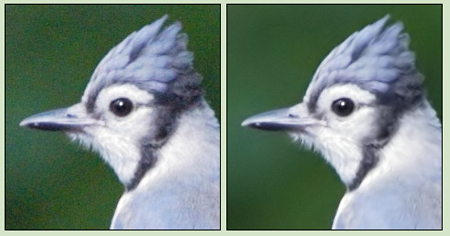
The original digital photo (left) suffered from noise; the filtered image is much improved.
In addition, it can remove film grain from scanned slides and negatives, JPEG artifacts from over-compressed images, and color banding. We highly recommend this product.
Table Styles in InDesign
Teacup Software’s TableStyles and CellStyles ($100) is a plug-in for InDesign that lets you create and apply styles (similar to paragraph style sheets) to either an entire table or to individual cells in a table. This ensures that tables appear uniform throughout documents, and it lets you reformat all at once by changing the style definition. You can save and share styles with colleagues and automate their creation and application by using AppleScript, VBScript, or JavaScript.
Printing Control in XPress and InDesign
Callas Software’s MadeToPrint XT (349 euro, $349 from ThePowerXChange) is available as an XTension for QuarkXPress 4, 5 and 6, or as a plug-in for InDesign CS. When printing or exporting to EPS or PDF, it lets you combine all the settings for a particular job into a selectable item: printer, Page Setup, PDF, EPS and Print settings. This lets you (or an inexperienced co-worker) easily print the same document to a laser printer, color proofer, imagesetter, and export to PDF or EPS with all the correct settings. You can even make a group of settings for different printers, and send a document to all the printers at once.
You can also break a print job into separate pages, which prevents long documents from choking or slowing down the printer. When creating a PDF, you can access Distiller’s settings from within the Print dialog box. MadeToPrint can also generate a job slug or a new name for the output file based on several variables, including date and time, user, page(s), and last modification date and time.
Callas Software’s more-advanced MadeToPrint Auto (2,490 euro, $2,499 from ThePowerXChange) adds the ability to drop native XPress documents into predefined hot folders for automated output or conversion to EPS or PDF. You attach a MadeToPrint setting to a folder, and any XPress document that gets dropped into it is automatically processed according to that setting.
This article courtesy of and copyrighted by Design Tools Monthly. For a free sample of the printed newsletter, email in**@**********ls.com.
This article was last modified on December 14, 2022
This article was first published on May 13, 2005
Commenting is easier and faster when you're logged in!

Recommended for you

Thou Shall Not Use Comic Sans
Excerpted from Thou Shall Not Use Comic Sans: 365 Graphic Design Sins and Virtue...
Scanning Around With Gene: Listening to Music with Both Ears
I recently splurged and used ten years’ worth of American Express points o...

Create Reflections in Photoshop with Smart Objects
With Photoshop’s Smart Objects you can combine multiple layers into one, distort...