


Photoshop How-to: Oo la la! Retouch Photos Like the French


Marie Laure Clec’h

To buy this book click here.
In its ads, Yves Rocher demands high-quality imagery that combines esthetics with instantly readable text. In this story, photo retoucher Cyril Bruneau describes how the photographer arranged and shot a still-life of semi-transparent and opaque containers, and how Cyril himself then retouched the image so it would meet Yves Rocher’s exacting standards.
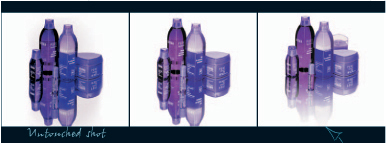
We’ve posted this excerpt as a PDF file. All you do is click the link “Photo Retouching With Photoshop” to open the PDF file in your Web browser. You can also download the PDF to your machine for later viewing.
To open the PDF, you’ll need a full version of Adobe Acrobat (5 or higher) or the Adobe Reader, which you can download here.
To learn how to configure your browser for viewing PDF files, see the Adobe Reader tech support page.
Excerpted from “Photo Retouching with Photoshop” by Marie Laure Clec’h. Copyright © 2004 O’Reilly. All rights reserved. Reproduced here by permission of the publisher.
This article was last modified on January 3, 2023
This article was first published on March 16, 2005
Commenting is easier and faster when you're logged in!

Recommended for you

Turn a Photo into a Planet Using Photoshop
We’re all familiar with panorama photography, and you may have used Photos...
Scanning Around With Gene: How to Look Like a Real Photographer
Originally published August 6, 2008 When I was in high school I spent a great de...

100 Most Important Cameras in History
If you didn’t get exactly what you wanted for the holidays, here’s a treat you c...