




If you place graphics into existing frames, you will almost always need to reposition or resize the graphic to fit the frame. InDesign has the same commands as XPress to resize or center the graphic, plus an extra command not found in XPress 4.
Choose Object > Fitting > Fit Content to Frame to expand or contract the artwork so that it fits completely within the frame, even if it distorts the artwork.

Choose Object > Fitting > Fit Content Proportionally to resize the image so that the entire image is visible inside the frame without distorting the artwork.

Choose Object > Fitting > Center Content to reposition the image so that it is centered within the frame.

However, InDesign has a command not available in the core XPress 4 program. Choose Object > Fitting > Fit Frame to Content to expand or contract the size of the frame (box) so that it displays all the artwork.
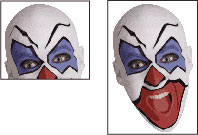
You can even apply the Fit Frame to Content command to resize a text box so that it will contract to exactly fit text in the frame.
Read more by Sandee Cohen.
This article was last modified on March 10, 2025
This article was first published on March 13, 2002
Commenting is easier and faster when you're logged in!

Recommended for you
Scanning Around with Gene: The Only Thing We Have to Fear…
One popular New Year’s resolution is to get organized, which is why retailers of...

Don’t trust the display of IDML files in Bridge
Have you ever noticed that IDML files don't always display correctly in Bridge?...

Bridge CC Update Adds New Features for Working with Graphics and CC Libraries
The details on a Adobe Bridge CC 2018 update that adds new features for working...