



Appreciating the View
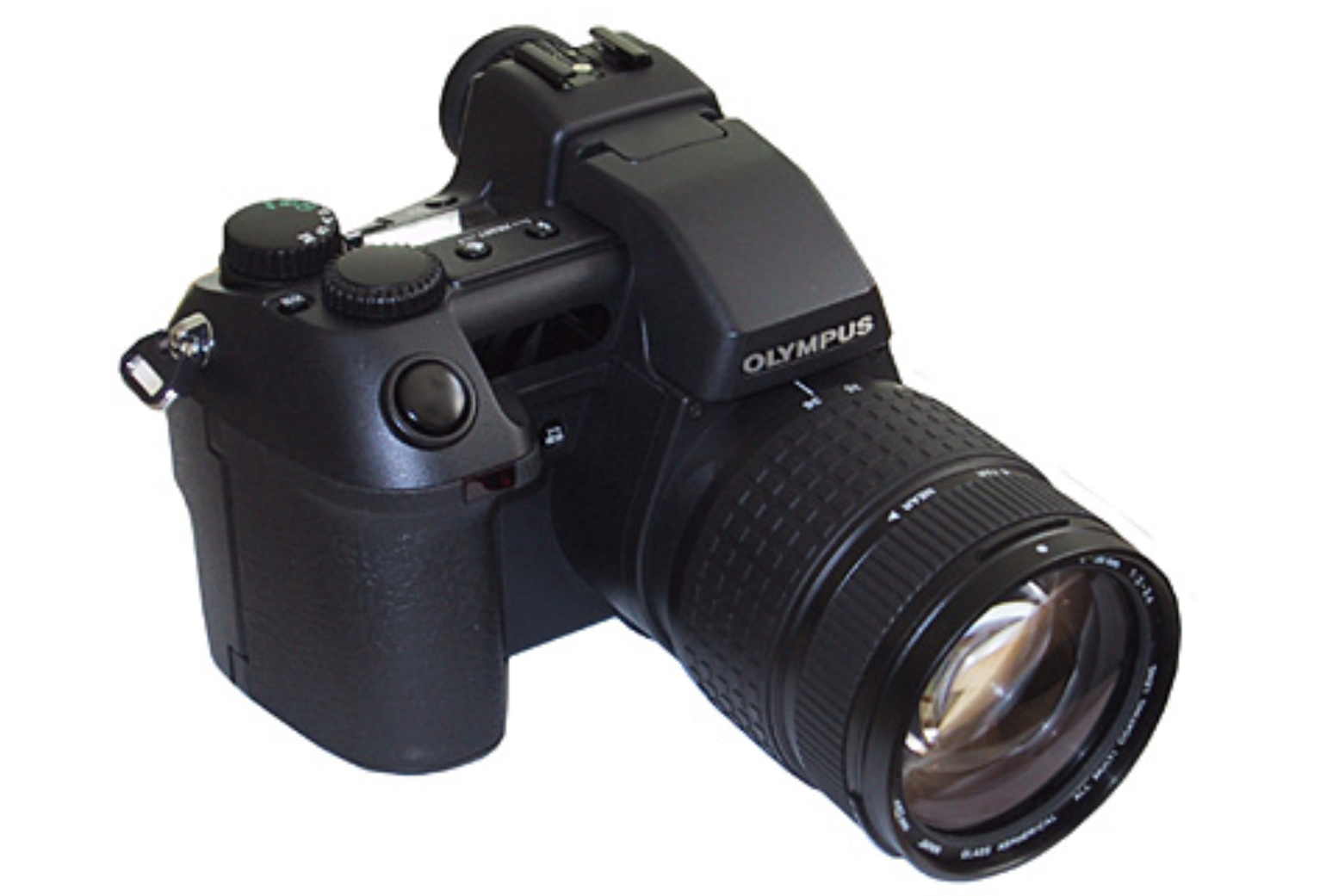
The Camedia E-10 benefits from one Olympus trick other digital SLR makers have yet to display: It lets you use its LCD panel as a digital TTL viewfinder. In a normal SLR, a series of mirrors directs the light collected by the lens to the viewfinder, so that you see what the lens “sees.” When you press the shutter button, the primary mirror flips up out of the way to allow the light to pass straight through to the focal plain — to expose the film or allow the CCD array to capture the scene. Because of this design, you usually can’t use the LCD screen as a viewfinder with a digital SLR, because the primary mirror blocks the CCD array until the shutter button is pushed. Olympus has solved this problem by using a beam splitter to feed light to both the optical viewfinder and the camera’s CCD, allowing you to frame images using either the viewfinder or LCD screen.
The camera’s through-the-lens optical viewfinder is much better than the optical viewfinders found on the typical prosumer camera. In addition to being sharp and bright, it displays about 92 percent of your image (the typical prosumer camera falls somewhere between 85 and 90 percent). In addition, Olympus has wisely included a good amount of status information within the display. Shutter speed, aperture, exposure compensation, flash status, and more are included in a line of LEDs at the bottom of the viewfinder. With these displays, you don’t need to take your eye from the viewfinder while composing a shot.
The E-10’s viewfinder suffers from some annoying problems. Most noticeable is a strange barrel-like distortion as you look from place to place within the viewfinder. Also troublesome is slight vignetting — darkening in the corners. These problems are limited to the viewfinder, however: Captured images do not exhibit these artifacts.
The E-10’s LCD display, while sporting some innovative features, is also a bit of a disappointment. Though the display sits on a nice swiveling mount that can be tilted out from the camera to facilitate a top down view, the quality of the LCD leaves much to be desired. When framing, the E-10 displays a somewhat chunky, low-res image that can be distracting when shooting. Curiously, when playing back an image, the LCD displays a sharp, clear picture.
Also frustrating is the information and status display on the camera’s LCD. For some reason, rather than simply superimposing exposure and status information Olympus has chosen to block out the lower part of the screen with a colored information bar. Needless to say, trying to compose a picture using this partial view is rather difficult.
Good Exposure
Most of the shooting functions you’d expect from a professional camera are included in the E-10, including your choice of center-weighted metering, matrix metering, and spot metering. Full program, shutter and aperture priority, and manual exposure modes are provided, along with three ISO settings (80, 160, and 320). The camera provides a very good automatic white balance, though its white balance presets are labeled in degrees Kelvin so if you aren’t used to thinking in these terms, you’ll need to spend some time with the manual. The E-10 also allows fully manual white balance adjustment.
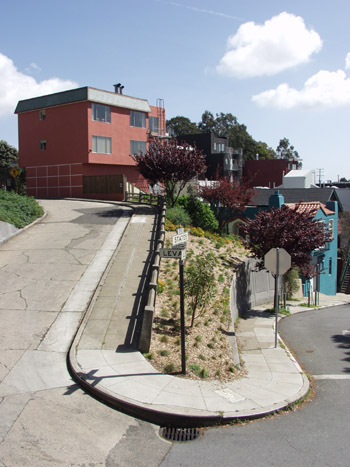
The E10’s iESP matrix metering is very good, though images are a touch noisier than we expected.
(Click hereto see the original, full-size image.)
The camera’s autofocus is a combination of active and passive mechanisms. An active IR mechanism makes a quick approximation of focus. This is then refined by a fairly typical contrast-detecting passive mechanism. In practice, the E-10’s autofocus is very good, neither better nor worse than that of the typical competitor.
A full assortment of burst, bracketing, and macro functions are also provided. The closest Macro focus is 8 inches.
The camera’s fastest shutter speed is only 1/640th of a second. That’s plenty fast for everyday use, but possibly a bit slow for professional sports or nature photography. Aperture size ranges from f2 to f11.
Shooting
The E-10 shoots fairly fast — in less than 0.1 seconds after you press the shutter button, according to Olympus — and the camera’s 32MB SD-RAM buffer provides enough storage to allow four photos to be taken in burst mode at 3 frames per second. But the camera is slow to boot and sluggish when displaying and erasing pictures, making this reviewer wonder how acceptable the camera’s performance would seem to a busy professional. Mind you, the camera is no slower than the typical prosumer digital camera (such as a Nikon CoolPix 990), but at more than twice the price, the E-10 should be faster.
This reviewer had one considerable complaint with the E-10’s controls when shooting: Though well placed, its shutter release does not have a well-defined halfway point. When depressing the shutter halfway to lock focus, we frequently ended up inadvertently taking a picture. It took quite a while to master the required feather-light touch.
Olympus has wisely placed all the camera’s essential shooting controls on the outside of the camera rather than burying them in menu pages, but we had one minor complaint here, too: Most of the controls require two hands to use. With your left hand you must press and hold the appropriate control button while you turn a dial with your right hand to change the settings of that parameter.
We were also sorry to see that the E-10 lacks any way to cycle through equivalent exposure modes to find just the combination of shutter speed and aperture you’d like. If you want to force a shutter speed or aperture, you’ll have to use a priority or manual mode.
Image Quality
The E-10’s image quality provides little cause for complaint. Olympus’ excellent iESP matrix metering produces very good exposures, even in difficult lighting situations (though we did find that the camera frequently had trouble metering skies). E-10 images do suffer from noise, but the camera’s very good lens makes other artifacts — such as geometric distortions and purple fringing — almost impossible to find.

This image shows the E-10’s excellent detail as well as its very good color quality.
(Click here to see the original, full-size image.)
The camera’s 4-megapixel CCD does not deliver significantly more information than a typical 3.3-megapixel camera, but it’s always nice to have more resolution if you can get it. As you can see from the samples, the E-10 produces images with very good detail, without oversharpening. Olympus has included separate sharpness and contrast settings, though we found the default settings usually yielded the best results. It’s nice, though, to see Olympus finally separate these two parameters. In previous cameras, it was not often possible to adjust sharpness without changing contrast.
The camera’s playback mode displays a number of helpful status displays, including a histogram. Unfortunately, no histogram is available when shooting.
Rolling Out
The Camedia E-10 is a very good camera, and for shooters who want an SLR design, its $2,000 price should at least place it firmly in the list of cameras that deserve a closer look. With its particularly mix of features and price, however, this camera sits at an awkward point: It’s price is too “pro” for many consumers yet its feature set is too “consumer” for many professionals. If you truly want an SLR with pro features and performance, it might be worth trying to go the extra distance for a Canon EOS D30 (our review is here.
If the E-10 does turn out to offer just the mix of features and pricing you need, make sure you buy from a source that will let you swap the camera if you run into problems: There have been many reports on Digital Photography Review and other sites of E-10s shipping with dead pixels, which show up as bright white spots in your captured images, though our evaluation unit was fine.
For Olympus features and specifications for the Camedia E-10, click here.
This article was last modified on January 18, 2023
This article was first published on May 23, 2001
Commenting is easier and faster when you're logged in!

Recommended for you
How to Prevent Photo Loss From Your Digital Camera
Photographers’ worst collective nightmare is probably the failure of technology....

Photojojo University
Photojojo, the site that brought you such goodies as the camera lens coffee mug...

Pentax Announces Optio S7 with Advanced Feature
PENTAX Imaging Company has announced the PENTAX Optio S7 compact digital ca...