




Every so often I just have to put my foot down and say “no.” No, you can’t do this, or no, you can’t do that. One question we often hear is, “can I assign an F-key keyboard shortcut to a paragraph or character style.” The answer is no, no, no. The only keys you can use are those on the numeric keypad — so Command-F6 won’t work, but Command-Keypad-6 will.
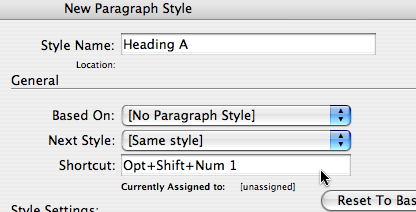
Of course, I want to be able to assign other shortcuts to styles. It would be so convenient to use any shortcut I want. But Adobe, in their infinite wisdom, apparently thinks it’s best if we don’t go down that road. I can sort of see their point: After all, let’s say I used Command-S for my “Subhead” style and then sent my document on to someone else. They’d press Command-S to save the file and not get what they were expecting… right? Or wrong? What would you expect/like to happen? For example, what if style shortcuts did not travel with the document, but only worked on your computer? I’m just curious to see if anyone comes up with clever ideas for this conundrum.
In the meantime, the only good workaround I know of is to use a third-party keyboard shortcut program, such as QuicKeys or iKey. Those kinds of utilities let you assign shortcuts to anything, including sequences of events, and they enable mapping of one shortcut to another. So you could set it up that when you press Command-Option-1, it sends “Command-Option-NumKey1” to the computer.
This article was last modified on December 19, 2021
This article was first published on June 23, 2008
Commenting is easier and faster when you're logged in!

Recommended for you

Tips for Selecting Objects Using the Layers Panel
When it comes to selecting objects on complex pages, the Layers panel is invalua...

TypeTalk: Access Special Characters
Q. I often use hard-to-find characters, such as register and trademark symbols,...
New Contest! The Puzzling Pasted Text
Solve this InDesign mystery for a chance at winning a great prize.