


Nikon’s Latest Lives Up to its Name


Do It Yourself
You can adjust a plethora of settings in Manual Mode, so many so that it can be overwhelming to an amateur. To the CoolPix’s credit however, it doesn’t make you go cold turkey if you decide to experiment. You can choose to manually set, say, only the aperture, while the camera does the rest. (This particular method allowed me to take excellent close-ups of flowers and control the depth of field in a way not possible with my PhotoPC 850Z.) You can also opt to set only shutter speed, or set both. In the Programmed Auto Mode the camera will maintain the correct exposure while you select from among various combinations of speed and aperture. (Shutter speed and aperture are adjusted inversely to maintain a constant exposure.) This is a perfect “training” mode that lets you familiarize yourself with the effects of these settings.
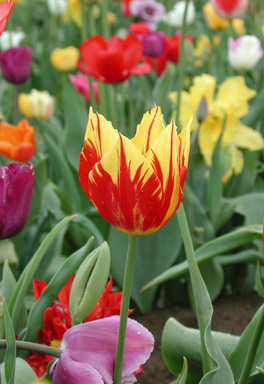
Setting the aperture manually lets you adjust depth of field. Here the background is intentionally blurred, with the focus on the tulip at center.
The CoolPix also has four Sensitivity settings (Auto, 100, 200, and 400), which correspond roughly to film ISO ratings. Auto produces good results under most circumstances, while the higher values improve quality in low-light conditions. Among other adjustable settings available in Manual Mode are White Balance and Metering. You can also adjust contrast, brightness, and sharpening in the camera before you capture a shot. This helps eliminate the loss of image quality that often results from digital retouching after the fact.
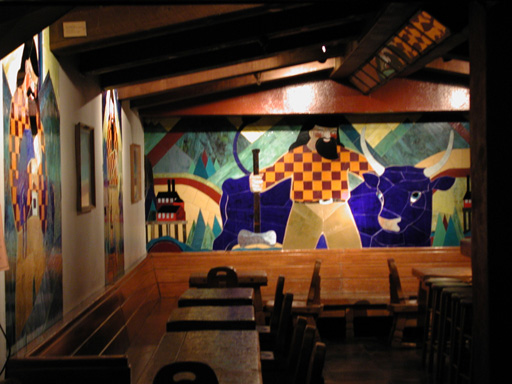
The CoolPix 990 performs well even in low light, as this unretouched indoor shot shows. Using a tripod however, would have made the image sharper.
In addition to the QuickTime Movie Mode the CoolPix offers four other multi–shot modes. Continuous Mode allows up to five images to be captured in nonstop firing while the shutter button is down. VGA sequence does the same at 640-x-480 resolution (up to 44 frames), while Ultra HS will shoot up to 80 QVGA-resolution frames at 30 frames per second. I particularly liked the Best-Shot Selection (BSS) Mode. This is great if you don’t have a tripod or your subject is moving about in a breeze. BSS will take up to ten shots while you hold the shutter button down, then the camera will automatically select and save the sharpest image, discarding the rest!
Professional photographers will be pleased that the CoolPix 990 accepts optional lens converters. The nonstandard lens size however, means an investment in new equipment. Wide-angle ($99), telephoto ($149.95), and fisheye attachments ($219.95) are available.
While the CoolPix offers a remarkable level of control over the camera’s settings, one major drawback is the drain on the batteries that manual adjustments require. Menus are displayed on the LCD Monitor and settings on the LCD Control Panel, so even if you shoot with the monitor off, you’ll have to switch it back on to change menu settings. There are also some camera effects and functions that are only available when the monitor is on. A feature called Auto–Bracketing does ameliorate this problem somewhat. In this mode the camera will take a series of shots (of the same subject) while automatically adjusting the exposure slightly on each one (from underexposed to overexposed). You get a sampling of exposures without having to return to the menu and manually set up each one.
This article was last modified on January 6, 2023
This article was first published on November 10, 2000
Commenting is easier and faster when you're logged in!

Recommended for you

The Colorful Art Of Camera Tossing
This article is courtesy ColourLovers.com. Who exactly threw the first camera is...
How to Prevent Photo Loss From Your Digital Camera
Photographers’ worst collective nightmare is probably the failure of technology....
100 Most Important Cameras in History
If you didn’t get exactly what you wanted for the holidays, here’s a treat you c...