


Nikon’s Latest Lives Up to its Name


Cruising On Autopilot
Initially I began using the CoolPix in tourist mode: that is, point and shoot with the autofocus and default settings. I’ve achieved excellent results this way with my Epson camera. Like many graphic designers, I’m only an amateur photographer and don’t expect to delve as frequently into the manual mode settings as would a professional.
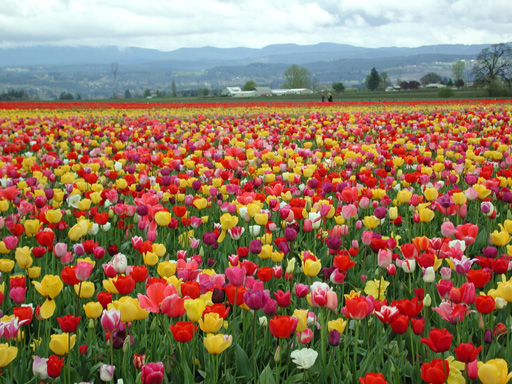
Using a point-and-shoot approach, the CoolPix’s automatic settings captured these vibrant colors.
The foreground is crisp, while the background is a bit blurry.
Ergonomic tedium aside (rotate lens, remove cap, turn on camera, press Monitor twice), shots were easy to frame and shoot with the viewfinder. I liked the 3x optical zoom, a feature I use often for wildflowers and foliage. If I didn’t disable the LCD monitor the extra digital zoom (up to 4x) kicked in when I held the Zoom button for more than 2 seconds. But digital enlargements can’t be seen in the viewfinder (only in the LCD), so I didn’t always notice. While the 1.8-inch LCD is slightly smaller than my Epson’s 2-inch screen, the CoolPix’s is definitely much easier to see than the Epson’s, especially in bright light.
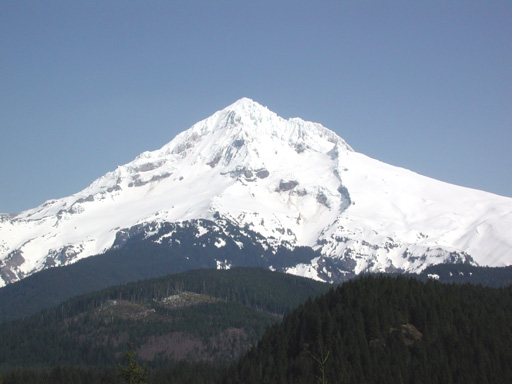
This picture of Mt. Hood was taken at a distance of 8 miles using the CoolPix’s 3x optical zoom.
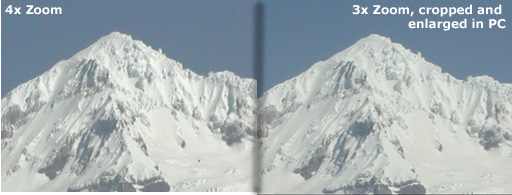
Digital zoom doesn’t improve close-up shots any better than your software can. The image on the left was taken using the 990’s 4x digital zoom (interpolated by the camera). The image on the right was taken using the camera’s 3x optical zoom, then cropped and enlarged (interpolated by PHOTO-PAINT)
Even when shooting in automatic mode I was presented with a lot of decisions to make: image size, image quality, focus method, flash mode, exposure compensation — all of these can be adjusted. At the very least it’s important to decide on image size and quality, as these determine storage requirements and the uses for which the pictures will be suitable. The terms “size” and “quality” confused me at first; I thought they referred to dimensions and resolution. Actually they refer to resolution and compression ratio, respectively.
Four resolutions (“sizes”) are possible with the CoolPix 990: Full (2,048 x 1,536), XGA (1,024 x 768), VGA (640 x 480), and a 3:2 size (2,048 x 1,360) that has the same aspect ratio as 35mm film. Multiply this by the four image compression (“quality”) options — HI (TIFF without compression), and three JPEG settings (Fine, Normal, and Basic) — and you get a 16 square matrix describing the number of shots possible per storage card. Using the included 16MB CF card this number ranges from 1 uncompressed image to 333 compressed at 94 percent. I found Normal compression suitable for most of my needs, which allowed me forty 3-megapixel images per card.
Set to Movie mode, the CoolPix can also capture 320-x-240 (QVGA) QuickTime video at 15 frames per second, up to a maximum length of 40 seconds. I was able to get 106 seconds of video (in three segments) on a 32-MB CF card. Sound is not recorded and zoom is disabled in Movie mode.
This article was last modified on January 6, 2023
This article was first published on November 10, 2000
Commenting is easier and faster when you're logged in!

Recommended for you
Sony RX100 V Review: The Ultimate Travel Camera
The new Sony RX100 V is the latest release in the Sony RX100 point-and-shoot ser...

Lexar Increases Performance of High-Capacity CompactFlash to 133X
Lexar Media, Inc., a leader in advanced digital media and accessories, today ann...

100 Most Important Cameras in History
If you didn’t get exactly what you wanted for the holidays, here’s a treat you c...