



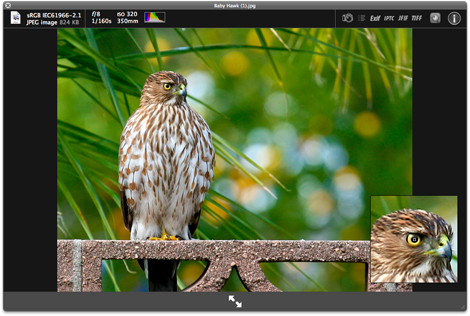
No longer do you have to import a picture into a photo application just to get detailed information about the shot. With SneakPeek Photo, simply click on the unopened photo file (no matter where it is, even on your card reader) and hit the space bar. Up pops the picture into a large view that immediately gives you the detailed information you need. The preview’s toolbar contains the much needed basics such as file type, size, f-stop, focal length, color profile (sRGB, ProPhoto, etc) and even a mini histogram.
But there’s much more. Also available are elements that offer Exif data, camera settings, a Loupe View with high resolution zooms, and a large Histogram to see the blueprint of your shot. If the photo is geotagged, you’ll not only see the coordinates, but a nifty map of where the picture was taken. Plus there’s even a link to a more detailed map online.
The clear benefit to this plug-in is time and convenience. “I really didn’t like to have to open a photo application, wait for it to load all the libraries, then spend time once again finding the one picture I needed information about. So I created SneakPeek Photo to use as a bypass to all of that,” says Code Line President/Developer Matheau Dakoske. Now, you can decide which pictures you want to download to your computer, without having to download them first. You can poke in and out of libraries and spot check shots without having to open and close applications. Want to check out a picture just sent to you in an email? SneakPeek Photo does that too and all in an instant. Compare photos at a glance to see which ones make the cut.
Price and System Requirements
SneakPeek Photo gives you access to the kinds of information usually found in expensive photo applications. The cost? Only $10 dollars. We believe you’ll think our product is worth it, the very first time you use it. Try it for free for 15 days to be sure.
SneakPeek Photo requires Mac OS X 10.5 or later (including 10.6).
This article was last modified on January 5, 2023
This article was first published on September 2, 2009
Commenting is easier and faster when you're logged in!

Recommended for you

Endnote and Footnote Improvements in InDesign CC 2019
InDesign CC 2018 introduced a new endnotes feature to go along with its long-sta...

InReview: MindSuite Pro
Master collection of linguistic products includes grammar checking, a thesaurus,...
The Art of Business: The Biggest Tax Question of All
If you have several clients, it’s easy to answer the question “am I...