



This InDesign tip on the new Links panel icons was sent to Tip of the Week email subscribers on August 18, 2016.

Sign up now and every week you’ll get a new tip, keyboard shortcut, and roundups of new articles, plus exclusive deals sent right to your Inbox!
Just scroll down to the bottom of this page, enter your email address, and click Go! We’ll take care of the rest. Now, on with the tip!
If you work in a collaborative environment where you share files with colleagues, you’re probably used to mysterious things popping up in InDesign from time to time. For example, you might spot some icons you’ve never seen before in the Links panel.
Like a shopping cart, three dots, and a cloud.

The shopping cart means the image is an unlicensed Adobe Stock image. You can also see its status is unlicensed if you’re showing Link Info in the Links panel.
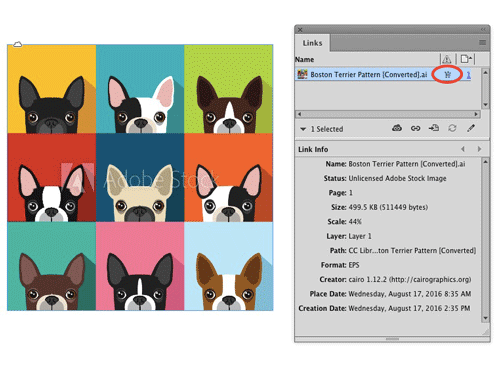
So someone searched Adobe Stock using the CC Libraries panel, and added a preview image to a library. And then they added the preview image to the InDesign layout. But they didn’t choose to license the image yet.
Double-clicking the shopping cart icon in the Links panel is a shortcut to license the image.
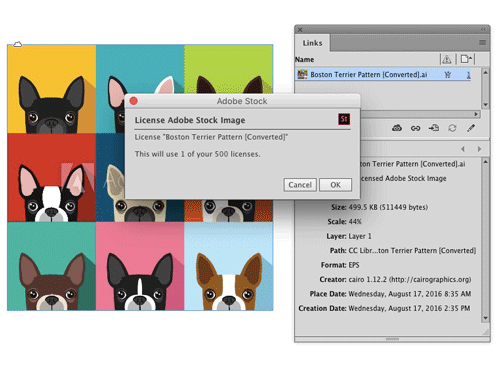
While the image is being licensed, you’ll see three dots in the Links panel, like a progress bar of sorts. And the Link Info status tells you it’s being downloaded.

And when the image is finished downloading, you’ll see a cloud icon.

Also notice that the Adobe Stock watermark is now gone from the image in the layout, another clue that the image is licensed, visible even without the Links panel open.
Thanks to Bart Van de Wiele for pointing this out!
This article was last modified on July 25, 2019
This article was first published on August 23, 2016
Commenting is easier and faster when you're logged in!

Recommended for you

Tip of the Week: Finding Overset Text With Preflight
This tip was sent to Tip of the Week email subscribers on June 4, 2015. Sign up...
Tip of the Week: Customizing the Control Panel
This tip was sent to Tip of the Week email subscribers on July 30, 2015. Sign up...

Learn About Your Links at a Glance
Learn how to get an instant summary of the status of all the links in an InDesig...