


New Dimensions: Two 3-D Modelers Open New Worlds


Carrara Studio 1.1
Carrara Studio was originally developed by MetaCreations, which also brought us Bryce — the wonderful 3D-world-modeling program. If you’ve ever used Bryce, you’ll be immediately at home Carrara. The interface is truly astounding in the way it packs an enormously powerful toolsets into compact and efficient workspaces (see figure 4). The basic work area displays three orthogonal grid planes representing the three dimensions. With the icons at the top of the display, you add objects (geometric and environmental primitives and modeled objects; lighting; and cameras), and use the navigation icons on the left to maneuver around the scene. A set of icons at the bottom of the display lets you customize the workspace preview — for example, wireframe, bounding box, flat, or shaded. Cleverly designed pull-out “trays” provide access to deeper functions such as the Object Browser, animation timeline (Sequencer), and rendering settings.
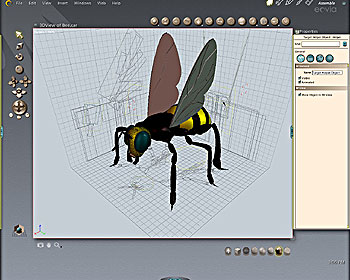
Figure 4: Carrara’s interface is compact and attractive. The Properties “tray” is open on the right side of the display.
Tasks in Carrara are carried out in “rooms,” where you focus on the five basic processes: assemble, model, texture, storyboard, and render. Most of the time, you work in the Assemble room, for it is here that you add and position objects, lights, and cameras, and special effects. The Model room provides an assortment of functions for creating spline (extrusion modeling), vertex (surface modeling), metaball (organic blob modeling), and text objects (see figure 5). (And, as you might expect, there’s a Bryce-like Terrain modeler too.)
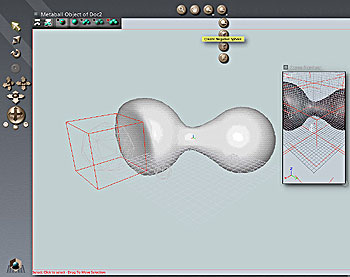
Figure 5: By combining positive and negative metaballs, you can create organic forms.
Adding surface texture and shading is performed in the Texture room and the Render room lets you set render parameters for output to image files. If you intend to animate the scene, you can assemble a scene and add motion effects simultaneously in the unique, multi-panel Storyboard room, although you may use the Assemble room and the Sequencer tray if you prefer (see figure 6).
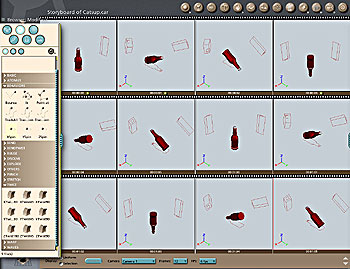
Figure 6: Spinning, dancing ketchup bottles are a one-button operation in Carrara’s Storyboard room.
The program comes equipped with a splendid set of tools, from primitive shapes to terrains, particles, and naturalistic effects such as fire, fog, and clouds. And the Object Browser provides a terrific assortment of pre-built objects, textures, behaviors, and special effects modifiers that you can drag and drop onto objects in the Assemble window. The program also ships with a CD packed with objects, textures, and rendered examples, which helps ease the awkwardness that often haunts newbies to the 3D modeling process. More sophisticated users will find plenty of advanced features for both still and animation modeling. Carrara supports inverse kinematics — a behavior that mimics natural motion — and can add behaviors such as explosions, dissolves, deformations, and shatters with a single click.
We found Cararra Studio surprisingly easy to master, thanks to the set of eight short tutorials that introduce the program’s feature set. More detailed tutorials ares prinkled inside the fat manual, but we wish there were a more sequential and logical progression such as those included in the Amapi docs. However, it took less than an hour to master the basics, produce a respectable animated logo with extruded text, and render it to an AVI file. Other output options include BMP, GIF, JPEG, TIFF, TGA, and PSD. The models themselves may be imported and saved in all popular 3D formats, such as DXF, OBJ, and VRML.
Illustrators looking to expand into the third dimension will find much to like in Carrara Studio. At $399, it’s reasonably priced given the sophisticated modeling and animation features.
This article was last modified on March 13, 2022
This article was first published on April 12, 2002
Commenting is easier and faster when you're logged in!

Recommended for you

How to Create Trees in Photoshop, Part 2
In part 1 of this tutorial, we saw how to use the new Tree feature in the 14.2 u...

The CreativePro Guide to Graphics File Formats
Learn about graphics file formats, their pros and cons, and how to choose which...

How to Clone a Row of Stormtroopers in Photoshop
Here’s how you can make your own Attack of the Clones in Photoshop, using the Cl...