



Hey folks, it’s time for another InDesign mystery that you can solve for a chance to win an awesome prize!
Here’s the scenario:
You’re working with a simple, one-page document to create some presentation slides. On the document page, there is one text frame with some styled text in it.
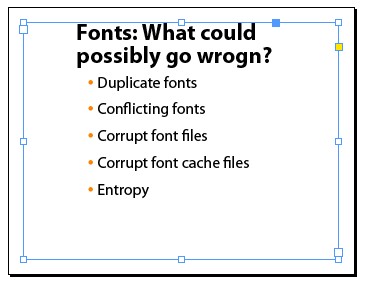
In the Paragraph Styles panel, you notice an unused style that you want to get rid of.

So you right-click on the style and choose Delete Style.
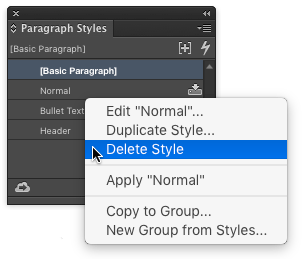
But then a dialog box pops up asking you to choose another style to replace the soon-to-be-deleted style wherever it is used.

Likewise, if you choose Select All Unused from the Paragraph Styles panel menu, no styles are selected. So it’s clear that InDesign really thinks this style is needed somewhere.
But you’re certain that style is not applied to any text.
If you use Find/Change to search for use of the style, InDesign cannot find a match.

Nor are any of the other styles in the document based on the unused style.
There is only one master spread and there is nothing on it.
There are no hidden layers or items.
The document is not corrupt, and everything else works fine.
Final clue: If you delete the one text frame on the document page, you can then delete the unused style without choosing a replacement.
Why does InDesign say this unused style is still in use?
This month’s prize is a biggie: A free one-day pass to the 2016 CreativePro Conference!

The winner can choose between Deke McClelland’s full-day Channels and Masking class on Sunday July 10th, or the full-day Illustrator Conference on Monday July 11th with an amazing line-up of Illustrator stars: Bert Monroy, Von Glitschka, Sharon Steuer, Mark Heaps, and Michael Ninness. Note: the prize does not include travel or hotel accommodations.
There winner will be chosen at random from all the correct answers I receive before June 15, 2016
Enter now by emailing your solution to mike at indesignsecrets.com
Note: Comments are closed on this post while the contest is open so no one gives away the answer. Good luck!
This article was last modified on July 25, 2019
This article was first published on June 8, 2016
Commenting is easier and faster when you're logged in!

Recommended for you

TypeTalk: Choosing and Using Swash Characters
Want to enhance and spiff up an otherwise ordinary or lackluster type treatment?...

Mystery of the Missing Image Contest Answer and Winner!
Last week I posted a challenge for folks to explain this strange looking screens...

New Fonts Popping Up All Over!
With the warmth of spring sunshine, great new Font Bros fonts are poppin’...