



Khizkey from the New Israelite Reader wrote us:
I’m trying to create a nested paragraph style that will automatically apply a special oversized character style to double quotes in my pull quotes.
The first nested style (on the first quotes) works but the last will not work no matter what I try.
I asked Khizkey to send me a screen shot of his paragraph style’s Nested Styles panel, suspecting a problem with “up to” vs. “through;” but everything appeared fine. His screen shot is too small to reproduce here, but here were the settings:
Apply “Pull Quote – Qt Mk” through 1 Character
Apply [None] up to 1 [he inserted a double quote mark here]
Apply “Pull Quote – Qt Mk” through 1 Character
I duplicated his settings on my machine:

The “quote mark” character style is supposed to increase the size of the type and change its typeface to Adobe Caslon. But sure enough, I had the same exact problem as Khizkey:
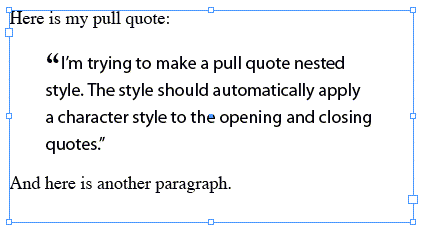
At first, I thought that perhaps InDesign can’t apply a nested character style to a character that was used as a “stop” character in the line before it. That would have been news to me; but I’m always learning new things about InDesign, so I wouldn’t have been too surprised. :-)
To test my theory, I replaced the quotes in the sample text with exclamation points, and then replaced the double quote in the nested style with an exclamation point as well. I found that InDesign was able to apply the nested styles perfectly, to both the opening and closing exclamation point. Hmmm. That meant there was something wrong with the quote mark.
Then I realized the problem. InDesign was looking for a straight double quote, but the sample text only had proper “curly” quotes. Unfortunately, the fly-out menu in the “stop character field” in the Nested Styles area (the one that lists Sentences, Words, Characters, and so on) doesn’t have any listings for curly quotes. If you know your OS’s special keyboard combination for these — on the Mac, a double closing quote is Shift-Option-[ — then you can insert it properly yourself.
If you can’t remember the keyboard combination, you can use the code that Find/Change (in the Edit menu) uses. It has a far more robust fly-out menu of special characters to the right of its Find What and Change To fields:
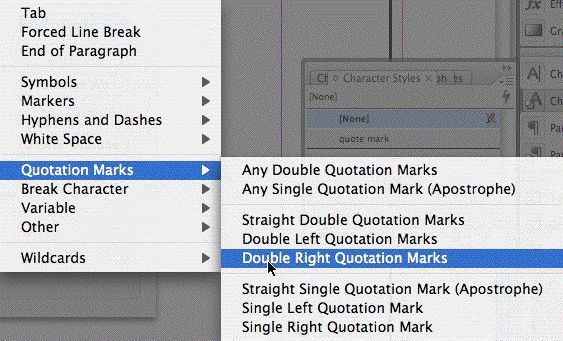
After choosing “Double Right Quotation Marks,” the Find field showed this code:
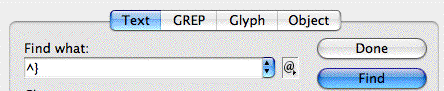
I copied the code, cancelled out of Find/Change, and pasted the code into the nested style field of my paragraph style, replacing the straight double quote. Immediately, InDesign converted the code back to a double close quote:

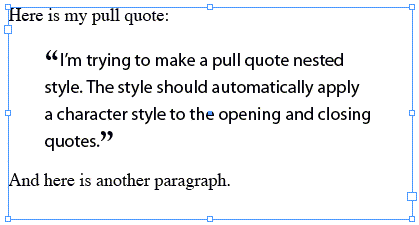
That fixed the problem with the nested style, and now the pull quote formats just as Khizkey needs it to:
This article was last modified on December 18, 2021
This article was first published on September 20, 2007
Commenting is easier and faster when you're logged in!

Recommended for you

The Frame that Tries to Steal Your Text (Why You Can Click Through Some Frames and Not Others)
Leonard wrote: I create the “guts” of the document and then draw a n...

Cleaning Up Hyperlinks from Word Text
Like many InDesign users, Terry V. is not fond of Word's hyperlinked text. He wr...
Making the Page Number and Pages Panel Numbers Match
What if you want your pages numbered 4A, 4B, and so on... both on the page and i...