




Press Release
Just in time for Earth Day, Neenah Paper has launched an enhanced version of the Neenah Eco-Calculator featuring greater customization capabilities that give designers and printers the information they need, the way they need it.
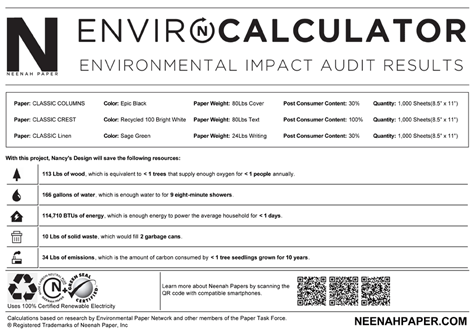
The enhanced Neenah Eco-Calculator instantly calculates the environmental savings achieved by choosing one of Neenah’s large selection of recycled papers made with post-consumer fiber papers. Highlights of the new Eco-Calculator include allowing the user to create a personalized, customizable and printable report and recording each project for future reference. And that’s only the beginning.
New features include:
• Personalized Environmental Savings Report – Each calculation is saved to a customized report that includes the client/customer’s name, project name and a detailed listing of the Neenah Paper selections including brand chosen; Writing, Text or Cover choice; paper weight, color, and percentage of post-consumer waste; as well as the environmental savings achieved. Designers and printers can also use the tool to calculate savings for up to three different papers for a project on a single report.
• Report History – Instantly reference previous reports which indicate the client or customer.
• Report Size and Orientation Flexibility – This new feature allows reports to be saved as a printable PDF and can be sized to users’ exact needs so it can be included in an actual printed piece such as a Sustainability Report or Annual Report.
• “Green” Logos* for each paper selected are incorporated at the bottom of each report.
• QR (Quick Response) Codes are imbedded into the report. With one snap of a smartphone, users are led to the brand webpage for detailed brand information.
• International Compatibility – Size requirements for a project can be entered in either metric or standard measurements, making it user-friendly for global audiences.
 Get the calculator here.
This article was last modified on January 18, 2023
This article was first published on April 22, 2011
Commenting is easier and faster when you're logged in!

Recommended for you

Repeating Nested Styles in a Loop
F.P. asked: Is there any way to find all the bullets in a paragraph and apply a...

Editor’s Picks for The Design + Accessibility Summit 2022
Our Editor in Chief lists his seven can't-miss sessions at The Design + Accessib...

Webinar: Varnish and Coatings
Satin UV coating, dry trap gloss varnish, soft touch aqueous coating — cre...