



Hey folks, it’s contest time again!
Last month, many of you unraveled the Mystery of the Unwelcome Text Wrap. This month, you’ll have to put on your thinking cap (or maybe just stand on your head) to explain what’s going on in this screenshot. You can click on it for a closer view.
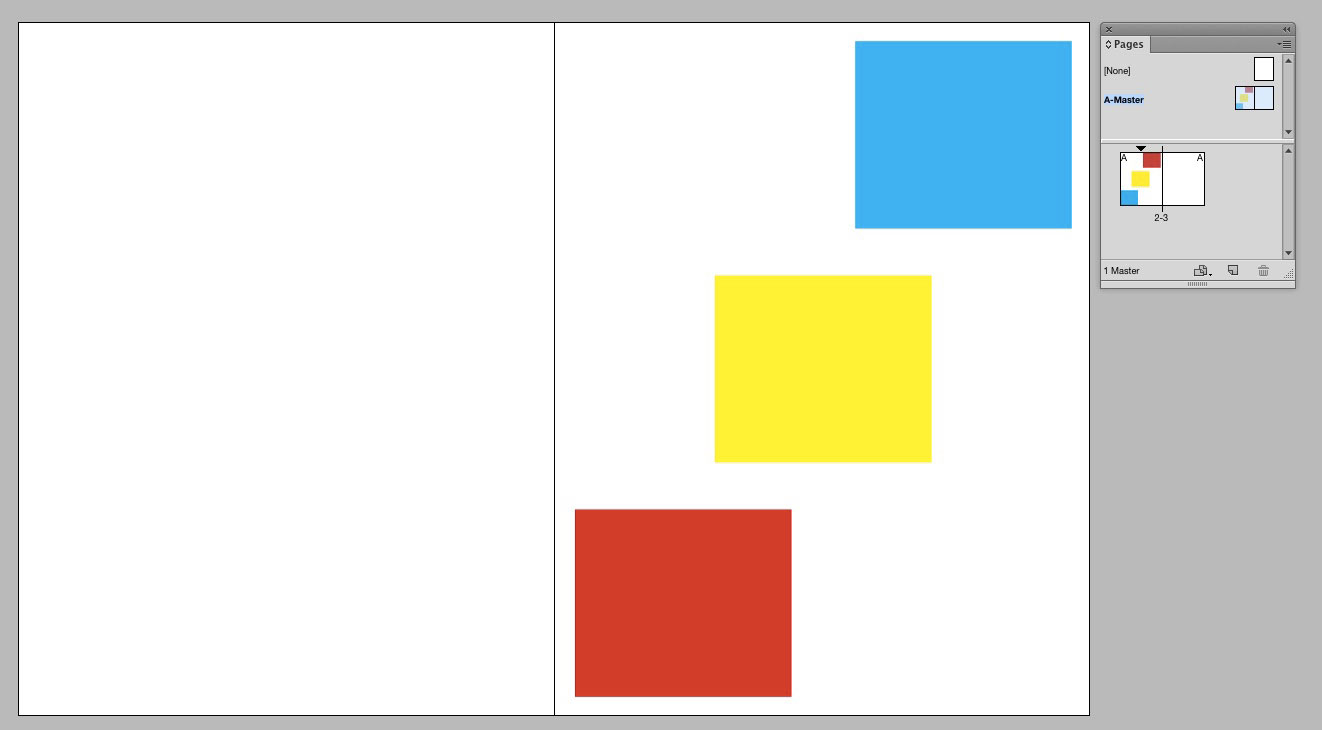
Notice in the Pages panel that the A-Master spread is highlighted, so that’s what we’re viewing in the document window. The A-Master has also been applied to the one document spread.
The thumbnails in the Pages panel show that there should be three colored frames on the left page: red on the top, yellow in the middle, and blue on the bottom. But that’s not what we’re seeing in the window. There, the frames are upside down and on the wrong page. But no items have been moved or altered in any way. How can this be?
This month, for a prize, three lucky winners will receive a copy of Erica Gamet’s InDesign PowerPack. This is a collection of awesome production timesavers for InDesign users.

The pack includes GREP searches, powerful text styles, table and cell styles, templates for often-used layouts, sample tables, PDF and new document presets, and other production goodies.
For a chance to win the prize, email me your solution at mike at indesignsecrets.com before Thursday April 23rd, 2015.
At that time, I’ll reveal the solution and choose three winners at random from the correct answers.
Good luck!
Note: Comments are closed on this post while the contest is open so no one gives away the answer.
This article was last modified on July 25, 2019
This article was first published on April 16, 2015
Commenting is easier and faster when you're logged in!

Recommended for you

Beware Overprinting White
Why white text can disappear in InDesign, when using a paragraph style and the O...

The Mystery of the Trailing Space Contest Answer and Winner
Solve this InDesign mystery for a chance at winning a great prize.
New Contest! The Case of the Misplaced Adornment
Solve this InDesign mystery for a chance at winning a great prize.