




It’s time to reveal the solution—and the winners—for this month’s InDesignSecrets contest!
Here’s the scenario:
You’re checking over a file getting it ready for output. You come across an image and want to see its resolution and color space. So you select the image and look in the Links panel. But the panel shows no information at all. In fact, it says there are no Links at all in the document!
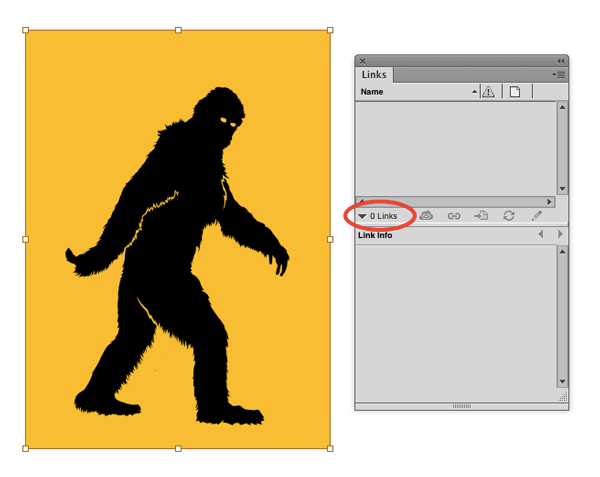
Why is there no information about this image in the Links panel?
The answer is that the image was copied and pasted (or dragged and dropped) directly from another application, in this case, Photoshop. So there is no linked image, and thus the Links panel is empty.
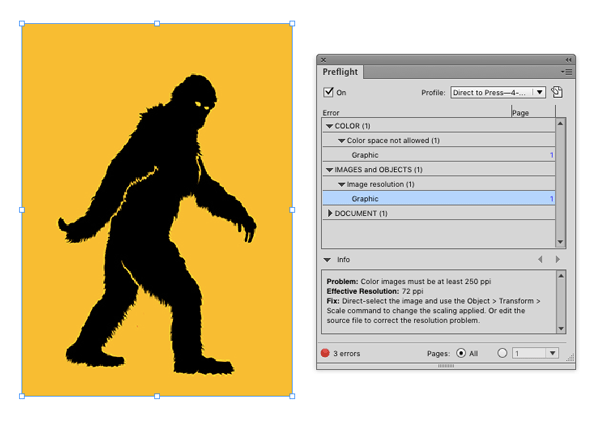
Interestingly, you can still see the image’s color space and resolution if you use the Preflight feature. Since this was a low-res RGB image, it gets flagged for both color space and resolution when the document is preflighted with a profile for CMYK press jobs (like the one shown below from last month’s Template Essentials.
And the winner of this contest are…
Somerset Walmsley
Holger Vaga
Both win an activation code for FrameReporter from Rorohiko!
Thanks to everyone who entered, and be on the lookout for another contest with a new great prize next month!
This article was last modified on July 25, 2019
This article was first published on April 11, 2016
Commenting is easier and faster when you're logged in!

Recommended for you

How to Prepare and Preflight Ads
How to manage the unique set of production challenges that come with producing p...

Accessible EPUB Export from InDesign Gets an Upgrade
Recent improvements in InDesign EPUB export bring the dream of "born accessible"...

CreativePro Ask the Expert Video: Laurie Ruhlin
In this week’s CreativePro video, David Blatner chats with Laurie Ruhlin, Adobe...