



DM wrote:
How do you move a row in a table to a different location? For example, move the 4th row to the 7th position. Drag and drop doesn’t work. A copy and paste creates a table-inside-a-cell effect.
[If you are using CC, then please see this comment for an update.]]
You’ve discovered one of the weaknesses in InDesign’s tables feature. There is no “move row” feature. (There is, however, a “go to row” feature under the Table menu that most people don’t notice. It allows you go jump to the 4th row, or the 405th row, quickly. Perhaps it’ll be an obscure feature of the week-eek-eek sometime in a future podcast.)
Anyway, moving one row to another ends up being a bit of a hassle. The best method is copy and paste, but as you noticed, copy and paste will sometimes give you an undesired effect. The trick is in how you paste.
First, select the row you want to move:

Next, cut it to the clipboard (Command/Ctrl-X). You’ll notice that the whole row disappears. (I wish there were a way to make it work like Excel — take the data and leave the cells.)
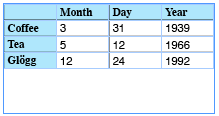
Now insert a new row where you want it (place the cursor in the row above or below the position you want to put the new row and then choose Table > Insert > Row). What you were doing is placing the flashing cursor inside a cell and pasting. That gives you a table inside the cell. Instead, select the whole cell itself (press Esc to toggle between selecting a cell or the text inside it), or select the whole row:

Finally (and this is the hard part), choose Edit > Paste. That should do it.

There are, I suppose, other ways to do this. For example, if it’s a simple table (no merged cells), you could convert it to text (Table > Convert Table to Text), move the data around, and then select it all and then convert it back into a table. But that, too, is fraught with peril in other ways.
Should it be this difficult? No! But as my grandmother is fond of saying, “nothing really important is ever easy.”
(Hm… perhaps my grandmother wasn’t referring to software… I’d better rethink that. :) )
This article was last modified on December 18, 2021
This article was first published on November 6, 2007
Commenting is easier and faster when you're logged in!

Recommended for you

Text In and On a Path
Kathleen wrote in with a problem: "I have a file that has two boxes that serious...

How to Create a Checkerboard Paragraph Rule
In a recent InDesign Secrets article, Keith Gilbert explored How to Add a Rule A...
Paste Image Into New Frame with Same Cropping Offsets
Shawn wrote: Is there a way to get paste into to place an image in exactly the s...