



Extensis has released an update to Suitcase Fusion 5 that adds support for Mac OS X 10.9 Mavericks, Windows 8.1, and (drumroll, please) Typekit Desktop fonts.
Adobe Creative Cloud subscribers can use some Typekit fonts in desktop apps like Photoshop, InDesign, Illustrator, etc. And now you can manage those fonts both in Suitcase Fusion and directly in the Adobe apps, via an Extensis panel. Pretty. Darn. Cool.

The new features are also seamlessly integrated into Suitcase Fusion. When you sync Typekit fonts to your desktop, they’re automatically added to a new library called Adobe Typekit that you can use to search, browse, preview, and compare them.
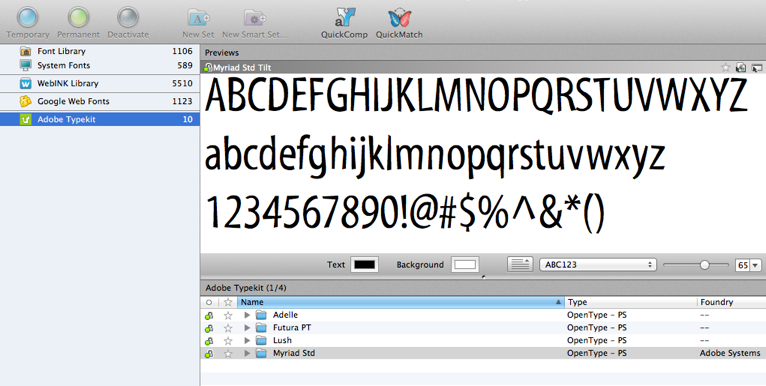
And you don’t have to be an Adobe susbscriber to enjoy working with fonts from the cloud (with a small “c”) in Suitcase Fusion. It also supports Google Web Fonts. Just choose File > Enable Google Web Fonts to create a new collection in Suitcase Fusion that’s dynamically linked to your Google Fonts collection.
This article was last modified on January 8, 2023
This article was first published on November 15, 2013
Commenting is easier and faster when you're logged in!

Recommended for you

New FontAgent Pro 4 for Windows
Insider Software today announced the availability of FontAgent® Pro 4 for Window...
Review: Suitcase Fusion 4
Pros: Easily manage thousands of fonts, including Google Web Fonts and WebINK fo...

10 Essential Tips for Working with Text in Photoshop
A picture’s worth a thousand words but occasionally you may need to include a fe...