




Sometimes a design calls for placing a line along the left or right side of a paragraph, often for emphasis or to indicate that something in the paragraph has changed. But InDesign doesn’t have a “draw a vertical line along the side of a paragraph” feature. I showed three ways to create this effect in this old post. But now, in InDesign CC, there’s a new option I wanted to share: using paragraph shading.
InDesign’s paragraph shading feature is awesome because it lets you put a colored box behind any paragraph. But actually, the paragraph shading doesn’t have to just be behind the paragraph; you can put it anywhere you want… even outside of the text frame.
For example, here’s a paragraph with paragraph shading:
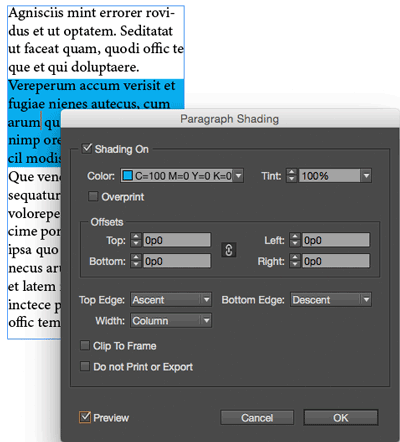
And then, simply by changing the Left and Right offsets (here I’m using a 1p6 Left offset and a -12p6 Right offset), you can turn the “box” into a line:

One of the best parts about creating “lines” with the Paragraph Shading feature is that they can span across more than one column, or even across threaded text frames:

Pretty cool, eh? It just goes to show that sometimes you have to think outside the… groan!… box!
This article was last modified on July 8, 2021
This article was first published on August 5, 2015
Commenting is easier and faster when you're logged in!

Recommended for you

Editor’s Picks for The Design + Accessibility Summit 2026
Our Editor in Chief lists his must-see sessions for The Design + Accessibility S...
Illustrator’s Two Kinds of Type
Khara Plicanic explains the two kinds of type in Illustrator.
How to Make Motion Look Realistic in Premiere
Create a convincing animation in Premiere using the Transform effect.