


Making a DVD Video Portfolio: Putting It All Together

Encoding 101
If you have the QuickTime MPEG Encoder installed on your system, getting your clips into the right format for DVDs will be easy. You can use the QuickTime MPEG Encoder to export DVD-compatible movies directly from Flash, After Effects, Final Cut Pro and any other application that lets you export QuickTime movies. Simply Export a QuickTime movie to the MPEG2 format, as shown in the QuickTime dialogue box below. If your video has audio attached to it, the QuickTime MPEG Encoder will export it as well in a DVD-compatible format. The options button opens a second dialogue box, on the right below, that lets you choose the video type (NTSC or PAL), the aspect ratio (4:3 or 16:9) and the bit rate. The higher the bit rate, the higher the image quality. Most DVD players can handle a maximum bit rate of 9.8 mbps, but that number includes the video stream, the audio stream, and any other information streams that play concurrently. It’s generally safer to choose a bit rate between 5 and 8 mbps, which leaves a little headroom for graphics and other elements.
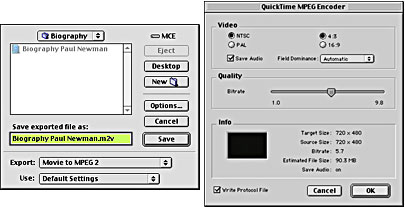
The QuickTime MPEG Encoder lets you export QuickTime movies that are compatible with DVDs.
The QuickTime MPEG Encoder isn’t the only way to create DVD-compatible video. Instead, you can use special encoding software like Heuris MPEG Power Professional or Cleaner 5 to make your QuickTime or Video for Windows clips DVD-ready. Be aware that not all MPEG2 encoders are alike – Apple’s QuickTime MPEG Encoder is one of the fastest software-based MPEG encoders, but Heuris MPEG Power Professional and Cleaner 5 are considered by many to result in a superior image quality. No matter which encoding application you use, remember that software-based MPEG encoding can take awhile – if possible, batch rendering overnight is a good idea.
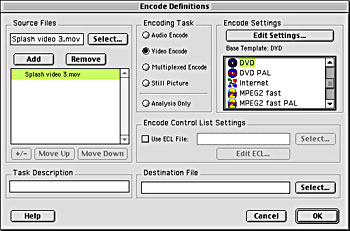
Heuris MPEG Power Professional (above) and Cleaner 5 (below) are two popular applications that offer MPEG2 encoding.
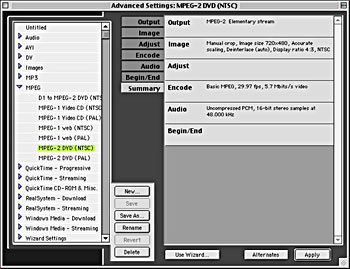
Normally, a video clip contains at least two streams of information – a video stream and one or more audio streams. When preparing media for a DVD, the video and audio streams are separated into two files – the MPEG2 video file and a specially encoded audio file, usually in AIFF (Mac) or WAV (Windows) format. All of the MPEG encoders we’ve talked about so far will provide basic audio encoding as well. 16-bit, 48 kHz stereo audio is the standard for DVD audio and it’s saved separately from the encoded video file. But DVDs are capable of much more than 16-bit, 48 kHz stereo sound. If your source audio is of very high quality – 24-bit, 96 kHz – or if you have a surround sound mix, your DVD can handle these formats as well. For surround mixes, you’ll need special digital surround sound encoding software, like Apple’s A.Pack (shown below).
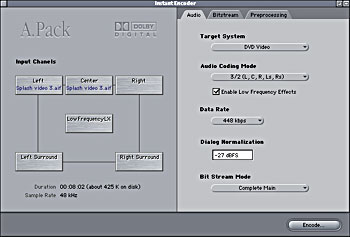
Apple’s A.Pack creates DVD-ready, Dolby-encoded digital surround sound in the AC-3 format.
This article was last modified on January 6, 2023
This article was first published on April 29, 2002
Commenting is easier and faster when you're logged in!

Recommended for you

CMYK vs. RGB
Excerpted from Real World Print Production with Adobe Creative Cloud by Claudia...
How to Start Using InDesign Scripts
Simple steps to get started running scripts to automate Adobe InDesign

Poll Results: Which Interface Color Theme Do You Use?
The results of our poll on what kinds of styles you use and a new poll asking ab...