


Mac, Camera, Action! Getting Started with Final Cut Pro

Complicating the Complication
“Complicating the Complication” is an old screenwriting adage, but it certainly applies to a Final Cut Pro editing systems. You’ve complicated your Mac by adding the components needed for a FireWire-based editing system. But what if you want more: more videotape formats, more compatibility with standard professional editing systems, more processing power, more real-time effects?
Adding a video capture board is the key to customizing and expanding a Final Cut Pro editing system. At present, there are only four video capture boards available for Final Cut Pro.
At the bottom of the barrel is the Matrox RTMac (about $1,000), which offers analog composite video input and output and adds some real-time effects capabilities to Final Cut Pro. In case you want to edit with analog composite video (i.e., VHS, Hi8, etc.), the Rtmac board lets you capture analog video without having to send the signal through a Firewire-based DV deck. In other words, if you’re really just planning to edit from VHS tapes, you can skip the DV deck and buy the Rtmac board instead and save $500 or more. Final Cut editors working in a professional environment may deem the real-time effects processing worth the expense if they find themselves in a deadline-oriented environment. But beware, the Rtmac board only offers a limited number of real-time effects. Motion effects, composites, and other complicated effects still need to be rendered.
You don’t need to add a capture board to your editing system if you plan to work only with Firewire-based video. But if you need to work with non-DV Firewire-based professional video formats, like HD (High Definition), Digital Betacam, Betacam SP, or plain old VHS, you may need more gear. It’s true that you can always simply patch the video out from one of these decks through your Firewire-based DV deck, but for most professional editors, this method is unacceptable: You can’t control the deck from your computer, you can’t capture timecode, and you can’t perform batch capture operations. The Aurora IgniterRT ($2,000 and up) with the right set of options can expand the capabilities of your Final Cut Pro editing system to include any of the video formats mentioned above. Like the Rtmac, the Aurora IgniterRT also offers single stream of real-time effects processing.
You can also upgrade the digital video interface from FireWire to SDI (Serial Digital Interface): Top-of-the-line digital video decks, such as D1, Digital Betacam, and high-end DVCAM decks, use 200Mbps SDI instead of 3.6Mbps FireWire. This high data rate is required for uncompressed digital video (also known as D1-quality video or CCIR 601). The Aurora IgniterRT has an SDI option and you can also choose from the groovy red Digital Voodoo Desktop 64AV, shown above (and a bargain at $3,500), or the Pinnacle Systems’ Targa Cinéwave.
The higher the quality of the video image, the more hardware your editing system will need to process it, and video shot in the HD (High-Defition) format will put your system to task. HD video has a vertical resolution of 1,080 pixels, as opposed to the 480-pixel resolution of regular video. For those looking for a seriously high-end video card, the Cinéwave board offers an HD (high-definition) option for an extra $8,000 on top of the $4,500 base price and includes the breakout box of your dreams, shown below.
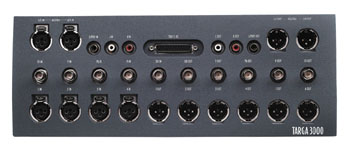
The high-end Targa Cinewave board, by Pinnacle Systems, comes with this breakout box that offers just about every digital and analog connector you could wish for.
Storage Facility
Last but not least, you need storage drives to hold the media you capture. Apple recommends that all video and audio media be stored on a hard drive other than the primary internal hard drive. Uncompressed video captured through FireWire needs about 1GB for five minutes of video. For small projects, 30GB will accommodate about two hours of raw footage, but for feature length projects, plan on a minimum of 600GB. The higher the quality of your video source, the more storage you’ll need, and uncompressed HD video will need about four times the storage space of DV video.
Your choices here divide into two categories: internal drives and external drives. Internal drives are generally cheaper but the amount of storage space is limited by the physical area inside your computer. External drives can be moved from one editing system to another and can offer more storage space, but are generally more expensive.
Drives for editing workstations need to be able to hold a lot of media, and they also need to be able to process that media fast enough to achieve real-time playback. As a result, your choices when it comes to storage drives for dedicated editing workstations are somewhat limited. Drives are usually rated according to their spin rate in revolutions per minute (rpm), and the minimum spin rate that will work with FireWire-based video is 4,200 rpm, although you should invest in 5,400- or 7,200-rpm drives if you need top performance. If you’ve installed one of the video capture boards discussed earlier, be sure to check the board manufacturer’s list of approved drives before you buy.
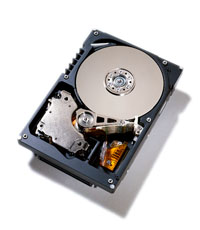
Internal drives, like this one from IBM, offer stability and function at a reasonable price.
With internal drives, you have a choice of SCSI (Small Computer Systems Interface) drives or ATA (also known as IDE or EIDE) drives. SCSI drives often use faster head-positioning mechanisms than their ATA counterparts, and some spin their platters faster — as fast as 10,000 RPM — and so they are generally more expensive. It’s possible to chain an ATA drive off your primary hard drive, but this isn’t recommended for Final Cut. Instead, you should add an EIDI PCI card, which will only set you back about $100. SCSI drives that are fast enough for video editing require a SCSI PCI card, which start at about $200.
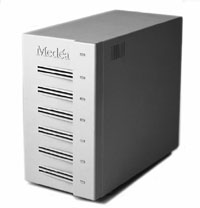
Top-of-the-line external drive arrays, like this VideoRAID RT from Medea, are necessary for high-end digital video editing.
If you’re opting for external drives, you can choose from SCSI drives or FireWire drives. FireWire drives are significantly cheaper but aren’t as fast as SCSI drives and can be unstable in editing applications, because not all drive manufacturers conform to the Apple FireWire spec. Poor drive performance is often the culprit behind Final Cut’s dreaded “Frames dropped” error message. Be sure to purchase FireWire drives at a place with a good return policy. Avoid chaining FireWire drives off the same FireWire port as your FireWire-based video deck to avoid trouble with playback and performance. SCSI drive arrays, like the Medea VideoRAID RT pictured above, are the cream of the crop for editors. They’re compatible with all the video capture boards approved for Final Cut Pro and offer the high spin rate needed for uncompressed, D1-quality or HD (High Definition) video. External SCSI drives, like the internal ones, require the addition of a SCSI PCI card. If you’re planning to work with high-end digital video, you’ll want to format two of these drive arrays together to get the fast throughput needed for uncompressed HD video. You’ll also need a dual-channel SCSI PCI card (about $350), which has two SCSI connectors — one for each drive array — and a special software utility like ATTO ExpressRAID, to stripe the drives together.
Veni, Video, Vici
In case your head is spinning from all that hardware, remember that you can get by with very little to start: a Mac, some extra RAM, an additional internal ATA storage drive, a camcorder, an old TV set, and a pair of headphones. Depending on how many of these items you already own, your cash outlay could be less than $1,000. When you consider that this kind of system would have cost at least $20,000 five or six years ago, the reason for all the hoopla surrounding Final Cut Pro starts to become clear.
In the second article of this three-part series, we’ll take a look at making the transition from Avid Media Composer to Final Cut Pro.
Read more by Sonja Schenk.
This article was last modified on June 30, 2023
This article was first published on September 19, 2001
Commenting is easier and faster when you're logged in!

Recommended for you

A Shortcut to View Pages Horizontally
This post was inspired by InDesign Secrets editor Mike Rankin’s comments a...
Beware The Double Effect with Object Styles
As you may have heard in Episode 69, when we interviewed Deke McClelland, he des...

Livestream Video: How to Make it Snow in Photoshop
Follow along with Khara Plicanic to learn how to add a festive and seasonal touc...