



Matthew asked:
…the chapters in our InDesign book file were rearranged accidentally, resulting in a substantial reprint cost. Is a way to lock the chapter order?
While InDesign has no built-in way to lock a book panel, you can lock the book file on your hard drive. Remember that a book is simply a file on disk, similar to an InDesign file, but it uses the .indb file extension. You can select it and lock it using Get Info on the Mac or Properties on Windows. (Be sure to save and close the book panel inside InDesign before you do this.)
However, this only locks that file—not the files that make up the book. The difference is important. For example, you can still rearrange the chapters in the book panel (by dragging them up or down), or even delete or add new files to the book panel. However, because the book file is now locked, you cannot save your changes.
When you close the book panel, InDesign asks you if you want to save the changes. But even if you click Save, unfortunately the program does not tell you that the book file is locked and your changes will be lost. It just quietly closes the file. Next time you open the book file, the chapters will be back in the same order they were in when you locked it.
But the files themselves may not be the same! The page numbers, in particular, may have gotten messed up. That is, when you “accidentally” rearranged the chapters in the locked book panel, InDesign usually updates the page numbers for you. Behind the scenes, it’s literally opening that file, changing the page numbering, saving it, and then closing the file. So that’s bad. When you next open the book panel, you’ll see that all the page numbers have been modified:
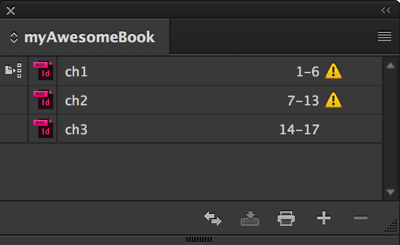
If that happens, you’ll need to choose Update Numbering > Update All Numbers from the book panel menu.
Or, even better: If you’re going to lock a book file, you should probably first (before locking the book file), choose Book Page Numbering Options from the open book panel and disable “Automatically Update Page & Section Numbers”:

That way, if someone does rearrange the book’s chapters in the book panel, InDesign won’t mess up the page numbering in those files.
Ultimately, this method of locking a book file is obviously kind of a hack and not truly locking down your document. It would be better if InDesign implemented a proper way to lock files and books from accidental changes.
This article was last modified on July 20, 2021
This article was first published on September 12, 2016
Commenting is easier and faster when you're logged in!

Recommended for you

Now available: JavaScript for InDesign, 2nd Edition
Learn how to harness the power of scripting in InDesign. And take advantage of a...

New Edition of Introduction to Graphic Communication Merges Print with Augmented Reality
By John Parsons In 2007, Cal Poly professor Harvey Levenson authored a textbook,...
Now available: GREP in InDesign, 3rd Edition
Learn how to harness the power of GREP in InDesign to supercharge your work. And...