




Mike wrote:
I’ve been importing copy from Quark files into InDesign and I keep getting odd hidden characters at the beginning of my paragraphs. The symbol looks like a colon, but it’s a hidden character, so it shows up the same color as whatever layer it is on.
 I looked for a “decoder ring” that lists of all the hidden characters in InDesign, but couldn’t find one! Frustrated, I compiled my own list and published it in Issue #19 of InDesign Magazine. If you’re not currently a subscriber, I encourage you to take this opportunity to become a Professional member of CreativePro. One of the great benefits of membership is access to all the back issues of InDesign Magazine.
These invisible characters (such as returns, spaces, tabs, and so on) only appear when you have Type > Show Hidden Characters turned on. And, as you pointed out, they take on the color of their layer (just like the frame edges of selected objects).
Here’s a sampling of some of the most common characters from that article:
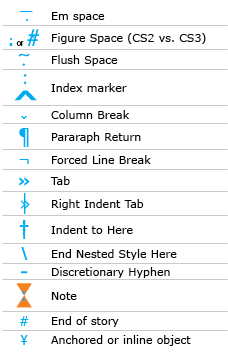
So, Mike, glancing at that list, there are a couple of symbols that like look like a colon, but I’m guessing that you’re seeing index markers. I hope that helps!
This article was last modified on November 11, 2021
This article was first published on August 16, 2007
Commenting is easier and faster when you're logged in!

Recommended for you

Track Down That Layout
Are you sure you're working on the right version of the layout? Here are a coupl...
Why Red Boxes Instead of Blue?
Chris wrote in with a perplexing mystery: We just moved from QuarkXPress to InDe...
Waah! I miss my PageMaker Pasteboard!
Q: Why isn’t the InDesign pasteboard like the old PageMaker “perma-p...