



For me, one of the most interesting highlights from last fall’s InDesign Master Class (along with the complimentary nose flutes) was a demo of an application called Flow. It is perhaps the coolest and most useful workflow management application ever, and it’s just been released by Gridiron Software. David wrote glowingly about a pre-release demo of Flow about 8 months ago. But now Flow is even better and it’s shipping, and that is exciting news.
So what exactly is Flow? Flow is a visual workflow manager that tracks and shows the relationships between your files. The formerly invisible connections between files are shown as literal lines, like strings tying files together. So you can look at a set of Photoshop files and literally see which InDesign layouts they have been placed in.
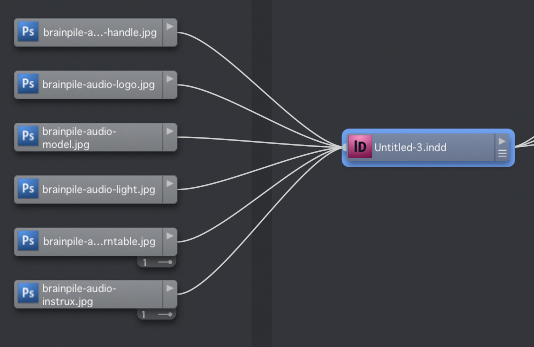
You can also see the outputs from an InDesign file: PDF, SWF, HTML, etc.
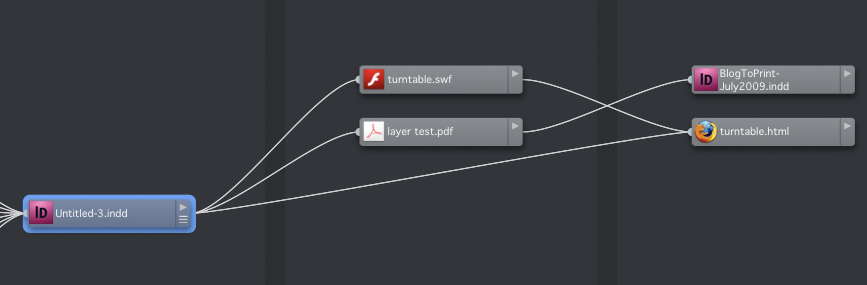
A full set of connected files is called a project map.

To wrap your head around this, imagine entering a room full of strangers at dinner party. You meet a random guy. A real life version of Flow would show you strings connecting the guy to his wife who’s in the den talking to her sister, and his brother over by the h’ors d’oeuvres, and his mother sitting by the window, and his kids peeking out from the kitchen…and his Uncle Mort across town, sitting in his living room watching the ballgame because he didn’t get invited to the party. Instantly, you know know the whole family. Dig?
Flow is beautifully designed, so the strings are always presented neatly, no matter how complex the file relationships are. And they can get complex (as you already know). Flow tracks every connection between files, not just placing, but drag and drop, cut and paste, import, export, save as, duplicate, you name it. And you don’t have to do anything special. Just work as you always do and Flow keeps track of things.

Flow can make a disorganized person appear hyper-organized. It doesn’t matter where your files are or what they’re named. If there are connections between files, you can find, gather, and edit anything you need. It is the cure for all the “Untitled-1” files in the world. No longer are they opaque, anonymous monuments to our haste and stupidity. Now you can see what’s in them and what came out of them.
Here’s a scenario: a month ago, you cut and pasted a sentence from a text file into InDesign. Now you need to find the text file that sentence came from. But you don’t remember the name of it or where you put it. InDesign is unaware. You can’t search by content since that content no longer exists in the text file. But Flow shows you a line between text file and the InDesign file.

Fantastic. “But wait” as the late great Billy Mays would say, “There’s more!”
Here’s another scenario. Someone asks you to make a “small” change in a Photoshop file, and expects it done fast and cheap. Well, now you can instantly see how that change will ripple through your entire project, and know every file that will be affected. “Sure, I can change the model’s eyes to blue, but it’s going to take two days and cost you $$$$ because I have to update 100 InDesign files and output new PDFs.” “Oh, never mind. Brown eyes are fine.” Flow just gave you your weekend back. Or prevented you from pulling an all-nighter and stepping on the cat on your way to bed at dawn. On behalf of Mister Whiskers, thank you, Flow.
Here, I can see one Photoshop file and all the downstream files that will be affected if I were to make a change.

Flow also allows you to make manual file connections. So say you have a PDF document that details the specs and instructions for a project. You wouldn’t actually place that PDF in an InDesign file, but with Flow you can make a connection between the spec file and an InDesign file simply by drag and dropping it on top. It’s like attaching the specs to the InDesign file, but they can be anywhere, even on another volume.

In addition to automatic and manual file connections, Flow lets you create and apply tags of your choosing to files and project maps. Later you (or someone else) can search on those tags (or any other metadata) to find the files. After you install Flow there really is no excuse for losing a file, ever. Flow can even tell you when you are about to cause a problem by moving or deleting a file. How’s that for headache prevention?
Flow does versioning as well, in an elegant way. Flow can create a version of your documents each time you save, and you can promote any past version to the current version with a quick drag and drop. You can customize versioning with preferences: telling Flow how many versions to keep, which file types to ignore, how much of your hard drive it’s OK to eat up with versions, etc.
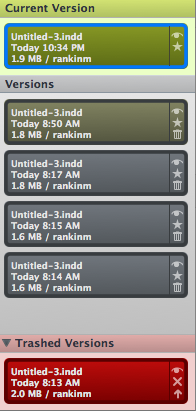
Flow does time tracking. You can see how much time you’ve spent working on a particular file, the time spent on a group of files, or the time spent on a whole project. Click the image to see the full size version of the screenshot.

Flow even works inside CS4, with its own Flash panels.

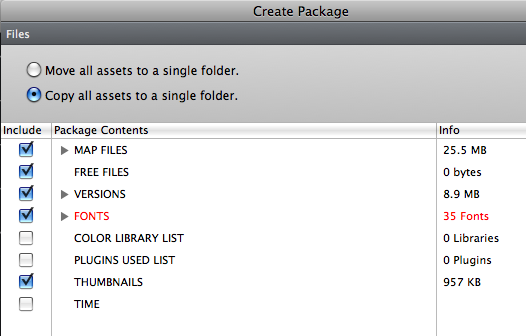
Finally, Flow does packaging. I hear you saying, “I already have InDesign. It can package.” Well, what if you’re an artist or a project manager and you don’t have InDesign? And even if you do have InDesign, Flow’s Package feature is better. You can package inputs and outputs. You can package all the files in a project map, or any piece of it. You have the choice to copy or move files. You can package versions of files, and you can even package the time log to include a record of how much time was spent on each piece. That is one package with a pretty bow on it.
Does Flow have a weakness, an achilles heel? The only one I’ve seen so far is that InCopy is not among the supported filetypes. Flow works with the Creative Suite versions 3 and 4, Office 2007/2008, iWork ’08 and ’09, and several other applications. But InCopy seems like a glaring omission. Book and magazine publishers who have to manage huge sets of files over long periods of time and many users, would seem like a group dying for something like Flow. But a lot of these people are going to want, nay, demand InCopy support before they “go with the Flow.”
Flow is $299 for a single license or $399 for a 3-pack of licenses. If you do decide to try and buy, be sure to use one of the discount codes floating around. Gridiron has a promotion with Deke McClelland to get you $100 off if you act before midnight Pacific July 3rd. Adobe’s John Nack (Principal Product Manager for Photoshop) has posted a promo code: NACKONADOBE that will get you a $50 discount. This code has no expiration date.
Now that I’ve tried Flow, I don’t know if there’s any going back. It will feel postively primitive to not have my files aware of their connections. In no time at all, I’ve gotten very used to looking at an InDesign file and seeing everything that’s ever gone into or come out of it.
This article was last modified on December 19, 2021
This article was first published on July 1, 2009
Commenting is easier and faster when you're logged in!

Recommended for you

Adobe TV is On the Air
Adobe TV debuted today with a wealth of ready-to-view video content, much of it...
Alias One Color Swatch to Another
Perhaps you know that InDesign's Ink Alias feature (hidden inside the Ink Manage...
Sandwiching Text or Logos Inside an Image
Joe wrote: I notice on every magazine out there -- such as Maxim, Stuff, or any...