




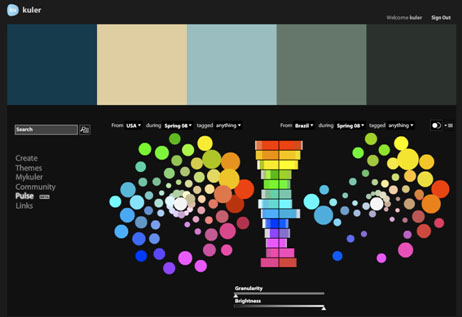
John Nack, principal product manager, Adobe Photoshop, reports on his blog that the Kuler team has added a new feature to the color harmony creation and sharing site: Community Pulse.
Described as a “big-picture view of color usage,” Community Pulse is a “beta feature, using data visualization to show the relative popularity of colors across a sampling of countries, time periods, and tags.”
Once you’ve signed into Kuler using your Adobe ID, you can mouse over the histogram to see the hues on the color wheel. Nack suggests that you play with the granularity slider to see more/less color detail, and use the comparison icon to compare and contrast.
This article was last modified on January 4, 2022
This article was first published on January 12, 2009
Commenting is easier and faster when you're logged in!

Recommended for you

Tip of the Week: New Links Panel Icons
There are three new Links panel icons in InDesign CC that you'll see when workin...
pdf-Office 3.4 Available
Latest edition of pdf-Office 3.4 is available now. The solution contains many ne...
Alias to Launch The Art of Maya – 3rd Edition
Alias today announced that on June 17 it will officially launch the 3rd edition...