



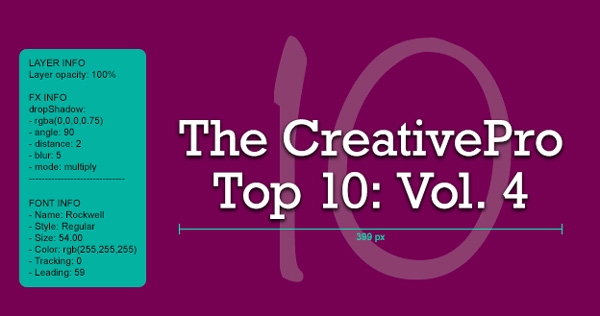
It’s true that a picture’s worth a thousand words. It’s also true that you could end up typing more than a thousand words to precisely document all the layers, type, shapes, and effects in your Photoshop documents. But with the free plug-in Ink by chrometaphore, you can skip all that tedious measuring and typing, and instantly gather precise specifications. That way there’s no guesswork, and no wasted time when you have to hand a design off to someone else to work with, or just when you want all the specs handy for your own reference.

Just install Ink in Photoshop CS6 or CC and click the buttons in the panel to create grouped documentation layers showing the measurements and properties of objects or selections.

Voila! Instant accurate info that you can show or hide just by changing the visiblity of the layers in the Layers panel.
This article was last modified on January 8, 2023
This article was first published on March 7, 2014
Commenting is easier and faster when you're logged in!

Recommended for you

TypeTalk: How Posters Work, by Ellen Lupton
How Posters Work is not only a beautiful catalog of famous posters, but also an...

Intelligently Resize Images with iResizer
Content Aware Scale, which allows you to resize photos disproportionally without...

Nigel French’s InDesign Type (4th Edition) Published
News about the latest edition of Nigel French's authoritative guide to working w...