



Miguel wrote:
I just finished doing an Index and one of the topics looks like this: University 3,12,13,14,56
Is there a way to make indesign represented continuous pages like a range? like this: University 3,12-14,56
The answer is “yes,” but it depends on how your document is created, and how you set up your indexing. If you add three different index markers — one on page 12, 13, and 14, in your example — then you’re going to get three separate entries in your index. InDesign assumes that if you’ve set up your index markers like that, then you obviously want separate page numbers like that.
(By the way, if you don’t know how to index documents, check out my title at Lynda.com, or Michael Murphy’s excellent videocasts on the subject.)
If you want a range (such as 12-14) just add one index entry at the beginning and then set the Type pop-up menu to a range. For example, a range of pages:
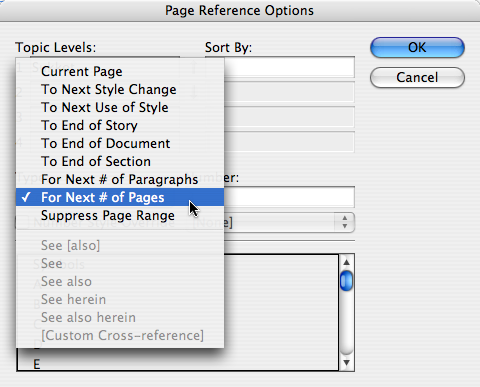
There are a couple of annoying things about page ranges in InDesign. For example, let’s say you put an index entry on page 1, choose Next # of Pages, and specify 2 pages. The page range will be “1-2”. That makes no sense to me, because it should be 1-3 (page 1 plus the next two pages).
Even worse, however, it’s not “the next two pages of the story,” it’s the next two pages of the document. That means, if your story skips a page, InDesign isn’t smart enough to leave that page out. Let’s say you use the range “To End of Story,” but the story skips page 3 because there’s an ad there. InDesign still includes page 3 in the range.
Indexing is far from perfect in InDesign. In fact, I find it downright frustrating most of the time. But you can usually get what you need if you bang on it long enough.
This article was last modified on December 19, 2021
This article was first published on May 16, 2008
Commenting is easier and faster when you're logged in!

Recommended for you

Convert Numbering to Text in InDesign
Daniel wrote: Recently I had to export a document with lists (numbered questions...
Joining Tables
Without a Join Tables command, what's a busy design/production pro to do? Follow...
How to Insert a Schwa (or other phonetic) Character in InDesign
How to find special little-used characters when working in InDesign