



I’ve been sitting here, editing a document that someone sent me, and wondering why every time I do a Find/Change it takes much longer than usual. Find/Change usually goes pretty fast, and I can make a change that replaces hundreds or even thousands of pieces of text in a few seconds. But in this document it is taking fffffffooooorrrrrreeeevvvvvveeeeeerrrrrrr…
And then it hit me: with each change, InDesign must be trying to reflow something in the background. And the feature that most often is culpable of trying to reflow stuff is Smart Text Reflow.
The Smart Text Reflow feature is pretty neat because it can automatically add or remove pages (and threaded text frames) from your document as your story grows or shrinks. That way you don’t have to worry about adding pages and frames, manually threading them, and so on. I wrote about it back here in this post.
You can turn it on and off in the Preferences dialog box:
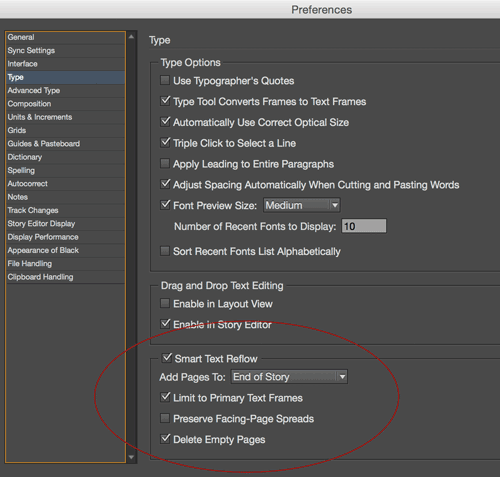
So when I opened Prefs for this particular document I was working on: Yup! It was enabled. And the main story was flowing through 100 pages of primary text frames.
To test my hypothesis, I turned off Smart Text Reflow and tried a find/change query again. It was as fast as ever. Hooray!
So make a mental note: disable Smart Text Reflow when you don’t need it.
This article was last modified on July 25, 2019
This article was first published on April 30, 2015
Commenting is easier and faster when you're logged in!

Recommended for you

How to Find and Fix Partially Italic Words with GREP
You can banish incomplete italics fast with Find/Change and the clever use of a...

Use Find/Change to Find Tables
Our friend Rudi Warttmann originally wrote up this technique for the German-lang...

Find More Than One Paragraph with GREP
GREP is, by default, set up to find text inside a paragraph. That is, if you sea...