



In our own version of “Who Wore it Best?” the latest InDesign Secrets polled asked, “Which workspace do you use most often?” Do you like to dress up your InDesign panels? Do you go with something off-the-rack or custom-made?
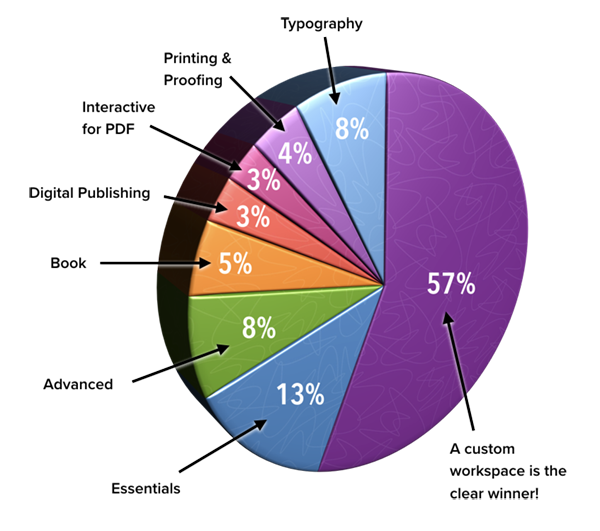
The majority of the respondents went with the latter, as nearly 60% said they create a custom workspace. It makes sense, since one of the great purposes of workspaces is to make them fit your workflow and work style perfectly. A custom workspace (Window > Workspace > New Workspace) lets you group panels in a logical-to-you layout, as well as color code menus if that’s your thing. Make it your own!
Following in a very distant second place was the Essentials workspace, getting 13% of the votes. A bare-bones workspace, it includes color options such as the Color and Swatches panels as well as Links, Layers, and Pages. The Essentials workspace also features the CC Libraries workspace rather prominently. If you’re new to InDesign and don’t want to be overwhelmed by an abundance of panels, Essentials is a good option. And 13% of respondents agree!
The remaining six options—ranging from Typography to Interactive for PDF to Printing and Proofing—cumulatively took about 30% of the vote. One of InDesign’s greatest strengths is the ability to customize its settings. Preferences and workspaces fall into that realm…and apparently most of us choose to take advantage of that fact.
New Poll: Which tool(s) would you vote off the toolbar?
This month’s poll is a real doozie of a hot-button topic: “Which Tool(s) Should be Removed from the InDesign Toolbar?” We InDesigners are a passionate bunch and we either love or hate many of the tools. It should be interesting to see which tools top the most-hated list. Note that you can vote for more than one tool. Now I’m going to quietly back out of this space, before things heat up in the [announcer voice] InDesign Tool Smackdown.
This article was last modified on July 29, 2022
This article was first published on January 15, 2018
Commenting is easier and faster when you're logged in!

Recommended for you

Poll Results: How Often Do You Use Free Fonts?
The results of our poll asking about free fonts, and a new poll asking about you...

Poll Results: What kinds of styles do you use on a regular basis?
The results of our poll on what kinds of styles you use and a new poll asking ab...
Poll Results: Do you still use classic PostScript Type 1 fonts?
The results of our poll on what kinds of fonts you use and a new poll asking abo...