




Another small update to InDesign CC 2015.3 (11.3) arrived today. It brings some small improvements as well as necessary bug fixes. Here’s a quick rundown on what you’ll get by clicking that Update button in the Creative Cloud app.
Saving Previous Version Files
A long requested feature has been to make it easier to save files created in previous versions of InDesign when you’re working in the newest version of the application. In the past, when you opened a document from a previous version and chose to save it in the new version, it would default to a different folder than where the old file was located.
Beginning with 2015.3, the default location will be the location from which the original file was opened.
Highlighting Style Overrides
A feature which has been in InDesign, but only “behind the scenes,” now has a visible interface: Since InDesign CS4, it’s been possible to highlight style overrides using scripting, and there have been scripts available to offer this feature.
See also: Style Highlighting
Beginning in 2015.3, you can now turn on a Style Override Highlighter button on the upper right corner of the Paragraph Styles and/or Character Styles panels. It appears in a bright aqua color. In the illustration below, italic formatting was added on top of a paragraph style.
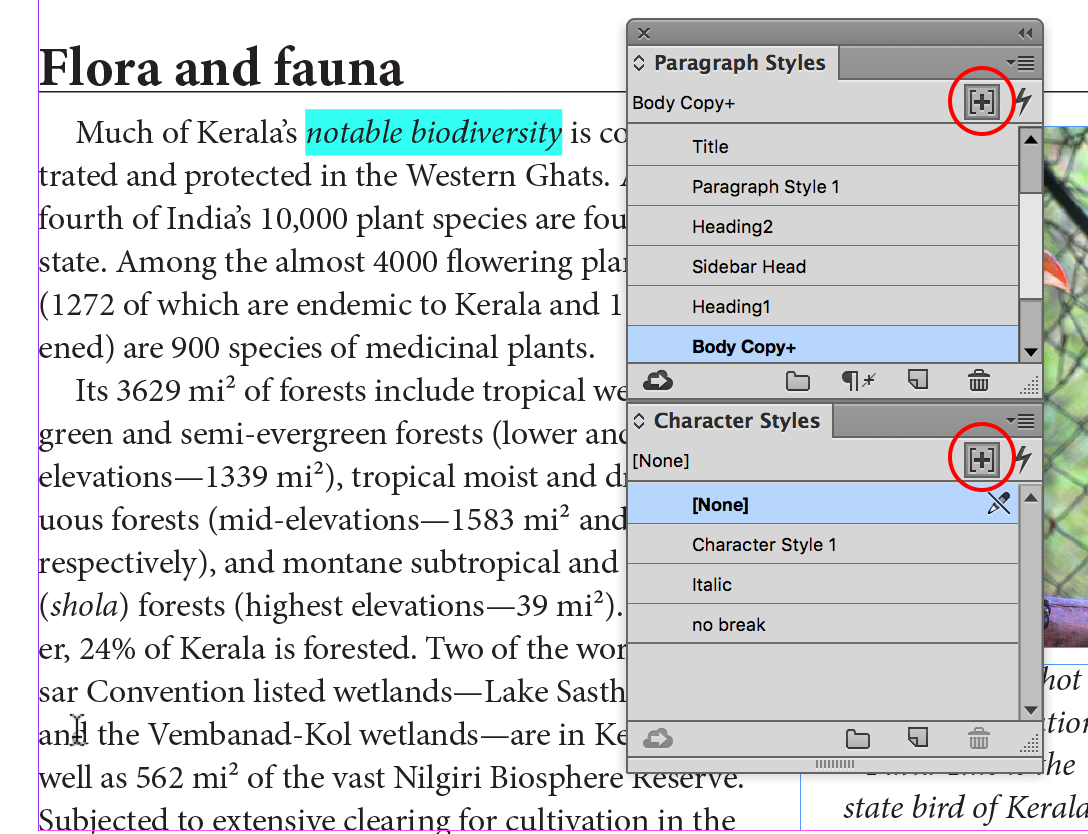
Style Override Highlighter
There are no settings or preferences for this feature. You cannot change the color of the highlighting. But it provides a quick and easy way to view local formatting applied which overrides paragraph and/or character style formatting.
(Note that you also cannot change the pink highlighting color for missing fonts or the colors of composition highlighting that Anne-Marie wrote about back in 2008!)
See also: Reveal all Tracking and Kerning in Text
Publish Online Additions
Publish Online has continued a quick development with some new additions in 2015.3:
- There is a new, less cluttered Publish Your Document Online dialog box.

Publish Online Dialog box
- A new feature in the dialog box is the ability to hide the Share and Embed options in a published document.
- There is new support behind a proxy wall for Publish Online.
- Occasionally a document would fail to upload to Publish Online with little indication what was going on: Bug fixes have been made for upload errors, and clearer error messages are provided.
Accessibility Features
Two accessibility features have been added and/or moved to the Advanced tab when exporting to Adobe PDF (Print).
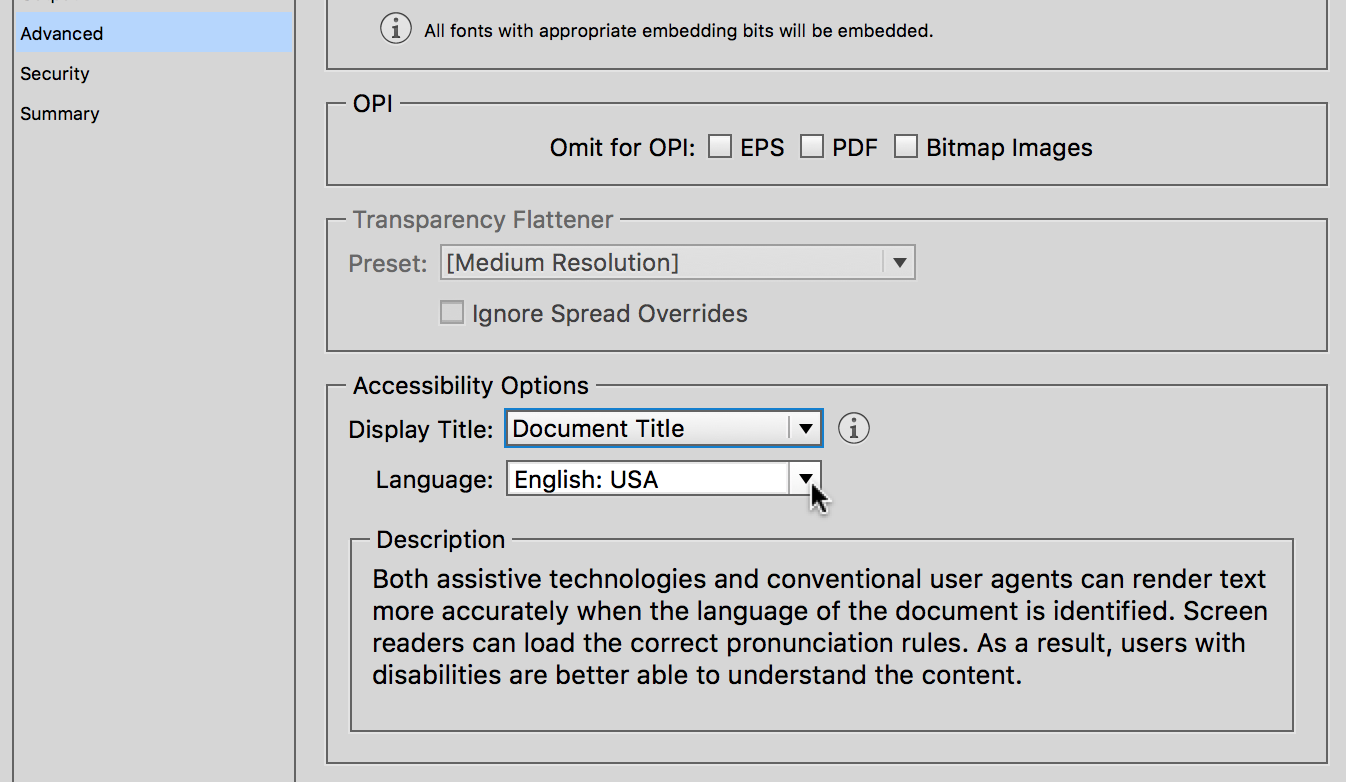
Accessibility Features
- The ability to display a Document Title instead of a File Name was added in InDesign CC 2015.2 (InDesign Magazine #80, “What’s New in InDesign CC 2015.2”). Now it’s moved to a new Accessibility Options section in the Advanced panel.
- New is the ability to designate a document’s language which is passed on to the PDF file. As pointed out in the description shown above, this makes it easier for people with disabilities to use screen readers.
Bug Fixes
A few critical bug fixes are included. They include (but are not limited to) these:
- The InDesign Start screen introduced in 2015.2 caused screen flickering. This is fixed.
- A Windows Touch workspace introduced in the 2015.2 version had bugs: The onscreen keyboard is launched while working with the Type tool when a USB keyboard is attached. While working in Touch workspace, Import Options dialog box is not shown even if it is selected in the Place dialog. Memory usage increases in launching Touch workspace help. These issues are fixed.
- Overprint is not honored when the Proof Colors option is on. This is also fixed.
Here are the release notes for 2015.3 where most of the bug fixes are listed.
This article was last modified on July 25, 2019
This article was first published on March 11, 2016
Commenting is easier and faster when you're logged in!

Recommended for you
Illustrator’s Two Kinds of Type
Khara Plicanic explains the two kinds of type in Illustrator.
Duplicate Formatting with These PowerPoint Tools
Use the Format or Animation Painters to apply styles with a single click!
Better first proofs. Fewer review rounds. Introducing PreProof™
Most designers are already familiar with Preflight — checking a document for tec...