




S.B. wrote:
I was just able to export my DPS folio to my tablet. My problem is that the animations didn’t come across!
Okay, well, look? we all thought the Animations feature in InDesign CS5 was the coolest thing since sliced bread, but there’s one major, huge, horrible, painful, icky problem: InDesign only currently creates these animations as Flash (SWF) files! That is, you can export them all beautifully to SWF, but that’s it. So no animations when you export PDF files, EPUB files, or anything else you can get out of InDesign. (There is a script that can help, for PDF files.)
Not only that: Unless you’ve been living under a rock for a couple of years, you know that the iPad and iPhone iOS don’t support Flash. So no Flash animations in DPS folios (or PDF files on iOS devices).
(By the way, curiously, PressRun — which is now owned by Quark — can use most of InDesign’s built-in animation features when building iPad apps? it converts them via IDML to HTML5. Very clever.)
That said, Bob Levine pointed out something interesting to me: If you look at the Preset popup menu in the Animation panel, it’s split into two parts:
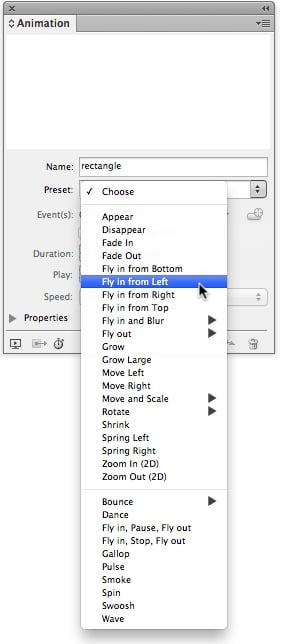
The first section (up to the horizontal line) appears to be animations that could probably be rendered in HTML5? the second section are definitely more “flash-like.” So perhaps Adobe has thought through this conundrum and will, sooner or later, update the animation features to work with DPS (probably exporting them as HTML5). All our fingers and toes are crossed!
This article was last modified on December 21, 2021
This article was first published on November 17, 2012
Commenting is easier and faster when you're logged in!

Recommended for you

TypeTalk: Five First-Rate Font Newsletters
TypeTalk is a regular blog on typography. Post your questions and comments by cl...

This Month in InDesign Articles, Number 140
Our editor in chief, Mike Rankin, is out on holiday this week, which means I get...
InDesign How-to Video: Create Lines in Forms
In this week’s InDesignSecrets video, David Blatner demonstrates one of the easy...