



Press Release
The $1.99
iCamera HDR equips you with a full palette of features helping you shoot the best, sharpest photos achievable on the iPhone. How does iCamera HDR do it? Using the full range of HDR Capture modes (auto, manual, rapid, normal) as well as image stabilization and the iPhone’s LED as an additional light source.
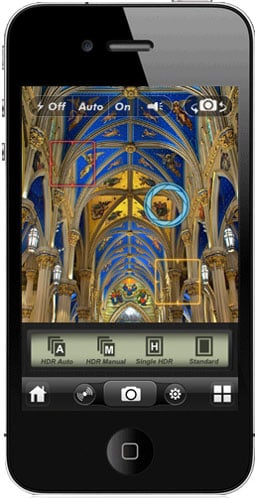
HDR Auto Capture Mode
With only one tap, iCamera HDR will evaluate the lighting and automatically calculate two exposure points (One is for a brighter exposure and the other is for darker exposure) and capture the HDR photo.
HDR Manual Capture Mode
This mode gives you more flexibility to set the exposure points (One is for a brighter exposure and the other is for darker exposure) that you would like to use to capture HDR photos.
HDR Single Capture Mode
The mode uses one exposure to capture HDR photos at lightning speed.
Normal Capture Mode
Use in-app iPhone standard camera combined with other capture features (steady &/or led fill light) to capture photos.
Continuous LED Flashlight
Use iPhone 4 LED flash as a continuous fill light to improve photo quality for your capture.(Available for HDR Single Mode and Normal Capture Mode)
Prevent Jitter
Use different levels of Stabilizer to steady your iPhone and get the sharpest photos you can.
Light and Color, Fine Controls at your fingertips
We know some people love sliders (and you know who you are) and having as many controls as possible. iCamera HDR has more than dozens of sliders for you to completely fine tune and control your final images. From fine tuning in different tone mapping engines, color balance, color temperature and tint adjustment, lens correction, highlight/shadow adjustment, white/black point adjustment, blur/sharpening, just to name a few, many levels of fine tuning are available. Most digital photography processing tasks can be easily done within iCamera HDR and the results are so good you will not need to use additional editing software, saving you still more time.
Tone Mapping
At Everimaging, we personally understand your need to achieve photo-realistic results on your HDRs, and to do it quickly. Thus, iCamera HDR provides a variety of tone mapping engines in iPhone for your preference. Tone Balancer is a local tone mapping engine and is aimed at balancing tones in the photo and reveal detail in both shadows and highlights; Tone Enhancer is also a local tone mapping engine and has the strong power of extracting details in the photos; Tone Compressor is a global tone mapping engine and provides the faster tone mapping processing. Using our Local and Global Tone Mapping Technology, you will be able to produce spectacular and faithful images at the fastest rendering speeds available today.
Innovative E-Lighting™ Technology
(only available for single photo capture mode processing)
iCamera HDR uses Everimaging’s E-Lighting™, an innovative technology that intelligently assigns an optimized exposure value for each pixel and lightens up each pixel to an individually differentiated level. Even the entire photo is lightened up, the details in highlight are not over blown. More important, E-Lighting is optimized for automation and anyone will see the the benefits with only one touch.
Splendid Photo Effects Gleaned from Professional Photographers and Artists
As photographers ourselves, we know the struggle to create special and beautiful photo effects using a myriad of techniques in various other programs. iCamera HDR includes a full range of artistic and professional photo effects, which are also easy to apply. With one touch, your photos can be further transformed into works of art to delight and impress your friends and family.
Direct Export To Social Media
You will not want to keep these amazing images to yourself, so we have made it easy for you to directly share your photos to social media and photo sharing websites. Your albums in Flickr and Facebook can be updated directly from within iCamera HDR. You can upload them with only one touch, and your friends and potentially millions of people will be able to view your wonderful images in seconds. (Check those privacy settings, kids!) Emailing photos directly from the app is also available.
This article was last modified on January 18, 2023
This article was first published on February 15, 2011
Commenting is easier and faster when you're logged in!

Recommended for you
Scanning Around With Gene: How to Look Like a Real Photographer
Originally published August 6, 2008 When I was in high school I spent a great de...

Thoughts on the Sony A6000 Mirrorless Camera
Mirrorless cameras have been both a hot topic and a subject of some debate. Duri...

Pixelstick Takes Light Painting to a New Level
Have you ever tried light painting by moving a light source around while you tak...