



J. wrote:
I accidentally turned off my “overset text” dialog box! How do I turn it back on? I know I can check for overset text in the preflight window, but I want my popup back!
There are a couple of places where InDesign offers warnings about one thing or another, such as “you have overset text” (when printing or exporting a pdf; see image below), or the alert you get when you click the Printer button at the bottom of the Print dialog box, or that crazy-long warning you get when you collect document fonts using Package.
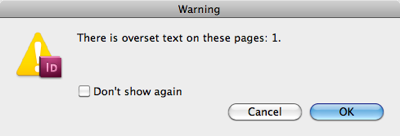
In all these cases, InDesign helpfully offers a “Don’t show again” checkbox. Turn that on, and you won’t see that alert anymore.
But what if you (like J. above) want to get it back? Turns out that it’s really easy: Just open the Preferences dialog box (Command/Ctrl-K) and, in the General pane, click the button labeled “Reset All Warning Dialogs.” Now click OK and you’re done!

It’s nice that this is an application preference, not a document setting, so you only have to change it once (not for every document).
This article was last modified on December 21, 2021
This article was first published on February 16, 2012
Commenting is easier and faster when you're logged in!

Recommended for you

Keeping the Same Scale Size when Updating or Relinking to Images
How to tell InDesign to stop scaling images when the dimensions change

How to Create a Checkerboard Paragraph Rule
In a recent InDesign Secrets article, Keith Gilbert explored How to Add a Rule A...
Editing InDesign Files Directly off a Server: Crazy?
David says no one in their right mind would edit an InDesign file directly off a...