




Did you ever want to know which styles in your InDesign document use a particular font? There’s actually a super simple way to see this information, and it’s been around for many years.
Just choose Type > Find Font.
If necessary, click More Info to reveal the entire dialog box.
Then select a font in the list and at the bottom of the dialog in the Info section you’ll see a list of the paragraph styles and character styles that use that font.
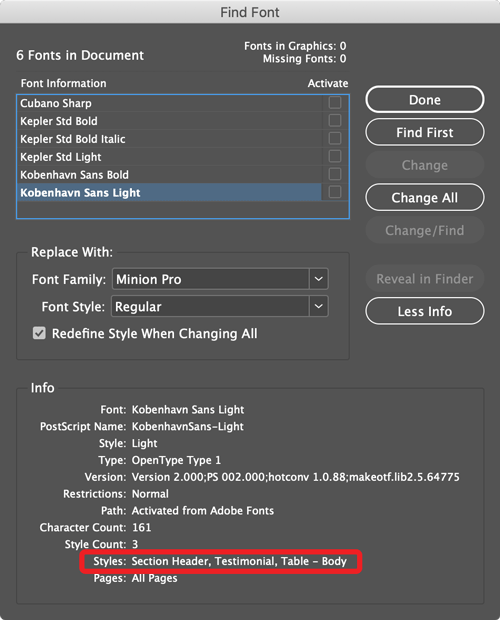
This is obviously helpful when you’re addressing a missing font problem, but it can also be useful when you’re trying to see how someone else designed a document, and for understanding how a design will change if you use different fonts.
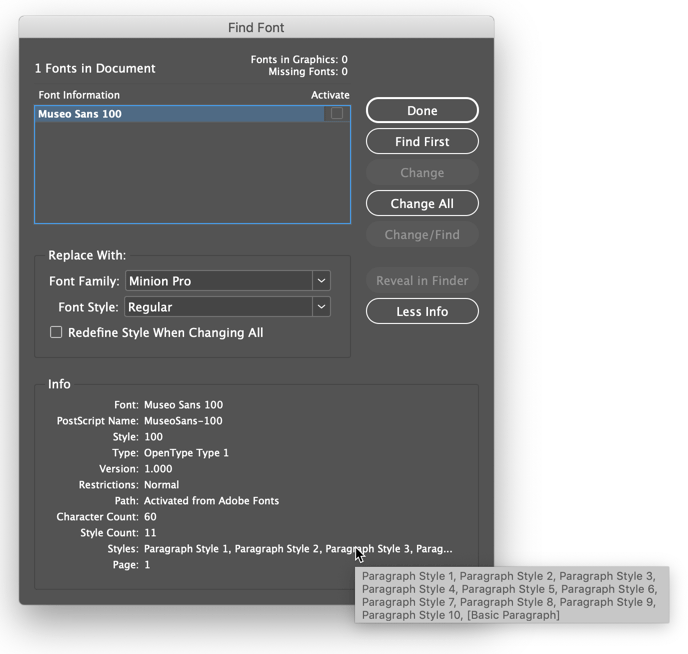
If there are several styles that use the selected font, the list will be truncated with an ellipse. Move your cursor over the list to see a tool tip with the full list of styles.
This article was last modified on July 23, 2021
This article was first published on February 3, 2020
Commenting is easier and faster when you're logged in!

Recommended for you

New Contest! The Mystery of the Inconsistent Indent
Solve this InDesign mystery for a chance at winning a great prize.
More Font Info for InDesign CC Users
Have you noticed that in recent versions of InDesign, the Find Font dialog box i...

Making a Character Style Change Only the Tint of Your Text
I wrote an article a while back about how to change the color of a character sty...