



Newspapers, newsletters, and magazines often include stories that “jump” from one page to another page later in the publication. Ideally, at the bottom of the first page of the article, you’ll include “continued on page XX”, and at the top of the article on the subsequent page you’ll include “continue from page XX”. Here is an easy, semi-automatic way to do this.
1. At the bottom of the first page of the article, draw a text frame to hold the “continued on” text. Add a text wrap to the frame.
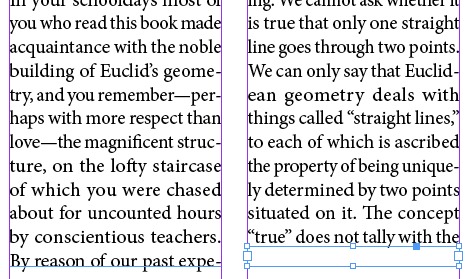
Create a small text frame on top of your main text frame, and give it a text wrap.
2. In the frame you just drew, type “continued on page “, and then right-click and choose Insert Special Character > Markers > Next Page Number. This will automatically insert the page number for the next page in the story.
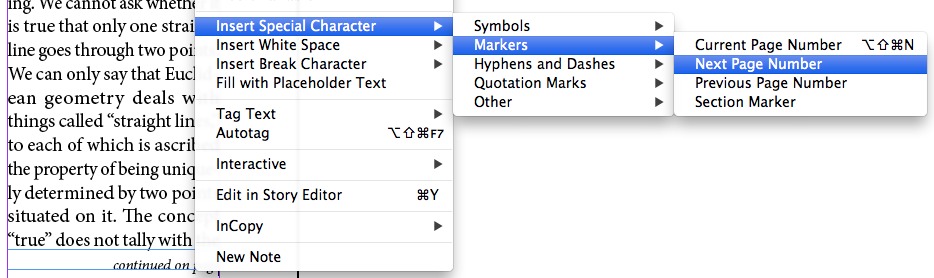
Insert the marker for the next frame in the story.
3. Turn to the page where the article continues, draw a frame at the top of the text frame where the story continues. Add a text wrap to the frame.
4. In this frame, type “continued from page “, and then right-click and choose Insert Special Character > Markers > Previous Page Number. This will automatically insert the page number for the page that the story continues from.

Repeat the process for the next frame in the story.
Because you used “Markers” to insert the page numbers, these numbers are now “live”, which means that if the page number the article is on changes, the “continued” text will update to reflect this.
Note, the text frame that contains the continued on/from text must touch the actual story that it is referencing for the page number to display correctly. This is why I overlap the frames and use text wrap.
Lining up the frames is made easier and more accurate if you use a baseline grid for your layout.
This is a fair amount of work to set up. But when you are done, create a “Snippet” of your continued on/from frames, or add them to an InDesign Library. This way, you can just import the snippet or add the item from your InDesign Library to create new jump lines with very little effort.
This article was last modified on December 21, 2021
This article was first published on December 3, 2012
Commenting is easier and faster when you're logged in!

Recommended for you

Kerntiff MoreInfo
Much of my workflow involves obscure, little understood technical features of In...

InDesign CS3! New Features and Pricing
Finally! After months of speculation from users worldwide ? "Will it fix this an...
Top 10 InDesign Secrets of 2015
What an incredible year for InDesign it has been! No matter what flavor of InDes...