


GREP of the Month: Locations
Tips on how to narrow your GREP searches and styles to specific places in a paragraph or story in InDesign.


This article appears in Issue 67 of InDesign Magazine.
Where you search is sometimes just as important as what you’re searching for. When it comes to GREP queries, InDesign will look through an entire paragraph unless you include code to narrow the search to a specific location. If you know that what you’re looking for is at the beginning or end of a paragraph, you can use the ^ symbol (Beginning of Paragraph) or the $ symbol (End of Paragraph), found in the Locations metacharacter submenu. So if you want to remove all white space at the start of each paragraph, use ^s+ and keep the Change to: field empty. You can find trailing white space at the end of paragraphs using s+$. The ability to target the beginning or end of a paragraph allows you to easily add desired content in those places. Just remember that to add new content with Find/Change, you need to first find some existing content. Using only ^ or $ will place your cursor at the right location, but it will not select anything. For example, to add an em dash followed by a thin space at the beginning of a paragraph, you need to find ^. (the period matches any single character), and replace with ~_~<$0. Here, the $0 stands for Found Text (everything we find, we put back in after the em dash and thin space).
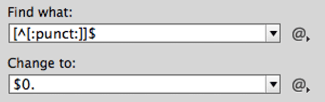
This GREP search adds a period at the end of each paragraph that doesn’t end with any punctuation. In this example, the ^ means “not” because it is inside brackets.
that don’t have any punctuation. For that, you can use
[^[:punct:]]$ which translates to “anything that is not punctuation at the end of the paragraph” and change to $0. If you want to search for something at the beginning or the end of a story, you can also use special metacharacters (not available in the Locations submenu): A for the beginning of story and z or Z for the end of a story.
Commenting is easier and faster when you're logged in!

Recommended for you

Ten Tips for New Web Designers
For those of you who may be less familiar with the details of web design it can...

Building Presentations in InDesign
Mark Heaps shows how to craft presentations in InDesign that are both beautiful...

8 Productivity Tips for Graphic Designers
Productivity is essential to graphic designers. This is true whether you work as...