



Jesi wrote:
I design a lot of ads, which will be used in multiple publications. When I copy and paste the entire ad into a different template and resize, the type size that is shown in the Character window stays the same, but the “actual” type size shows up behind it in parentheses. This is very frustrating as I’d like to see at a glance what my actual type size is.
Jesi, this is a huge problem for many people. The problem typically appears when you scale one or more text frames in a group. For example, these two text frames were grouped and then enlarged:
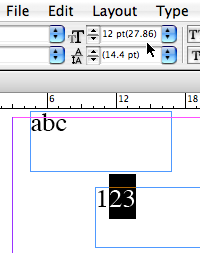
Notice how the selected text’s point size appears as both 12 point and 27.86 point (in parentheses, sometimes called brackets). The 12 point is the original text size and the number in parens is the size after scaling.
So what do you do about it? You must choose Object > Ungroup and then choose Scale Text Attributes from the Control palette flyout menu. This feature only appears when you have a scaled text frame like this.
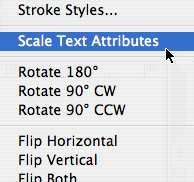
No one disputes that this is painful and unpleasant (even engineers at Adobe have quietly agreed with me on this point), but it’s the only good solution for now.
This article was last modified on July 11, 2023
This article was first published on August 31, 2006
Commenting is easier and faster when you're logged in!

Recommended for you

Tab Stops Snap to Points
Dragging a tab stop should be a smooth and easy affair. But those darn tab stops...
Add Custom Text at the Beginning of Each Line
When you need to add text to the beginning of each line automatically, this tric...
Base a Paragraph Style on a Character Style
Colin wrote: I've created several character styles, but now I want them to be pa...