


Getting It Together with PageMaker 7


Our sample catalog takes advantage of several powerful features in the Merge Records dialog box. The actual choices we made are shown in Figure 9. Under “Layout Options” we switched to manual layout, to have PageMaker place multiple records on a page. Notice that we’ve specified a vertical gap of .08″ between records. It was not necessary to specify a horizontal gap because our design occupies the full width of the page. We also chose to remove any blank lines that may appear due to empty fields.
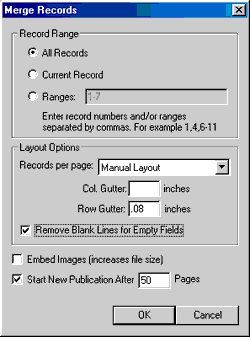
Figure 9: Advanced options in the Merge Records dialog box allow you to transform a single catalog entry into a multi-item listing.
You can see the results of the merge in Figure 10, where three records are placed on each page. Take special note of the first and second entries, where PageMaker has removed what would have been a disruptive blank line under the product name.

Figure 10: The manual layout option in the Merge Records dialog box lets you place multiple records on each page.
As we discussed previously, the Merge Records operation results in two separate publication files. The original document that is linked to the data source remains intact. The merged publication incorporating all of the live content is no longer linked to the data source. Because the merged publication is a standard PageMaker document, comprising formatted text and imported pictures, you can employ PageMaker’s long-document features to round out the catalog. In Figure 11, for example, we created a simple product list using PageMaker’s automatic table of contents utility.
Remember that when we created our layout we formatted the text placeholders with text styles. In our sample document, any text that is formatted with the “Product” paragraph style is included in the product listing.
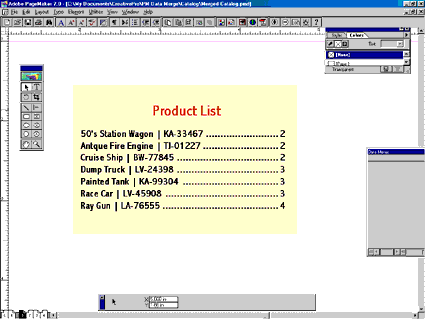
Figure 11: PageMaker’s ability to generate a table of contents made short work of this product listing for our sample catalog.
The Competition
If you’re looking for this kind of data-merge capability from QuarkXpress or InDesign, you’ll need to look to third-party add-ins. These days, though, PageMaker’s primary competitor is the Microsoft Publisher, and the $129 Publisher does offer a mail-merge feature similar to PageMaker’s Data Merge function. Publisher earns high marks for its data handling functions. For example, it can access data stored in many different native formats, including .DBF, XLS, and .MDB. In addition, Publisher can filter and sort records directly. We sincerely hope Adobe adds these features to the Data Merge palette in future versions of PageMaker. However, PageMaker ultimately wins the day by providing more-powerful design options. The ability to reference externally stored pictures in the data file and to place multiple records on a page make PageMaker unbeatable for catalog publishing.
This article was last modified on February 22, 2022
This article was first published on August 21, 2001
Commenting is easier and faster when you're logged in!

Recommended for you

Getting InDesign to See Your Fonts
Susan wrote: We use CS2 and we are having trouble with our fonts. When we open u...

On the Track of Good Type
Typography is largely about tweaking the spaces between characters. Kerning, as...
Tips for Creating Gradient Mesh Effects in Illustrator
Tips to get started meshing things up in Adobe Illustrator