




We’re happy to announce the release of the Keyboard Shortcuts plug-in from DTP Tools and InDesignSecrets! I designed this plug-in with DTP Tools to help you find and assign shortcuts quickly and easily. The plug-in is free of charge and both Mac OS and Windows versions are available for InDesign CS3 and InCopy CS3. You can download it from www.dtptools.com/kbsc.
Features
When you choose Keyboard Shortcuts from the Window menu, the Keyboard Shortcuts plug-in opens a floating panel (similar in design to other InDesign panels).
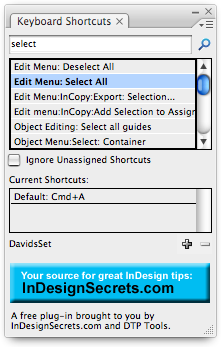
The panel lets you:
- Use a dynamic search field to quickly find which keyboard shortcut is assigned to each feature.
- “Reverse lookup” to find which feature is associated with the shortcut you press.
- Quickly add/remove shortcuts.
- Add/delete custom shortcut sets.
- Export your custom shortcut sets to share with others.
- Filter out hundreds of commands with no current shortcut.
- Get immediate feedback on which custom shortcut set is active.
This article was last modified on January 18, 2023
This article was first published on October 4, 2007
Commenting is easier and faster when you're logged in!

Recommended for you

What to Do When You're Out of Ideas
Originally published in “Graphic Define Magazine“ Designers love eur...

12 More Experts Confirmed to Speak at CreativePro Week 2021
We’re excited to announce 12 more speakers have been confirmed to join us online...

A Photographer Who Paints with Light
Brad Rickerby had a camera in his hand before he could walk. As a child he trave...