




120 Free Art Media and Utensil Photographs
Do you remember the tools we used before Photoshop, Illustrator, and InDesign? Even today, many of us still enjoy paints, crayons, pastels, colored pencils, markers, technical pens, erasers, or ink when we need to soften the corners on eyeballs made square from too much screen time.
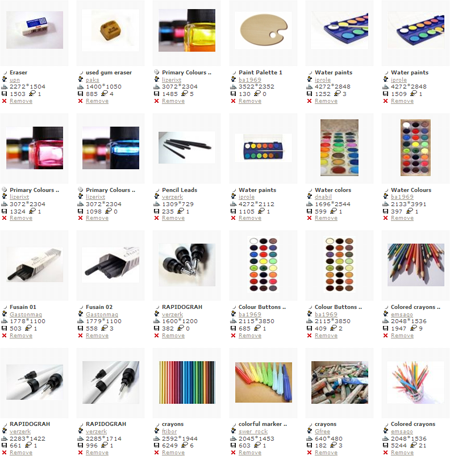
It’s easy to evoke natural media in the digital realm with free stock photography service Stock.xchng. I hunted down photos of old-school tools and collected the best in two lightboxes — a total of 120 images — that you can browse, download, and use for free. The only catch is that you need to sign up for a free Stock.xchng account before you can download them.
You’ll find the first 60 images in lightbox 1, but don’t miss the second 60 in in lightbox 2.
Muro, Unique HTML5-Based Painting App
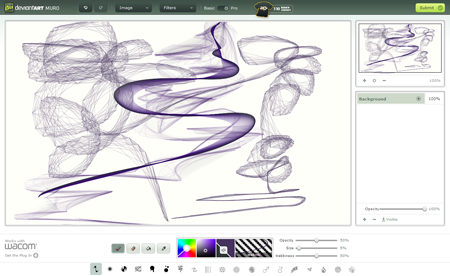
Muro from DeviantArt.com is a painting application with a twist. This browser-based HTML5 painting app lets you instantly create Spirograph-like strokes in any shape or direction. The app offers a full color palette; precision brush controls for tip opacity, size, and intensity; and pressure sensitivity (although that requires a Wacom tablet). Switch to Pro mode via the easily missed control at the top and you can work in multiple layers, which are crucial as you explore the just under two-dozen photo filters built into Muro. Seven brush tips/effects come standard with Muro for free. Another 12 are available for purchase using DeviantArt points, which you can earn through different uses of DeviantArt.com or buy using legal currency. When you’ve finished your HTML5-based masterpiece, you can submit it to the gallery in the DeviantArt.com account or export it PNG.
Pantone Plus Series Digital Ink Installers
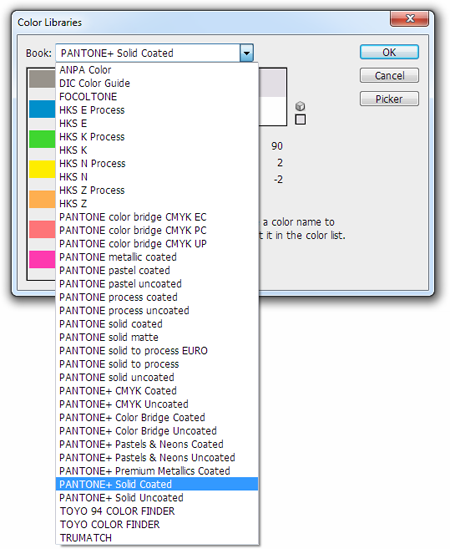
Pantone recently expanded and improved its library of ink colors. The new Pantone Plus Series adds 224 solid colors, 42 neon colors, and 300 metallic colors to the previous Pantone Matching System library of 1,114 colors.
The PMS colors were printed on cover stock, though a much larger percentage of printed works use a text paper stock. With the Plus Series, Pantone printed everything on a text weight stock, which creates more accurate, more predictable color output between swatch and guidebooks and final printed designs.
To realize the benefits of the better matching between swatches and final output, you’ll need to pick up the new Plus Series swatch or guidebooks, which aren’t free. However, the digital libraries that update Photoshop, Illustrator, InDesign, and QuarkXPress to the expanded Pantone Plus Series color sets are free.
Download and run the digital installers (here for Adobe Creative Suite applications, here for QuarkXPress). Then you’ll have new Pantone+-designated color libraries or color books in your creative pro applications alongside the older Pantone- or Pantone®-designated libraries.
Note that a limitation in Adobe Illustrator requires the Pantone installer to remove the older libraries; thus, after installation, you’ll have only the Plus Series color libraries instead of both.
TransformMaster InDesign CS5 Script
You may know that InDesign CS5 supports multiple pages sizes in a single document. You can even have master pages of different sizes, and, when they’re applied to document pages, objects on the document pages re-arrange to fit the size of the masters. There’s one problem with that, however — you can’t scale or rotate master page items when applied to a scaled or rotated document page. Leave it to our friend Kris Coppieters at New Zealand-based Rorohiko Workflow Resources to whip up the perfect solution to that particular dilemma!
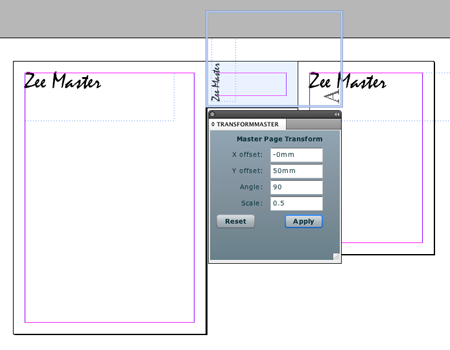
The new Rorohiko TransformMaster script for InDesign CS5 enables you to scale and rotate master pages, and all of their objects, at will. Just get a copy of TransformMaster, follow Kris’s installation instructions, and then you’ll find it’s panel accessible just above the Kuler panel in Window > Extensions > TransformMaster.
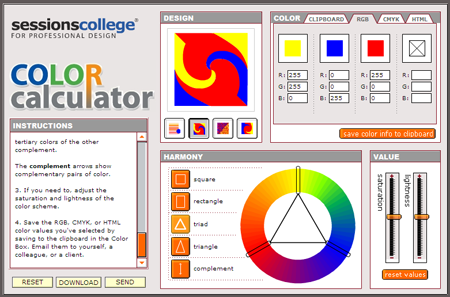
Color Calculator
Still looking for the perfect way to pick and mix colors and then convert them from one color model to another? Sessions College built one that might just be the tool you seek. Check out the Color Calculator, a free color picker with different ways of visualizing and mixing colors, as well as easy conversion of color values between RGB, CMYK, and HTML Hex color. You can use the Color Calculator in your browser or download desktop clients for Windows and Mac.
What can I find free for you? Want more free fonts? More Photoshop brushes? How about more online applications that do this or that for free? Tell me in the comments what you’d like to see in future installments of Free for All, and I’ll do my best bloodhound impression to track it down for you.
Please note: Free for All will often link to resources hosted on external Web sites outside of the control of CreativePro.com. At any time those Web sites may close down, change their site or permalink structures, remove content, or take other actions that may render one or more of the above links invalid. As such neither Pariah S. Burke nor CreativePro.com can guarantee the availability of the third-party resources linked to in Free for All.
This article was last modified on August 12, 2021
This article was first published on August 16, 2010
Commenting is easier and faster when you're logged in!

Recommended for you

Complete Berthold BQ Library Now Available at MyFonts
MyFonts (NASDAQ: BITS, www.myfonts.com), the leading provider of the world...
The Paper That Changed Type Design
John Baskerville is known best as the man who, in the mid-18th century, created...

Recosoft Corporation Announces PDF2Office Professional v3.0 for Mac OS X
Recosoft Corporation the developer of cross platform Macintosh and Windows file...