




Continuing with our digital photography holiday shopping guide, we shift this week from cool photography hardware to cool photography software.
Whether you shoot with film or digital, these days you’re probably doing your editing and post production digitally. There are, of course, loads of applications and plug-ins for modifying and altering your images. We’re gonna look at a select few here, staying away from the red-eye reducers and page-peel effects and looking instead at slightly more practical tools that the creative pro might use more often. Unless otherwise noted, all products discussed here will work with the Mac or Windows.
DataRescue PhotoRescue
Anyone who’s used a computer for any length of time knows that, inevitably, you will accidentally delete a file or erase your hard drive. Even if you’re diligent enough that you have accidentally trashed data by your own hand, you might still have encountered data loss from hardware failure of one kind of another. In these instances, file-recovery programs like Norton Utilities can be invaluable.
Your digital camera’s storage card is formatted and organized using the same type of file system as an MS DOS PC. So, you might think that if you accidentally erase or format a card, you can simply stick it in a card reader attached to your PC and use Norton, or another file recovery program to retrieve your data. Unfortunately, this isn’t the case. The good new is that a company called DataRescue sells a product called PhotoRescue that is specifically designed to retrieve accidentally erased or formatted flash memory cards.
This $30 stand-alone application does an exceptional job of retrieving lost images. What’s more, DataRescue’s excellent licensing agreement lets you download the software and run it, to see if it can actually retrieve any data. If it finds some, then you can pay for the software to actually save out the lost data. This risk-free agreement means there’s no reason not to give it a try if you accidentally hit that little trash can button on the back of your camera.
Noise-Reduction Software
Noise is the bane of all digital photographers, but these days there are lots of things you can do to remove those annoying colored specs from your images. Although manual noise reduction methods abound, a better approach is to opt for specialized noise-reduction software. We have several favorites, some stand-alone applications, other Photoshop plug-ins.
- PictureCode Noise Ninja, a standalone application that yields excellent results and includes features such as custom camera profiling, and a noise brush that lets you selectively remove noise (see Figure 1). Very reasonably priced at $69, the only downside to Noise Ninja is that you might not be able to integrate it into an automated, Photoshop-based workflow. Fortunately, PictureCode has a Photoshop plug-in version on the way.
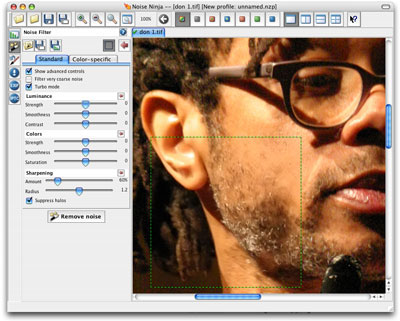 Figure 1: Noise Ninja provides a stand-alone noise reduction tool with custom profiling and fine control.
 - nik Multimedia Dfine is the priciest of this noise removing lot ($100, plus another $40 if you want an optional profile for your camera), but it offers exceptional noise reduction control that allows you to apply different types and degrees of noise reduction for different-colored areas in your image. Because it’s a Photoshop plug-in, DFine might fit a little better into your existing workflow, but unless you have to regularly do lots or noise reduction, its steep price may not be worth it.
- Fred Miranda ISOx is a $15 Photoshop Action (that does a lot of the same types of things you might do by hand, but is completely automated, and perhaps provides a little more sophistication than the techniques you’re already using. Miranda sells separate, customized versions of the action for a number of popular digital SLRs and high-end point-and-shoots, or you can opt for the “generic” ISOx plug-in which will do a good job of fighting noise on images from any camera.
For more detailed reviews of each product, as well as sample before-and-after photos, check out the Web site I launched in conjunction with my book, “Complete Digital Photography, Third Edition.
Sharpening Software
Whether they come from a digital camera or high-end scanner, all images need a sharpening pass before going out to print. The sharpening routines provided by most cameras are coarse and sometimes damaging to your image. Fortunately, most cameras allow you to reduce or completely defeat these routines so that you can apply your own custom sharpening process during your post-production cycle. Although Photoshop includes some excellent sharpening plug-ins, for ease-of-use or more control, you might want to go to a stand-alone sharpening package.
- Pixel Genius PhotoKit Sharpener is a $99 sharpening package for photographers who take their sharpening very seriously. PhotoKit not only provides excellent sharpening control, it helps you develop a multi-pass sharpening workflow provides more control of how much sharpening is applied to different types of detail in your image. Co-developed by creativepro.com contributing editor Bruce Fraser, it’s not for the user who wants a quick-and-dirty solution.
- nik Sharpener Pro is a pricey ($170-330) Photoshop plug-in that provides a nice balance of control versus ease-of-use. Sharpener Pro uses complex custom algorithms that are intended to properly sharpen your image based on the type of output you’ll be creating. While users in a hurry will appreciate its “one-button” prowess, power-hungry users will still find good depth and tweakability. Obviously, at this price, you’d better have a lot of images to sharpen.
Photoshop Filters
Soon after installing Photoshop for the first time, most users lose a couple of hours to wending their way through the program’s extensive bundle of filters. These plug-in bits of code allow you to do everything from practical traditional photographic tasks to painterly special effects. Although Adobe includes a generous assortment of Filters, there’s no reason not to add more!
There are a lot of silly weird effects out there, but we’ve elected to narrow our selection to filters geared specifically to photographers, and to more day-to-day practical effects.
Andromeda Software has made high-quality Photoshop plug-ins for years. While they offer a few “arty” plug-ins, most of their offerings provide digital alternatives to practical shooting and printing effects, providing inexpensive alternatives to what have traditionally been more expensive procedures.
In particular, you might want to take a look at:
- Screens, a $265 plug-in that lets you create traditional mezzotint and mezzogramming effects (see Figure 2). Offering a tremendous degree of customization and control, Screens lets you create the same type of engraved effects that you see on everything from money to the front page of The Wall Street Journal. Traditionally, creating such effects photographically was a very expensive process. Andromeda Screens greatly simplifies the process.
 Figure 2:Andromeda Software’s Screens Filter can create sophisticated mezzotinting and engraving effects.
 - Varifocus. ($47) Because of their short focal lengths, most point-and-shoot digital cameras inherently have very deep depth of field. If you want to create shallow depth-of-field effects, you often have to resort to hand-blurring your images in Photoshop. Unfortunately, creating a realistic depth of field with such techniques is very difficult. Varifocus provides a simple plug-in interface that allows you to create realistic, complex shallow depth of field effects. A valuable tool for users using small cameras.
- LensDoc ($100) can correct barrel and pincushion distortion with just a few clicks of the mouse. Simply activate the filter and then identify lines that should be straight, and LensDoc will automatically distort your image to compensate for any optical aberrations produced by your camera.
nik ColorEffects Pro shares several things in common with nik’s sharpening and noise reduction products: it yields very good results, and it’s very expensive. The $300 package provides a set of 16-bit filters that are designed specifically to mimic real-world lens filters and lighting effects. Included are a number of color filters and graduated color filters that do an extremely good job of reproducing the types of color and contrast shifts that photographers traditionally achieve with colored lens filters.
Even more amazing, though, are the circular polarizer and reflector plug-ins that do an astonishingly good job of mimicking these real world tools. Other standouts include an infrared filter, and filters to mimic specific types of chemical processing.
Free and shareware filters are a great way to expand your image repetoire. Although the packages covered above serve as good workhorse effects for your more common photographic needs, there will still be times when you simply need a unique look or more “out-there” design element. While there are loads of commercial plug-ins available, why not take a look at some freeware and shareware offerings. You’ll find a good index to dozens of inexpensive or free filters that can be downloaded immediately at the Photoshop Filters Web site.
There’s no software that can turn you into a great photographer, but there are software tools available that, when used by a skilled artisan, can turn a bland photo into something more interesting.
This article was last modified on December 14, 2022
This article was first published on December 7, 2004
Commenting is easier and faster when you're logged in!

Recommended for you

10 Essential Tips for Adobe Camera Raw
Adobe Camera Raw is an incredibly powerful and flexible tool for applying adjust...

How to Apply Textures to Uneven Surfaces with Photoshop
This tutorial is intended for intermediate Photoshop users, or really patient, f...
Photoshop Power Shortcuts on Adobe TV
After the conclusion of the Adobe MAX conference in May, I posted a news item ab...