



Lisa wrote:
I’m using InDesign and I want to justify a paragraph, but the first line (the title of the paragraph) has to be aligned left.
The simplest solution is to break this into two paragraphs — a heading paragraph followed by a body para. But it sounds like you want them to be a single paragraph for some reason so? here’s a solution: Follow the heading with a tab and then a forced line break (Shift-return/enter).
For example, here’s the original paragraph:
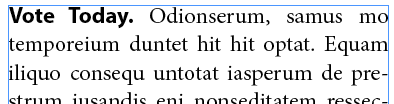
Now, here’s what we get when we put a Shift-Return/Enter (forced line break, or “soft return”) after the period instead of the space:
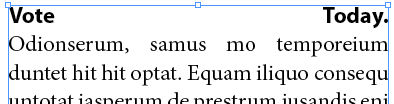
That obviously isn’t going to work! But if you put a tab character after the end of the heading (before the soft return) you get what (I think) you want:
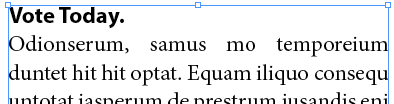
You don’t need to set any tab stops or anything like that; the tab character itself is all you need.
Note that the bold heading could be formatted manually, but in this case I’m using a nested style or a line style inside the paragraph style.
I wish there were a way to automate this trick in a paragraph style, but you have to manually insert the tab character. (You might be able to find a way to insert it quickly with a find/change, though, depending on the formatting of your headings.)
This article was last modified on December 21, 2021
This article was first published on November 6, 2012
Commenting is easier and faster when you're logged in!

Recommended for you

Adjust Word Spacing in Paragraph Styles
MH wrote: We are doing a series of children's books and ample space in between w...
Stop Hyphenated (Compound) Words from Hyphenating
Cathy wrote: Is there an easy way to change preferences so that it will no...
Splitting Up Threaded Stories into Separate Frames
Daniel wrote: I've linked boxes of text throughout a whole document. Is there a...