



Photoshop File Support/QuarkVista: One of the things I hear cited a lot as an advantage to InDesign is its support for native Photoshop files. Quark added support for PSD files in version 6.5 which includes layer control and alpha/spot color channel mapping, but will expand on that in 7.0 to include transparency support. XPress 7.0 will not, however, support layer comps or export modified PSD files (which isn’t possible in InDesign either).
QuarkVista, an image editing plug-in that debuted in XPress 6.5, didn’t create the fanfare I thought it deserved. Quark looked at what its customers typically did to images in Photoshop, then added the most popular to XPress. QuarkVista’s capabilities don’t satisfy everyone’s needs, but in many production environments Photoshop is overkill. In QuarkVista, you can apply filters (Gaussian blur, unsharp mask, add noise), adjust images (levels, curves, color corrections), and render transformations (rotate, crop, skew) without permanently affecting the original. Quark maintains that many of these actions should be made visually in the context of the page, and I agree.
In XPress 7.0, QuarkVista will become more powerful. (I’ll cover the expanded feature list when creativepro.com reviews the shipping version of XPress). Nevertheless, I concede for those people who are naïve enough to insist on the comparison that QuarkVista is no Photoshop killer. The list of things you can’t do in QuarkVista is staggering!
Expanded Output Options: XPress 7.0 adds to projects output styles that can be saved, applied to other files, exported to JDF, and accessed by XTensions. Combined with the other features of Job Jacket, these output files will make it possible for your printer (or the magazine in which you place ads) to send you a file that will automatically setup your document correctly. And you can apply different output styles to the same project, thus making it easier to print to various devices in-house, or to create multiple versions of the same project for different destinations.
PDF output, one of Quark’s biggest weaknesses to date, will not only include PDF/X-1a and PDF/X-3 export directly from within XPress, but now has the ability to export multi-page layouts as single-page PDFs. Quark is still licensing the JAWS PDF engine from Global Graphics, and some of the issues around transparency flattening in XPress are because Quark actually creates a PostScript file first, then sends it to RIP in Jaws, resulting in the final PDF file.
EPS files from XPress 7.0 now support embedded fonts and single and multiple-file DCS 2.0.
And one small thing that will dramatically improve printing to non-Postscript printers: XPress now rasterizes placed EPS images to the appropriate printer resolution rather than sending the low-resolution preview file.
Palette Management: In XPress 7.0, Quark’s solution for palette bloat is good. Palettes can be grouped, of course, and rearranged, minimized/maximized, and opened in groups. A unique feature snaps palettes to scroll bars so palettes don’t disappear as you scroll through a page. And unlike in most applications, if you open a palette and it forces another palette to close (to make room), when you close that new palette, the previous palette will reopen.
A new measurement palette retains its familiar look but adds an auto-hiding button bar that considerably expands functionality and now has dialogs for modify, character attributes, paragraph attributes, and space/align.
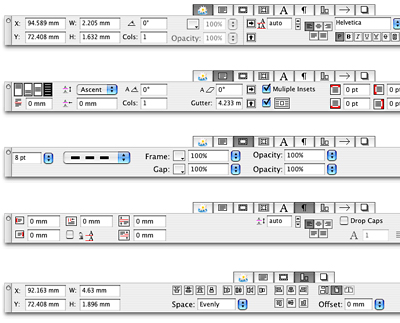
The classic XPress measurement palette can now turn into other palettes by highlighting the new button bar (which can be hidden) which rests on top.
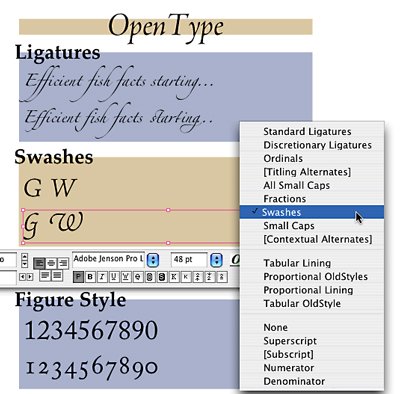
As part of Quark’s OpenType support, a new glyph palette makes accessing special characters easy. A new OpenType invisible font lets you not only view spaces, but determine the type of space (non-breaking, em space, en space, and so on). You can also insert spaces directly from the glyph palette.
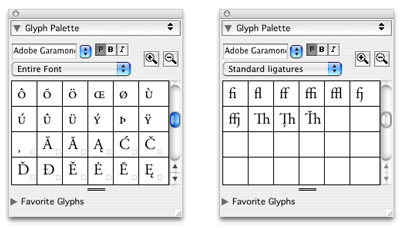
InDesign users will gloat that XPress is only now supporting some OpenType features and will sport a familiar insert-glyph palette.
What’s to Come and What’s Missing
In the can’t-talk-about-it-yet category fall a slew of new features in the areas of color management, expanded image effects, layout management and synchronization, interactivity, and the previously mentioned collaboration tools. Trust me when I say the most interesting news is still to come.
I can’t address what’s missing from XPress 7.0 until I have my hands on the final product. And I’m also relatively sure that for those of you keeping score this way, Adobe InDesign’s feature set will still be longer than that of QuarkXPress 7.0. But even so, I see in XPress 7.0 a number of things that will make current users’ lives much easier and that will more completely open up production systems to third-party developers. That’s the biggest issue for large publishers looking for custom solutions and aggressive automation. Quark has provided many hooks into XPress documents and the content (and specifications) that resides in them.
XPress 7.0 may not ship until the end of this year or early next year. I considered keeping silent until then because I cringe at the thought of being part of a PR campaign to build anticipation and stave off further customer losses. I admit I’m being shown what Quark wants me to see, but that doesn’t change the fact that it’s impressive.
By the time XPress 7.0 ships, I hope everyone can finally declare their allegiance and move on. While we’ve been arguing among ourselves, the entire market has lost value. That should cause more concern than how your type rasterizes when it’s part of a transparency.
Read more by Gene Gable.
This article was last modified on June 30, 2023
This article was first published on July 25, 2005
Commenting is easier and faster when you're logged in!

Recommended for you

Tip of the Week: Placing Images at a Specific Size
This tip was sent to Tip of the Week email subscribers on July 23, 2015. Sign up...

The (Font) Doctor is In!
Even though I am using Typekit fonts more and more—it’s part of my Creativ...

Quark Names Raymond Schiavone President and CEO
Quark Inc. today announced that Raymond Schiavone, a veteran software company CE...