




Here’s a feature I wish were in InDesign: I want a way to add to a paragraph style definition, “Use a 1p6 first line indent… unless the paragraph comes after a heading or subheading!” As it is, because we don’t have that feature, I have to use two different pararaph styles (usually something like “body” and “body with no indent”).
Even more frustrating, I have to apply each of those styles separately, making sure they’re applied to the proper pargraph. If the text gets edited, I often have to go back and reapply the proper styles. Grr.
That’s why I jumped when I saw a new script by Thomas Silkjær that lets you find/change the paragraph styles for “this paragraph and the one following it.” Unfortunately, because it’s an AppleScript, it will only work on a Mac. However, perhaps he’ll release a VB or JSX version at some point. Or perhaps other scripters will even improve on his idea.
Here’s the basic UI for the script (using the paragraph styles in my document):
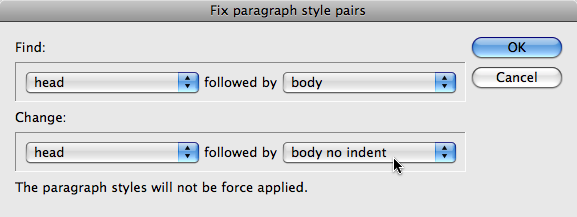
I’m actually not sure what the text at the bottom of the dialog box means, but the script seems to work well in my quick tests (as long as you have your text cursor in a story).
This article was last modified on December 19, 2021
This article was first published on April 20, 2009
Commenting is easier and faster when you're logged in!

Recommended for you

Remove Imported-Style Symbols
When you place a Word file in InDesign, all styles have a symbol to indicate tha...
GREP Query Runner
This is a much simpler version of the Query manager. It displays a list of all y...
GREP Change Case (Pre-2024)
Using InDesign's Find/Change dialog, you can't change the case of what your GREP...