



One of InDesign’s great little capabilities is that it’s so simple to just place a PDF file. But like everything else in life, it’s just not perfect.
Once in a while an error alert will pop up saying “Failed to Open the PDF” That’s hardly a very specific or helpful error especially since you’re not trying to open the PDF, just place it in your document.
I’ve seen this myself and have found the fix to be anything from restarting InDesign to resaving the PDF in Acrobat.
But it seems there’s a simpler solution. As pointed out by User to User forum contributor Scott Falkner, just select the Show Import Options choice in the place dialog (or alternatively, hold the shift key down when placing the file).
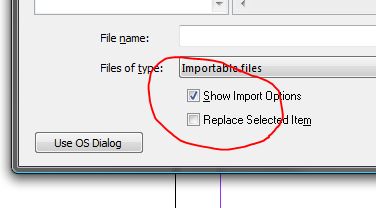
Why does this work? I don’t know. Perhaps it’s just enough to jog InDesign’s internal thought processes, but it does work.
Give it a try if you ever get this error.
This article was last modified on December 19, 2021
This article was first published on August 22, 2008
Commenting is easier and faster when you're logged in!

Recommended for you

This Week in InDesign Articles, Number 58
A large selection of articles, videos, and goodies to keep you busy while we're...
Better InDesign Contact Sheets
Adobe Bridge CS2 and CS3 have a neat little automation script for InDesign users...
How to Control Stacking Order with Step and Repeat in InDesign
Frustrated by the stacking order of objects being the opposite of what you want?...