



You’ve no doubt explored Google’s Image Search. And you may have tried its “find similar images” option. But now there’s a new twist on that — or rather, a new swirl.
The Google blog says that Image Swirl, still in the experimental phase, “builds on new computer vision research to cluster similar images into representative groups in a fun, exploratory interface.”
Here are results from an Image Swirl search I did on “Tower of London.” The first screen of results shows images tagged with my search parameters.

I clicked on the photo in the top row, second from the left. That brought up the following screen, with my pick in the center of the circle on the left. The smaller circle on the right contains the original search results.
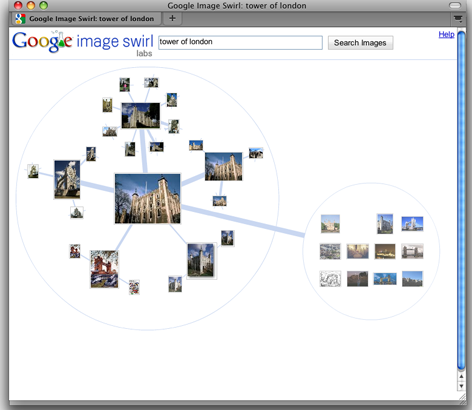
When I clicked on one of the smaller images in the left-hand circle, Google displayed another results set, yet still maintained links with my previous two results sets.

Are the results better than “find similar images”? I’m not certain. But it sure is fun!
Try Image Swirl for yourself at https://image-swirl.googlelabs.com.
For a related article that explains how to find online images you can use without violating copyright, see “Safely Find and Use Images Via Google.”
This article was last modified on January 5, 2023
This article was first published on November 23, 2009
Commenting is easier and faster when you're logged in!

Recommended for you

Designing with Column Rules
Creative techniques for designing with InDesign’s column rules feature.

Selecting Body Parts in Photoshop with the Object Selection Tool
Now it's easier than ever to select people, facial features, clothing, or body p...

Add a Page to the Right Spot Quickly
Alexa wrote: When I click the Create New Page icon at the bottom of the Pages pa...