



James Wamser, from Sells Printing in Wisconsin, sent us a great tip recently. A client was frustrated because someone had accidentally typed the word “emplyee” in an InDesign document and InDesign’s spelling-check feature didn’t flag it as incorrect. After all, that can’t be a real word, right?
Well, not in English. However, James (who is quite good at this kind of sleuthing) pulled the document apart until he found the answer: Somehow all the text in the document had been set to the Ukrainian language.
While I don’t speak Ukrainian (though one or more of my grandparents may have), I do know something curious about how this language acts in InDesign. Specifically: Every word you can type appears to spell-check properly. That’s an amazing feat for a language — even über-flexible Esperanto can’t pull that off.
The problem, you see, is that Adobe either forgot to include a Ukrainian dictionary in CS3 or they couldn’t find one to stick in the box. A quick glance at the Dictionary pane of the Preferences dialog box uncovers the error:
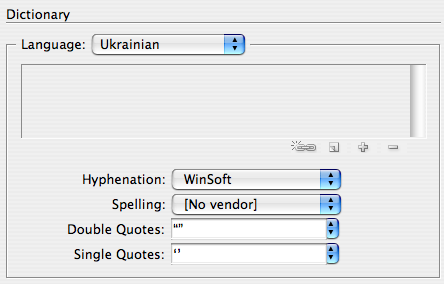
Notice how Spelling is set to [No Vendor]? No vendor, no spelling. So “emplyee” looks jes’ fine to me!
None of the other languages are so lucky. I’m at a loss as to how to turn this problem into an opportunity (besides an April Fools’ joke on a colleague). But it is worth noting as Potential Quicksand #47: What to check when spell checking stops checking!
This article was last modified on December 18, 2021
This article was first published on January 15, 2008
Commenting is easier and faster when you're logged in!

Recommended for you

Why Are My Hyperlinks Still Working?
Jacob wrote to us with a problem he was having with a file: he was having troubl...
Discretionary Line Breaks
There are so many new features in InDesign CS3 that it’s easy to lose trac...
Track Down That Layout
Are you sure you're working on the right version of the layout? Here are a coupl...