


Enhancing Your Marketing Materials with the Focus Gold XTension



Version: 4.1
Operating system: Macintosh
One way to ensure your marketing materials achieve the maximum response rate is to personalize them towards the individuals who receive them. Doing so gives the target audience a sense of familiarity. Something as simple as using their names within the body of text will accomplish this. Or, you can try something that’s more complex, which may involve changing the content based on demographics and geographic location.
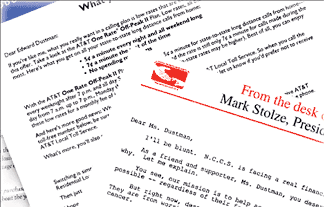
You’ve probably received numerous promotional materials that have used this technique, otherwise known as mail merging. It involves combining a standard letter or mailer with personal information that’s maintained in a database. Examples of direct mail pieces are shown in Figure A.
You might have already used mail merging in a word processing application. Now you can do the same thing right in QuarkXPress with the help of Focus Gold. By adding the Focus Gold XTension to your XTension folder, you can create customized direct mail pieces while continuing to work in QuarkXPress. In this article, we’re just going to cover the basic process of using Focus Gold. However, look for a future article on creating a direct mail piece from start to finish.
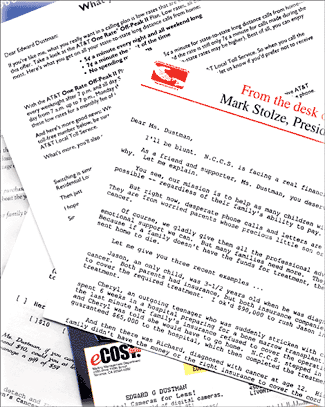
Figure A: Direct mail recipients tend to respond better when referred to by name, rather than Current Resident.
Its Capabilities
Focus Gold enables you to create a link between a database and a QuarkXPress publication, forming a new file containing information from both. The information you include from the database files is selective and encompasses variable text, graphics, lines and boxes. Focus Gold reads tab-delimited or fixed-record-length ASCII text files created in nearly any database, spreadsheet program or word processor application. Adding to its compatibility, merged files created with Focus Gold can print to any output device supported by QuarkXPressboth PostScript and non-PostScript.
Behind the Scenes
Though planning and setting up the data files used to merge with QuarkXPress may be a little complicated, the actual merging of files is fairly straightforward. Focus Gold uses data, text and parameter files to accomplish its task of merging variable data with QuarkXPress. The data files are created in a database and can contain common information, such as names and addresses, or more complex information, such as an entire catalog. A parameter file includes information pertaining to the data as to how it’s defined within the database. For example, a parameter file might specify the maximum number of characters a field can contain.
Text files are used when creating a document that will have more than one version. For example, let’s say you’re designing a catalog that’s to be distributed nationally. However, you don’t want to include ski equipment for southern recipients or surfing equipment for mid-westerners. On the cover, you want to include a different line of text for each region. This situation would require two separate text files, each containing text that’s related to either region.
A Guided Tour
Once you’ve completed all the data files to be used in the merge, and your mailer is designed, you’re ready to set up the QuarkXPress document to accept the variable data with the help of Focus Gold.
Focus Gold uses text variables to insert the data. Text variables are placeholders within the document. They indicate where the text is to be inserted. In order to insert text variables, however, you must first select the variable parameter file from the Focus Designer Preferences dialog box, as shown in Figure B. This enables Focus Gold to know where to look for the text variables.
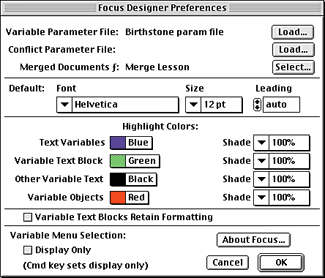
Figure B: To be able to insert text variables, you must load a variable parameter file.
Text variables are then inserted into the document from the Focus Designer palette shown in Figure C. Examples of such text variables include data such as first and last name, address, city and state, and appear in the QuarkXPress document as follows:
<<FIRST>><<LAST>>
<<ADDRESS>>
<<CITY>> <<STATE>> <<ZIP>>
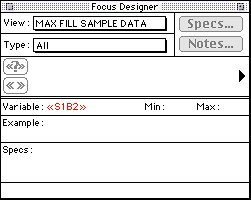
Figure C: Text variables are inserted into the document from the Focus Designer palette.
Vary the Layout
The Edit Variable Sets dialog box, shown in Figure D, is where you customize the data in your direct mail piece. It’s here that you would specify which region gets what product in the catalog previously mentioned. For example, in Sets there would be two options: Southwest and Midwest. To each set, you could apply different characteristics, such as graphics and lines.
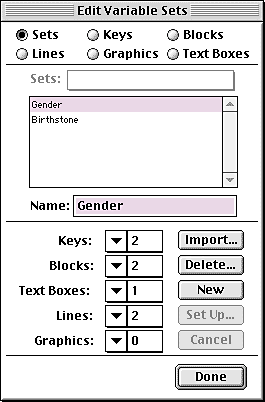
Figure D: Creating variable sets with your variable data is the next step.
Once you’ve finished editing within the Edit Variable Sets dialog box, you can move on to the variable text block containers, which are automatically placed on the pasteboard of your document while you’re creating variable sets. They serve as containers for text that’s to be inserted during the merging process. The containers themselves don’t actually print. You establish which variable text file goes within which container by clicking in the box with the Content tool and then selecting Get Text from the File menu.
The final steps before merging include indicating where the text should be inserted and when. Focus uses variable text block locations and variable set formulas to do that.
Then you’re ready to merge the document with the actual data. To perform a merge, you must first specify a destination folder for the merged documents. This is done through the Focus Designer Preferences dialog box. With the document to be merged open on-screen, you select Merge from the Focus menu to open the Merge Variable Data dialog box, shown in Figure E, from which you select the file with which to merge.
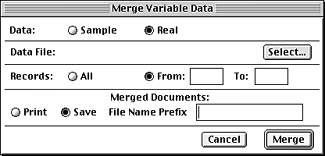
Figure E: Once you’ve set up all the variables, it’s time to merge the data with the document.
Focus Gold creates a new file, which will contain the QuarkXPress document and the merged data, saving it to the destination folder you would have previously specified. You can then print the finished merged document as usual.
You’re Golden!
Unlike other forms of media (such as television), direct mail enables you to target not only a specific market, but specific people too. Focus Gold makes it possible to customize your direct mail promotions in a familiar and printer-friendly environment. The result is the opportunity to increase the response rate of your direct mailers!

Copyright © 2000, Element K Content LLC. All rights reserved. Reproduction in whole or in part in any form or medium without express written permission of Element K Content LLC is prohibited. Element K is a service mark of Element K LLC.
This article was last modified on March 12, 2022
This article was first published on November 22, 2000
Commenting is easier and faster when you're logged in!

Recommended for you

This Week in InDesign Articles, Number 27
Want more CS5 coverage? Want some good tips for CS3 and CS4? Check out this week...
Type History: What a Difference a Century Makes
A few months back, I took a stroll down memory lane to revisit some popular face...
Add Any Diacritic Easily
Last month I was in New Mexico, teaching the InCopy/InDesign workflow to about 3...